
Yes. Register the RevoGrid Custom Element, assign source and Pivot configuration as element properties, and use standard DOM events for updates.
JavaScript Pivot Table Component
Embed a configurable Pivot Table in a JavaScript or TypeScript application without adopting a framework-specific analytical runtime. RevoGrid Pivot uses a standards-based custom element, native properties, and DOM events while providing the same field workflow, charts, export, and data models as the framework wrappers.
View the live Pivot demo · Get Pro Trial · Inspect the JavaScript example
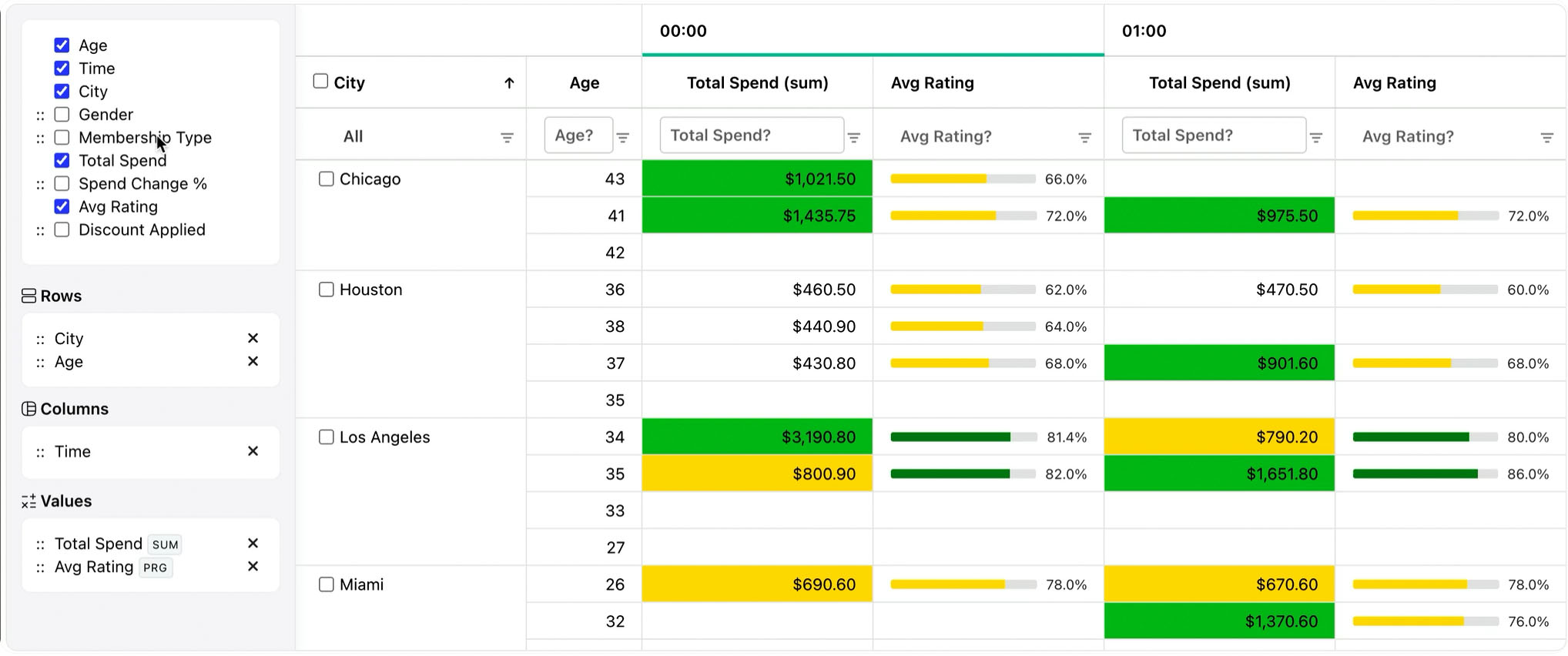
A native Pivot Table for web applications
RevoGrid Pivot fits framework-free applications, micro-frontends, server-rendered products, progressive-enhancement workflows, and shared component platforms. The Custom Element boundary lets any host assign records and configuration without asking the Pivot engine to own the rest of the page.
Users can move fields among Rows, Columns, Values, and Filters; create nested hierarchies; run built-in or application-defined aggregations; inspect subtotals and grand totals; open linked charts; export the current analytical result; and restore saved layouts.
The host application owns the source data and lifecycle. RevoGrid owns virtual rendering and the analytical model. The same public element properties and events work from plain JavaScript, TypeScript, or another UI layer.
Component capabilities
| Capability | JavaScript product value |
|---|---|
| Standards-based Custom Element | Mount the Pivot surface without a framework-specific runtime. |
Typed PivotConfig | Use TypeScript contracts while keeping the runtime compatible with plain JavaScript. |
| Drag-and-drop fields | Handle self-service report changes through native CustomEvent listeners. |
| Custom aggregations | Register domain calculations beside sum, average, count, min/max, and median. |
| Totals and linked charts | Present nested totals and synchronized charts from the committed model. |
| Export and state | Export Excel-friendly CSV and serialize versioned user layouts. |
| Client- or server-side | Analyze local records or connect the same element to a governed analytical API. |
JavaScript integration shape
Register the Custom Element once, assign complex values as properties, and listen for configuration updates with addEventListener:
ts
import { defineCustomElements } from '@revolist/revogrid/loader';
import {
  PivotPlugin,
  type PivotConfig,
} from '@revolist/pivot';

defineCustomElements();

const grid = document.querySelector('revo-grid') as HTMLRevoGridElement;
const pivot: PivotConfig = {
  dimensions: [
    { prop: 'region', name: 'Region' },
    { prop: 'quarter', name: 'Quarter' },
    { prop: 'revenue', name: 'Revenue' },
  ],
  rows: ['region'],
  columns: ['quarter'],
  values: [{ prop: 'revenue', aggregator: 'sum' }],
  totals: { subtotals: true, grandTotal: true },
  hasConfigurator: true,
  fieldPanel: { visible: true, allowFieldDragging: true },
};

Object.assign(grid, {
  source: revenueRows,
  pivot,
  plugins: [PivotPlugin],
  readonly: true,
  resize: true,
  filter: true,
  hideAttribution: true,
});

grid.addEventListener('pivot-config-update', (event) => {
  const next = (event as CustomEvent<PivotConfig>).detail;
  localStorage.setItem('revenue-pivot', JSON.stringify(next));
});
html
<revo-grid style="height: 680px"></revo-grid>Assign objects and arrays as JavaScript properties rather than HTML attributes. The complete JavaScript implementation adds custom aggregations, linked charts, Excel-friendly export, state restoration, cleanup, and 10K/100K/350K evaluation controls.
Client-side or server-side Pivot
| Use client-side Pivot when | Use server-side Pivot when |
|---|---|
| The full dataset can safely be held by the page. | Raw records must remain behind authorization or governance boundaries. |
| Measured interaction latency meets the product target. | Cardinality or custom calculations exceed browser budgets. |
| The application needs zero-round-trip exploration. | Metrics must be shared and authoritative across products. |
| Source memory is acceptable on supported devices. | A warehouse, cube, or analytical service should aggregate data. |
The Custom Element contract remains stable when computation moves to a server. The application can preserve the same Rows, Columns, Values, Filters, totals, and drill interface while changing the model provider.
Lifecycle and progressive enhancement
Create the grid after the DOM container exists, keep named event handlers when cleanup is required, and remove chart references, subscriptions, object URLs, and the grid element when the host view is destroyed. A mount function that returns a cleanup function works well in micro-frontends and multipage applications.
For server-rendered pages, render an accessible fallback or report summary first, then define and configure <revo-grid> in a browser module. Do not serialize aggregator functions or plugin instances into HTML; reconstruct them when the client initializes.
Excel-oriented reporting
Export grid.columns, grid.source, and pinned totals from the committed Pivot model rather than downloading the original records. The Pivot CSV helper creates an Excel-friendly file. Use the Pro Excel layer when requirements include native XLSX formatting, formulas, multiple worksheets, or workbook metadata.
Large-data evaluation
Test 10,000, 100,000, and the maximum expected source row count using realistic dimension cardinality, measures, filters, totals, drill state, chart refresh, and export. Record production-build measurements on representative devices. Virtual rendering limits mounted DOM cells; it does not remove the cost of transferring, retaining, sorting, and aggregating the source records.
Package and licensing
RevoGrid Pivot is included in RevoGrid Pro Advanced. RevoGrid Core remains MIT licensed; the Pivot engine, configurator, charts, export/state helpers, and remote analytical contracts are commercial capabilities.
Use the publicly installable trial to validate your application lifecycle, data scale, chart workflow, export requirements, and server architecture. Review the Pivot product overview, pricing, live demo, and complete repository.
FAQ
JavaScript Pivot Table Component FAQ
Evaluate the JavaScript Pivot Table
Open the live demo, inspect the JavaScript source, or get the Pro trial.