Yes. This tutorial uses the commercial Pro PaginationPlugin for remote paging and its shared UI panel. The downloadable starter includes the official trial. Core renders the grid, and the application backend validates and executes SQL queries. Infinity Scroll is a separate loading interaction.
Server-Side Pagination, Sorting, and Filtering in a JavaScript Data Grid
A data grid can show ten orders while the database holds thousands. That becomes a problem when a customer searches for an order outside those ten rows. Filtering the current page cannot answer a question about the whole dataset.
The solution is a clear division of work: the server selects the matching records, sorts them, and returns a page; the browser presents that result and sends the next request. The same rules must govern the matching total, the page buttons, and the rows the user sees.
This guide builds that workflow around RevoGrid, plain TypeScript, and a SQL-backed orders endpoint. The query protocol is independent of React, Vue, Angular, or another application framework. You can connect a framework adapter later without changing what a filter or a page means.
Run the complete client and SQL server
Download the runnable TypeScript and SQLite starter. This static documentation site does not host its database; screenshots and the recording below come from the actual local application. No full fixture is imported into the client bundle.
Extract the ZIP, open server-side-data-grid, and use Node 24.13 or later with pnpm:
sh
pnpm install --frozen-lockfile
pnpm seed
pnpm build
pnpm start
Open http://127.0.0.1:49303. The production Node server serves both the compiled Vite client and /api/orders/query on that origin. pnpm dev starts the development client and API; pnpm test runs the SQLite, HTTP and loader checks. The verified stack is Core 4.31.4, Pro and Pivot trials 4.0.6, Vite 8.3.5, Revo UI 4.0.6, and TypeScript 5.9.3, tested on Node 24.22.1. PaginationPlugin is a commercial Pro feature; the starter uses the official trial package.
The download's dependency is "@revolist/revogrid-pro": "npm:@revolist/[email protected]", with @revolist:registry=https://trial.rv-grid.com in its .npmrc. It uses the real plugin and preserves the official trial behavior. A licensed application uses its licensed Pro package and registry configuration instead. The connected chart additionally uses "@revolist/pivot": "npm:@revolist/[email protected]" from the same registry. No private token is included in the starter.
The database lives in .data/orders.sqlite; pnpm seed explicitly restores the synthetic records. Server scope is fixed to demo-a and is not authentication. A deployed application must obtain authorized scope from its authenticated server context.
Explore the remote orders example
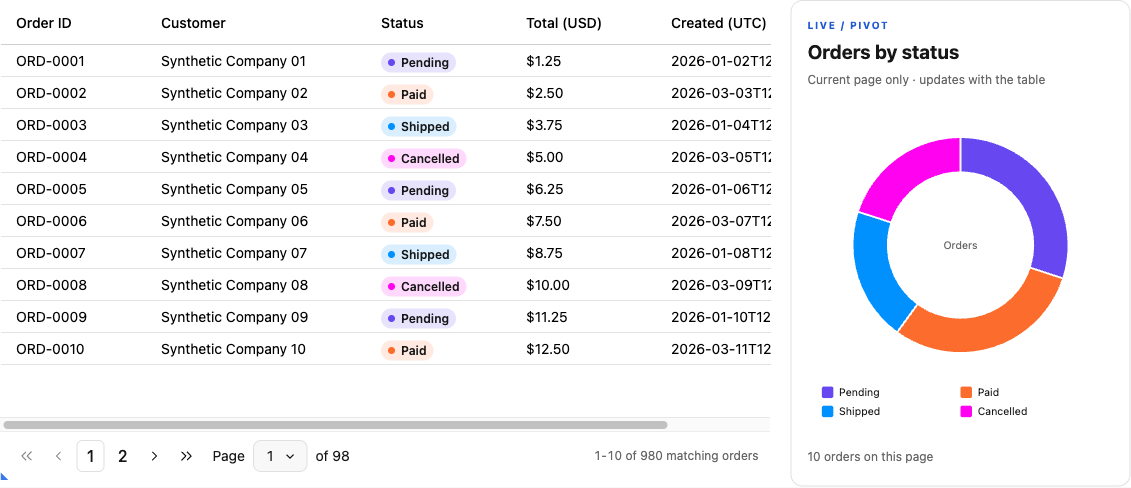
The supplied dataset contains 1,000 synthetic orders. The example's server-selected account can access 980 of them. Ten appear on the first page, ordered by their immutable order ID. Amounts use US dollars, and creation timestamps use UTC.
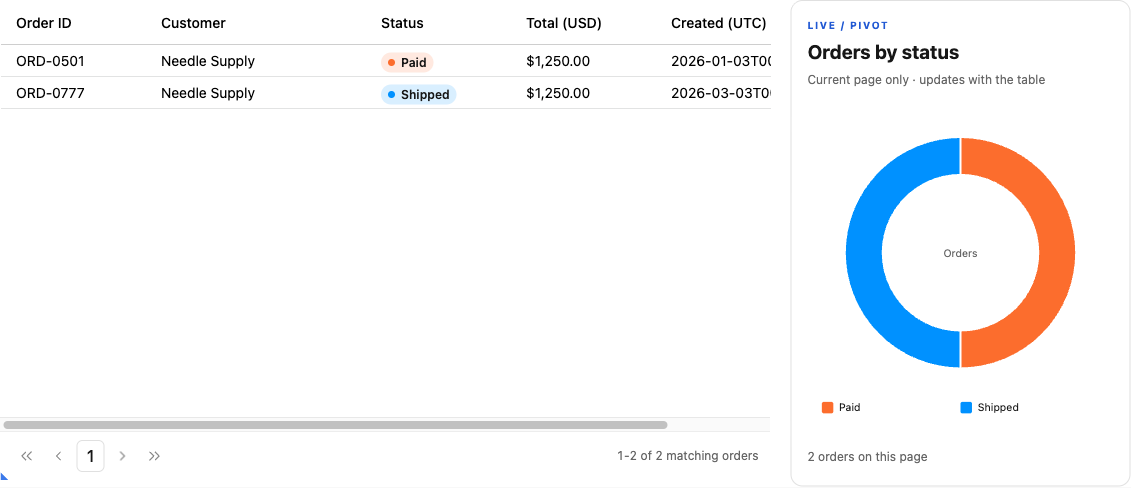
Start by searching for Needle. The matching orders are ORD-0501 and ORD-0777; neither appears on the first page. The result should read Showing 1–2 of 2 matching orders. Another account has its own Needle Supply order, ORD-0991, which must affect neither these rows nor this total.
Next, select paid or shipped orders worth at least $1,000. Both Needle Supply records still match. Sort by total descending: they both contain $1,250, so their IDs determine their relative order. The result remains reproducible even though the visible sort values tie.
A search reaches matching records outside the original page, while the response count uses the same account and filters as the returned rows.
The query inspector below the grid shows the requested offset, page size, ordered sort rules, and complete filter expression. It also distinguishes the request being loaded from the query that produced the rows currently on screen.
Use the source download to run the browser client and backend together. Seed the supplied orders into the example database before starting the client. The deterministic fixture is deliberately small enough to inspect; it demonstrates query correctness without making a performance claim.
Decide which layer owns each operation
The Pro loader describes a query, SQL evaluates the complete matching set, and only the current response updates the displayed page.
RevoGrid receives row data through source and column definitions through columns. Its server-side data guide describes an application-controlled remote-data layer around those interfaces.
| Layer | Responsibility in this example |
|---|---|
| RevoGrid Core | Render the returned page, display columns, and emit sorting and filtering intent. |
| Pro PaginationPlugin | Own page navigation, remote loading, cancellation, stale-result acceptance and source updates. |
| Backend and database | Validate the query, enforce account scope, evaluate filters, order records, count matches, and select the page. |
| Application controls | Express search, compound filter and sort intent; configure the plugin and display its status through Revo UI. |
Keep sorting and filtering authoritative on the server whenever the browser holds only a page. Otherwise, selecting “largest total first” can mean “largest among these ten rows,” while the user reasonably expects the largest matching order in the account.
This article focuses on making that remote query correct. For choosing the controls that express a business question, see advanced data-grid filtering for order and project workflows.
Define a query contract your backend can explain
Use one explicit, serializable request shape. The following types belong to the example application; they are not RevoGrid types:
ts
type OrderQuery = {
  offset: number;
  limit: number;
  sort: Array<{
    field: 'id' | 'customer' | 'status' | 'totalCents' | 'createdAt';
    order: 'asc' | 'desc';
  }>;
  filter: Filter | null;
  search: string;
};

type OrderPage = {
  rows: Order[];
  total: number;
};
offset counts matching records to skip, starting at zero. limit caps the number returned. The sort array preserves priority: status first and creation time second differs from creation time first and status second.
The response's total counts every matching record within the server's account scope, before pagination. It is neither the database's unrestricted row count nor the number of rows in this response. The browser never selects an account through this query body.
Preserve compound filter meaning
A filter can be one condition or a group containing conditions and other groups. Our paid-or-shipped queue uses this expression:
json
{
  "kind": "group",
  "logic": "and",
  "children": [
    {
      "kind": "group",
      "logic": "or",
      "children": [
        { "kind": "condition", "field": "status", "op": "eq", "value": "paid" },
        { "kind": "condition", "field": "status", "op": "eq", "value": "shipped" }
      ]
    },
    { "kind": "condition", "field": "totalCents", "op": "gte", "value": 100000 }
  ]
}
The outer AND matters. It says that the minimum total applies to both statuses. Flattening this structure into an unparenthesized SQL expression could unintentionally admit every paid order, including those below the threshold.
Define a deliberately small vocabulary. Text fields accept equality and literal substring matching; status accepts an allowed status value; totals accept numeric comparisons or an explicit null check. Dates accept a lower inclusive and upper exclusive timestamp. Unsupported combinations produce an error instead of a different filter.
Search trims surrounding whitespace and matches order IDs or customer names using case-insensitive ASCII comparisons. That is sufficient for this synthetic dataset. A multilingual product should choose and test its database collation and normalization rules explicitly.
Distinguish missing values, zero, and date boundaries
totalCents: null means the total has not been calculated. It is different from the zero-dollar order ORD-0041. The missing-total filter finds 51 records in the example account; the zero-total filter finds one.
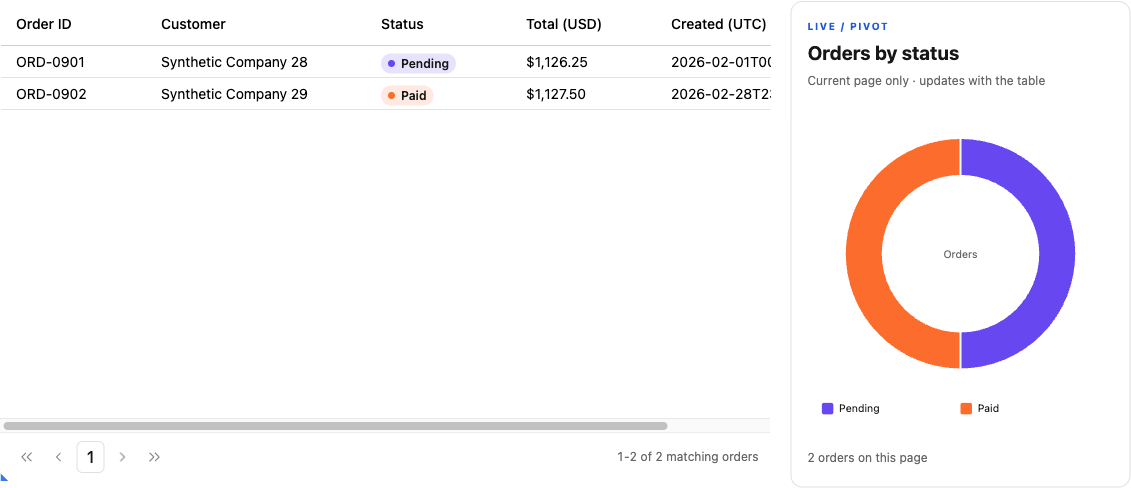
For February, request creation timestamps greater than or equal to 2026-02-01T00:00:00.000Z and less than 2026-03-01T00:00:00.000Z. This includes ORD-0901 and ORD-0902, while excluding the January record immediately before the range and the March record at its end. A half-open interval avoids guessing the final representable instant of a month.
Both date filters use Revo UI's shared calendar picker through attachTemporalPicker. Pick February 1, 2026 as the start and March 1, 2026 as the excluded end, then Apply filters. The editable fields accept YYYY-MM-DD; the application maps the selected day to UTC midnight for the strict SQL protocol. It does not interpret it in the browser's local timezone. Calendar selection, typed entry, clear actions and popup lifecycle remain owned by Revo UI.
Apply scope and filters before pagination
Build the row query and count query from the same validated predicate. For the Needle search with the paid-or-shipped and minimum-total filters, the row selection can look like this:
sql
SELECT id, customer, status, totalCents, createdAt
FROM orders
WHERE accountId = ?
  AND (status = ? OR status = ?)
  AND totalCents >= ?
  AND (
    instr(lower(id), lower(?)) > 0
    OR instr(lower(customer), lower(?)) > 0
  )
ORDER BY (totalCents IS NULL) ASC, totalCents DESC, id ASC
LIMIT ? OFFSET ?;
The bound values are demo-a, paid, shipped, 100000, needle, needle, 10, and 0. The two search placeholders receive the same text. The count uses the identical WHERE clause and the first six values, without LIMIT or OFFSET.
Use the database driver's parameter API for values. SQLite documents bound parameters as values attached to prepared statement placeholders. Column identifiers and sort directions require a separate allowlist; a field name from an HTTP body must never become an arbitrary SQL fragment.
The literal search expression deliberately treats % and _ as ordinary characters. Searching for 100% Parts_Kit finds ORD-0042. If you instead implement substring search with LIKE, handle its wildcard characters according to the matching semantics promised by your interface.
Make tied values deterministic
Sorting by total alone does not uniquely position the two $1,250 Needle Supply orders. Append the unique ID as the final ascending sort rule unless the user already included it. With page size one, page one contains ORD-0501, and page two contains ORD-0777.
Our explicit null marker puts missing totals after known totals in either direction. SQLite's SELECT documentation describes ordering, LIMIT, and OFFSET behavior; the particular null policy here is an application decision that should also appear in the UI.
A tie-breaker stabilizes an unchanged result set. It does not freeze a changing database. An insertion before the current offset can shift records between page requests. For a live operational stream, consider cursor pagination or an explicit snapshot requirement instead of promising that numbered pages never move.
Give the count and page one database view
Run both reads within a suitable read transaction on the same connection. SQLite's transaction documentation explains that an active read transaction continues to see its database snapshot. This prevents an intervening write from making one response's count and rows describe different moments.
The transaction covers one response. The next page request can observe newer data. If the requested offset is now beyond the last matching row, the backend returns an empty page with the current total. PaginationPlugin moves to the last valid page and loads it. The application does not implement a second recovery loop. Zero matches produces an empty result state, without a recovery loop.
Let Pro PaginationPlugin own remote paging
Install the plugin before mounting the grid and configure its direct pagination property. The plugin's own panel supplies Previous/Next, numbered pages, a page selector and range totals using Revo UI. The surrounding search, filters, sort and row-count controls also come from Revo UI.
ts
import { PaginationPlugin } from '@revolist/revogrid-pro'
import '@revolist/revogrid-pro/styles.css'
import { createOrdersLoader } from './load-orders.ts'

const grid = document.createElement('revo-grid')
grid.readonly = true
grid.columns = columns.map(prop => ({ prop, name: labels[prop], sortable: false }))
grid.pagination = {
  itemsPerPage: 10,
  initialPage: 0,
  total: 0,
  buttonCount: 3,
  boundaryButtons: true,
  loadData: createOrdersLoader({ search: '', sort: [], filter: null }),
  query: { retry: false, refetchOnWindowFocus: false },
}
grid.plugins = [PaginationPlugin]
container.append(grid)
The remote pagination guide describes this public loader boundary. src/load-orders.ts translates Pro's skip and take to the SQL endpoint's offset and limit, forwards the cancellation signal from the optional tenth context argument, validates the response, and returns { data: page.rows, total: page.total }.
The complete adapter also attaches an immutable request snapshot to the returned result. The public query.reconcile callback uses that metadata to label the accepted result in the inspector; it returns the same result for the plugin to hydrate. query.onStatus drives loading/error presentation. Neither callback assigns grid.source, tracks request generations, or decides whether an obsolete result may reach the grid. Those decisions belong to Pro's loading engine.
Keep the application SQL AST separate from Pro's advanced-filter AST. This example's explicit controls build its own supported query tree, so columns are not locally sortable/filterable and the grid is read-only. The backend's ID order reaches the screen without a second local sort or trim pass.
Apply query changes through the plugin
Search, filter and sort changes create a loader closure over a cloned query intent and assign a new full configuration to grid.pagination with initialPage: 0. The plugin disposes the previous remote binding and loads the first page of the new scope. The Rows per page field configures itemsPerPage; the panel's Page dropdown selects a page number.
Retry uses a partial configuration assignment that keeps the plugin's current page and row count:
ts
grid.pagination = { loadData: currentLoader }The source contains no custom Previous/Next handlers, page arithmetic, AbortController or request-generation controller. Removing the grid lets its plugin lifecycle dispose remote requests and its registered panel. The application still clears its search debounce and its own UI mounts.
Prove that old responses cannot replace newer rows
Under Request delivery demonstrations, the application holds a real earlier Needle SQL response at the client delivery boundary. It then asks the plugin to load Boundary's four rows. Releasing the older response leaves Boundary displayed, even though the controlled transport deliberately ignored cancellation. This exercises the plugin's stale-result guard rather than a second application controller.
Keep badges and a Pivot chart connected to the page
The status filters and grid cells use the same shared Revo UI badge presentation and status-color mapping. Purple, orange, blue and bright pink come from CHART_SERIES_COLORS in @revolist/ui/color-palette/chart-palettes; the checkboxes retain their native labels, keyboard behavior and form values. Apply filters, Clear filters and Rows per page share one control baseline.
The adjacent donut uses the public Pivot headless controller to count orders by status, then passes its committed aggregate rows to createStandalonePivotChartDataset and createStandalonePivotChart from @revolist/pivot/charts. This runs the native Pivot engine and chart renderer rather than a separate handwritten count or SVG.
The chart is explicitly labeled Current page only. It receives page.data only from the pagination engine's accepted reconcile result, so paging, filters and sorting update the table and chart together without another HTTP request. It does not imply totals across all 980 matching records. Loading and errors hide the prior chart; empty results show the empty notice. Semantic member colors keep Paid orange and Shipped blue even when other statuses disappear. Theme changes and disposal use the public controller/chart lifecycle methods.
See src/page-chart.ts for the Pivot report and chart adapter, and src/status-badges.ts for the single color/caption mapping. To chart the entire filtered result instead, add a scoped server aggregation endpoint using the same validated predicates; do not download every row through the pager.
Handle the states around a successful request
Under Request delivery demonstrations, Fail next request rejects the next successful HTTP response in the client transport. It is a controlled delivery-failure demonstration, not a database outage. The real server separately validates requests and returns structured errors.
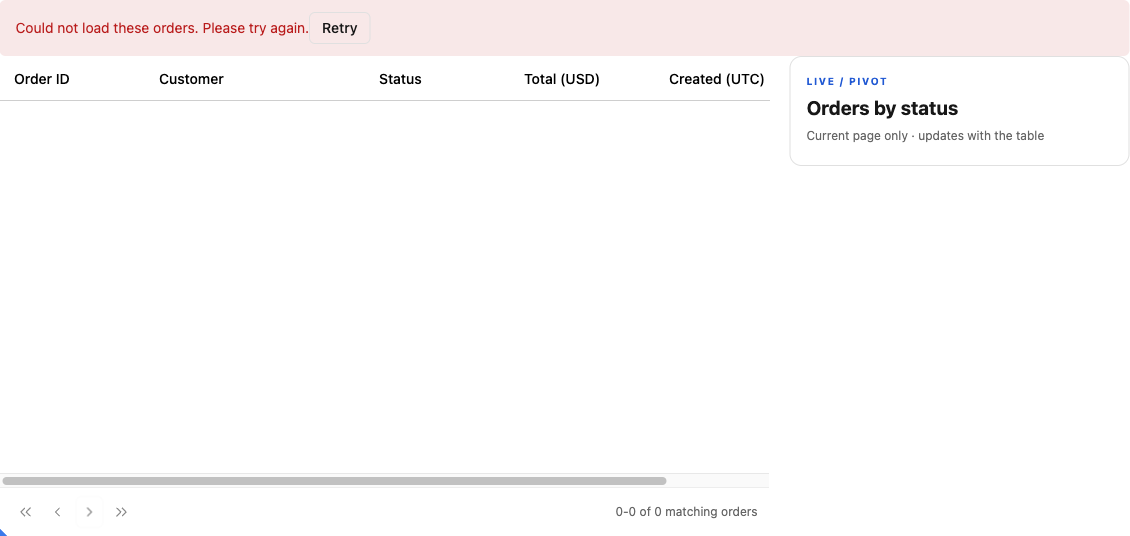
On the first load, show Loading orders…. Pro clears its previous source while a replacement loads, so the surrounding notice explains that behavior; the starter does not promise to retain old rows after a failed refresh. If the request fails, show Could not load these orders. Please try again. and a Retry button. Retry the current loader on the plugin’s current page; do not silently revert to the last successful filter.
For an empty result, use No orders match these filters. with Clear filters. Keep itemsPerPage, reset initialPage to zero, and clear both the text search and filter expression. This returns the user to a useful view without changing an unrelated preference.
If you add caching later, include offset, limit, ordered sorting, the entire filter tree, search, and server scope in the cache identity. A page number alone is insufficient. This starter disables automatic retry and focus/reconnect refetch, uses zero stale/garbage-collection times, and creates a fresh plugin binding for each external query intent. Caching and acceptance remain owned by Pro’s loading engine.
FAQ
Frequently asked questions
Run the example against your own data
Begin with the supplied seed and reproduce the Needle Supply search, the tied-total pages, and the February boundary filter. Then replace the schema mapping and server account selection with your application's validated fields and authorization context.
Run the server-side data-grid example to inspect the complete client and backend together. Keep the server-side reference nearby while adapting the integration, and retain the query cases as regression examples for your own data layer.
Source map and verified cases
The download contains shared/query.ts (runtime query/response validation), server/database.ts (allowlisted parameterized SQL), server/fixture.ts (server-only seed), server/http.ts (HTTP and the 8-KiB body limit), src/load-orders.ts (the Pro loader adapter), src/main.ts (the controls and grid), the lockfile, tests and setup README. mountOrders accepts host message overrides.
Focused tests execute real SQLite queries and a real HTTP endpoint. They check account isolation, nested predicates, null versus zero, literal percent/underscore searches, stable tied ordering, exact UTC boundaries, invalid input, count/page snapshot consistency under a second connection's write, the Pro loader’s skip/take mapping, cancellation forwarding, immutable request metadata and response validation. Browser checks separately exercise native Pro navigation, last-valid-page recovery, stale-result rejection and retry, matching badges, chart counts/colors, action alignment, mobile dark layout, and actual calendar selection with UTC boundary assertions in a non-UTC browser timezone.
Browser checks exercise paging, Needle search beyond page one, compound filters, one-row tied-sort pages, February boundaries, plugin loading/error states, retry, controlled late-response delivery, Clear during the search debounce, and a 390px layout. These are correctness cases on synthetic data, not performance measurements.
The fixture was reconstructed from the retained manuscript after the original research JSON became unavailable. The published walkthrough IDs/counts are preserved; unrelated records are fresh synthetic material. SQLite's case-insensitive comparison here is deliberately bounded to ASCII fixture data. Define a collation/search policy before extending it to arbitrary languages.
For a separate row-editing workflow, see the Next.js editable data table. Keep remote loading and conditional row saving as distinct application contracts.
The shared control styles import @revolist/ui/styles.css and @revolist/ui/dropdown/editor-dropdown.style.scss. Sass is included in the starter so the exported dropdown styling is compiled alongside the application.