RevoGrid Gantt is the best overall choice for an editable, data-heavy planning product where the task grid and timeline must work together. Bryntum and DHTMLX are strong alternatives for teams prioritizing long-established dedicated scheduling engines. Frappe Gantt is a good lightweight open-source choice.
The Best JavaScript Gantt Chart Libraries in 2026
RevoGrid Gantt product hub
Go from comparison to evaluation with the JavaScript Gantt chart component: complete features, live demos, frameworks, performance evidence, pricing, and trial terms.
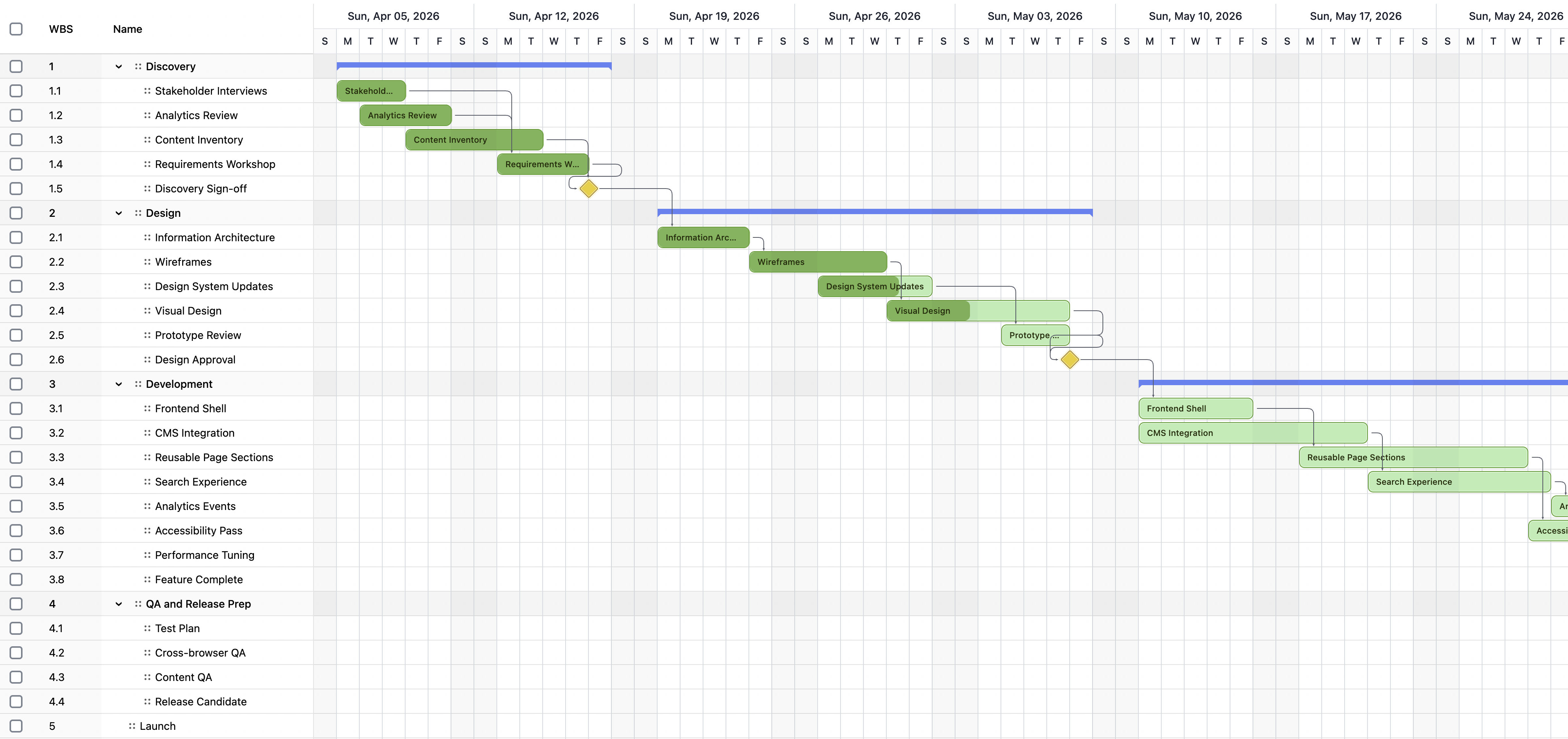
Choosing a JavaScript Gantt chart in 2026 is not just a question of drawing task bars on a timeline.
A production Gantt component may need to calculate schedules, preserve dependency rules, respect working calendars, roll up parent tasks, highlight the critical path, compare baselines, expose resource overloads, support inline editing, and remain responsive as a project grows. It also has to fit the surrounding application rather than behave like a separate project-management product embedded inside it.
This guide compares eight of the strongest JavaScript Gantt chart libraries available in 2026:
- RevoGrid Gantt
- Bryntum Gantt
- DHTMLX Gantt
- Syncfusion Gantt Chart
- Webix Gantt
- Highcharts Gantt
- AnyGantt
- Frappe Gantt
The goal is not to declare that one component wins every possible project. The goal is to identify the best fit for different product architectures, scheduling requirements, teams, and budgets.
Editorial note
This comparison is published by the RevoGrid team. RevoGrid is ranked first for the use case it is designed to solve: an advanced Gantt inside a larger editable, data-heavy product workflow. Competitor strengths and RevoGrid limitations are included so teams can make a practical decision and validate it with a proof of concept.
What is a JavaScript Gantt chart library?
A JavaScript Gantt chart library is a reusable frontend component for displaying and editing activities against a time axis. At minimum, it shows task names, start and finish dates, durations, and bars on a timeline.
A full project-planning component goes much further. It can include:
- hierarchical tasks and work breakdown structures
- milestones and summary tasks
- finish-to-start, start-to-start, finish-to-finish, and start-to-finish dependencies
- lead and lag time
- automatic and manual scheduling
- forward and backward scheduling
- working calendars, holidays, and non-working time
- constraints, deadlines, and critical path
- baselines and progress tracking
- resource assignments, workload, and capacity warnings
- drag-and-drop task editing
- an editable task grid beside the timeline
- undo and redo
- import, export, and backend persistence
This distinction matters. A library that is excellent for visualizing ten roadmap items may be the wrong foundation for a project-planning application with thousands of editable tasks and business-specific fields.
How we evaluated the libraries
The ranking uses criteria that matter after the first demo is complete:
| Criterion | What we looked for |
|---|---|
| Scheduling depth | Dependencies, constraints, calendars, auto-scheduling, backward planning, and critical path |
| Grid experience | Inline editing, custom columns, validation, filtering, selection, and task hierarchy |
| Resource planning | Assignments, calendars, utilization, workload, and over-allocation warnings |
| Performance architecture | Virtualization, update behavior, and suitability for large or frequently changing projects |
| Framework support | React, Vue, Angular, Svelte, TypeScript, and vanilla JavaScript integration |
| Customization | Task renderers, editors, menus, timeline headers, themes, events, and extension points |
| Developer experience | Documentation, examples, TypeScript coverage, predictable APIs, and time to first prototype |
| Commercial fit | Open-source availability, licensing clarity, trial access, support, and long-term product fit |
Feature lists are useful, but they are not enough. The decisive question is usually: does the library's architecture match the application you are building?
The short ranking
| Rank | Library | Best for | Main trade-off |
|---|---|---|---|
| 1 | RevoGrid Gantt | Data-heavy SaaS, ERP, PPM, operations, and planning products | Newer Gantt layer than long-established dedicated vendors |
| 2 | Bryntum Gantt | Deep enterprise project scheduling | Broad engine and API require a larger implementation commitment |
| 3 | DHTMLX Gantt | Mature standalone Gantt applications | Advanced planning features are concentrated in the commercial edition |
| 4 | Syncfusion Gantt | Teams already standardizing on a broad UI suite | Most attractive when the wider Syncfusion ecosystem is also valuable |
| 5 | Webix Gantt | Ready-made project-management UI within the Webix ecosystem | More opinionated application structure |
| 6 | Highcharts Gantt | Interactive project visualization and reporting | Not primarily a full scheduling engine |
| 7 | AnyGantt | Project and resource timeline visualization | Less suitable for workflow-heavy planning automation |
| 8 | Frappe Gantt | Lightweight open-source timelines | Limited advanced scheduling and enterprise project controls |
The ranking reflects overall product-building fit, not only the number of features. If your application needs a specialized scheduling engine above everything else, Bryntum or DHTMLX may rank higher for your requirements. If you only need a compact open-source timeline, Frappe Gantt may be the most efficient choice.
Feature and architecture comparison
| Library | Product orientation | Framework approach | Scheduling depth | Editable grid | Resource planning | License model |
|---|---|---|---|---|---|---|
| RevoGrid Gantt | Grid-first planning workspace | Web Component core with React, Vue, Angular, Svelte, and JS integrations | Advanced | Core strength | Built in | Commercial Gantt on top of an MIT grid core |
| Bryntum Gantt | Dedicated project planner | JavaScript with first-party framework wrappers | Advanced | Strong | Advanced | Commercial |
| DHTMLX Gantt | Dedicated Gantt component | Framework-agnostic JavaScript with integrations | Advanced in Pro | Strong | Advanced in Pro | MIT Community + commercial Pro |
| Syncfusion Gantt | Enterprise UI suite component | JavaScript, React, Angular, Vue, and Blazor variants | Advanced | Strong | Built in | Commercial + eligible community license |
| Webix Gantt | Ready-made Gantt application widget | Webix-based JavaScript component | Advanced | Built in | Built in | Commercial |
| Highcharts Gantt | Charting and visualization | JavaScript with official framework integrations | Moderate | Axis grid | Primarily visualization | Commercial for commercial use |
| AnyGantt | Project/resource visualization | JavaScript charting API | Moderate | Data grid presentation | Resource view | Commercial |
| Frappe Gantt | Lightweight timeline | Dependency-free JavaScript | Basic | No full data-grid workspace | No advanced workload engine | Open source |
Treat this table as a shortlist, not a substitute for testing. Terms and product capabilities can change, and similarly named features may behave differently under real scheduling rules.
1. RevoGrid Gantt: best for data-heavy planning products
RevoGrid Gantt combines a project timeline with the editable, virtualized grid foundation of RevoGrid. This is its most important architectural difference.
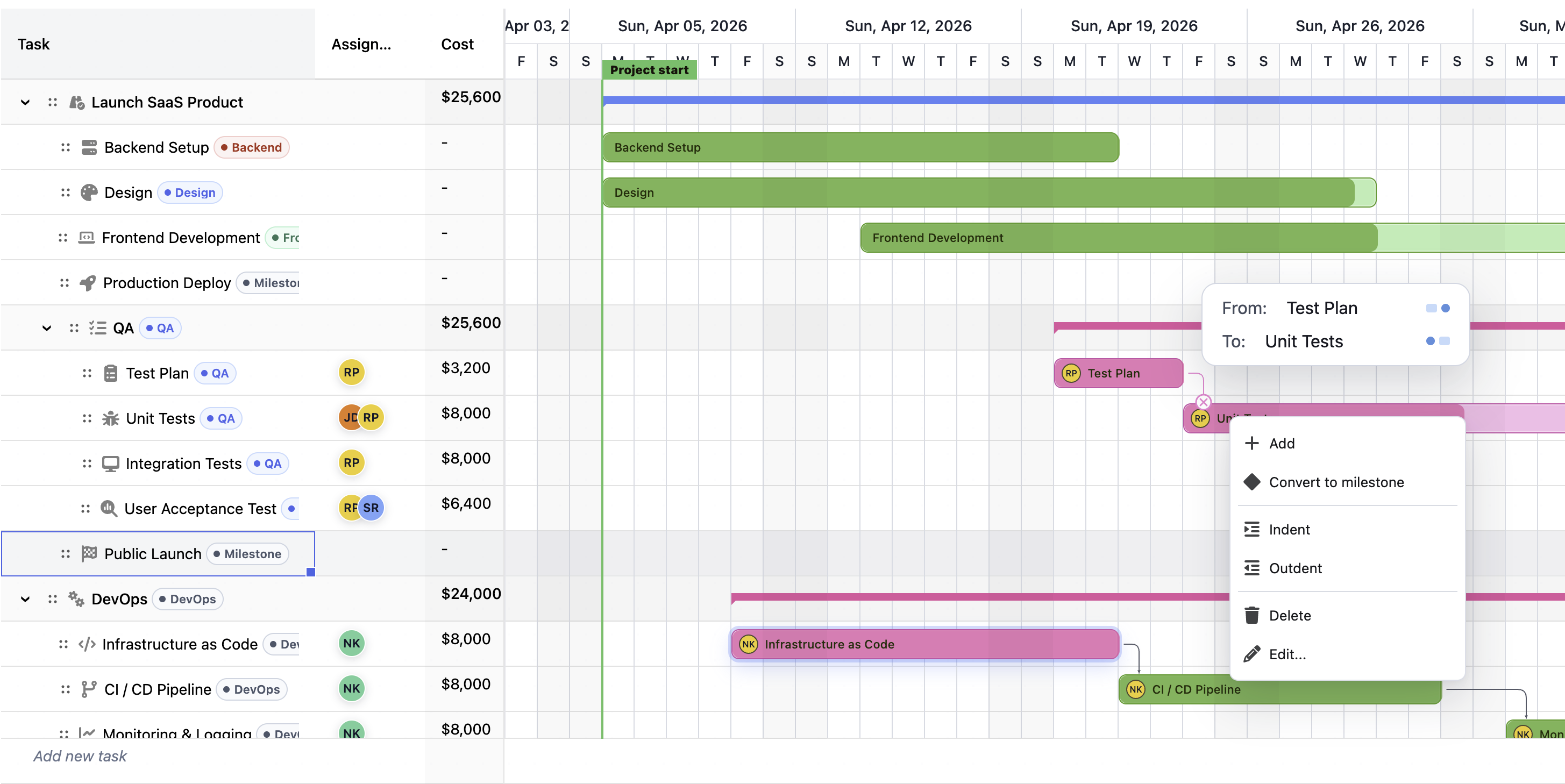
In a serious planning product, users do not work only with bars. They edit names, dates, owners, costs, statuses, percentages, priorities, custom fields, and domain-specific values. The task table and the timeline are two synchronized views of the same workflow.
RevoGrid starts from that reality.
Its Gantt supports task trees, summary tasks, milestones, parent rollups, the four common dependency types, lead and lag, dependency validation, automatic and manual scheduling, forward and backward scheduling, task constraints, deadlines, task splitting, critical path, total slack, baselines, progress tracking, working calendars, resource assignments, resource workload, utilization, over-allocation warnings, inline editing, task-bar dragging and resizing, timeline zoom, markers, and undo/redo.
Because the underlying grid is a Web Component, teams can use the same core model across React, Vue, Angular, Svelte, TypeScript, and vanilla JavaScript.
Why RevoGrid ranks first
The grid and timeline belong to one component model
Many Gantt products begin with the timeline and attach a task list to it. RevoGrid begins with an advanced data grid and adds scheduling as an integrated planning mode.
That makes RevoGrid especially strong when the surrounding product needs:
- rich inline editing
- business-specific columns
- filtering and structured task data
- reusable cell renderers and editors
- pinned or frozen working regions
- spreadsheet-like interaction
- integration with reporting, pivot, or operational workflows
The result feels less like embedding a separate project-management application and more like adding scheduling to an existing data product.
Framework independence
RevoGrid's browser-native Web Component core reduces framework lock-in. A company can use the Gantt in a React product, a Vue administration tool, and an Angular enterprise module without adopting three unrelated scheduling models.
This is valuable for long-lived B2B products, migrations, design systems, and organizations with multiple frontend stacks.
Planning features without losing product flexibility
RevoGrid includes the planning concepts expected from a serious Gantt—dependencies, calendars, baselines, resources, constraints, and critical path—while keeping the grid configurable for product-specific workflows.
That balance is the main reason to choose it over a visualization-only chart or a more opinionated standalone project planner.
RevoGrid Gantt pros
- Grid-first architecture for editable planning applications
- One Web Component foundation across major frontend frameworks
- Task hierarchy, milestones, summary rollups, and split tasks
- Four dependency types with lead, lag, validation, and link editing
- Automatic, manual, forward, and backward scheduling
- Constraints, deadlines, calendars, critical path, and slack
- Baselines, progress tracking, resources, workload, and capacity warnings
- Drag, resize, progress editing, timeline zoom, and configurable markers
- Undo/redo and structured project snapshots
- Natural fit with the wider RevoGrid data workflow ecosystem
RevoGrid Gantt limitations
- The Gantt layer is newer than Bryntum Gantt and DHTMLX Gantt
- Advanced Gantt functionality is commercial rather than part of the MIT grid core
- Teams needing Gantt-specific server-side windowing should validate current limits with their largest dataset
- Highly specialized keyboard operations, project-file formats, or scheduling rules should be tested against the exact workflow
- RevoGrid is more capability than necessary for a small read-only timeline
Best fit
Choose RevoGrid Gantt for:
- project portfolio management products
- ERP and operational planning modules
- construction and engineering software
- manufacturing and production planning
- resource and capacity planning
- financial and professional-services planning
- product roadmaps with editable business data
- Microsoft Project-style web interfaces
- SaaS products where the Gantt is part of a larger grid workflow
Verdict
RevoGrid Gantt is the best overall choice when the Gantt must live inside a larger editable product, not beside it.
It is particularly compelling for teams that already know they need both a serious data grid and a serious planning timeline. Explore the RevoGrid Gantt overview, open the Gantt demo, or review the Gantt documentation to test the scheduling model.
2. Bryntum Gantt: best for a deep dedicated scheduling engine
Bryntum Gantt is one of the most capable dedicated JavaScript Gantt products. It combines a mature scheduling engine with an editable grid, task editor, dependencies, constraints, baselines, resource assignment, critical paths, conflict handling, and extensive customization.
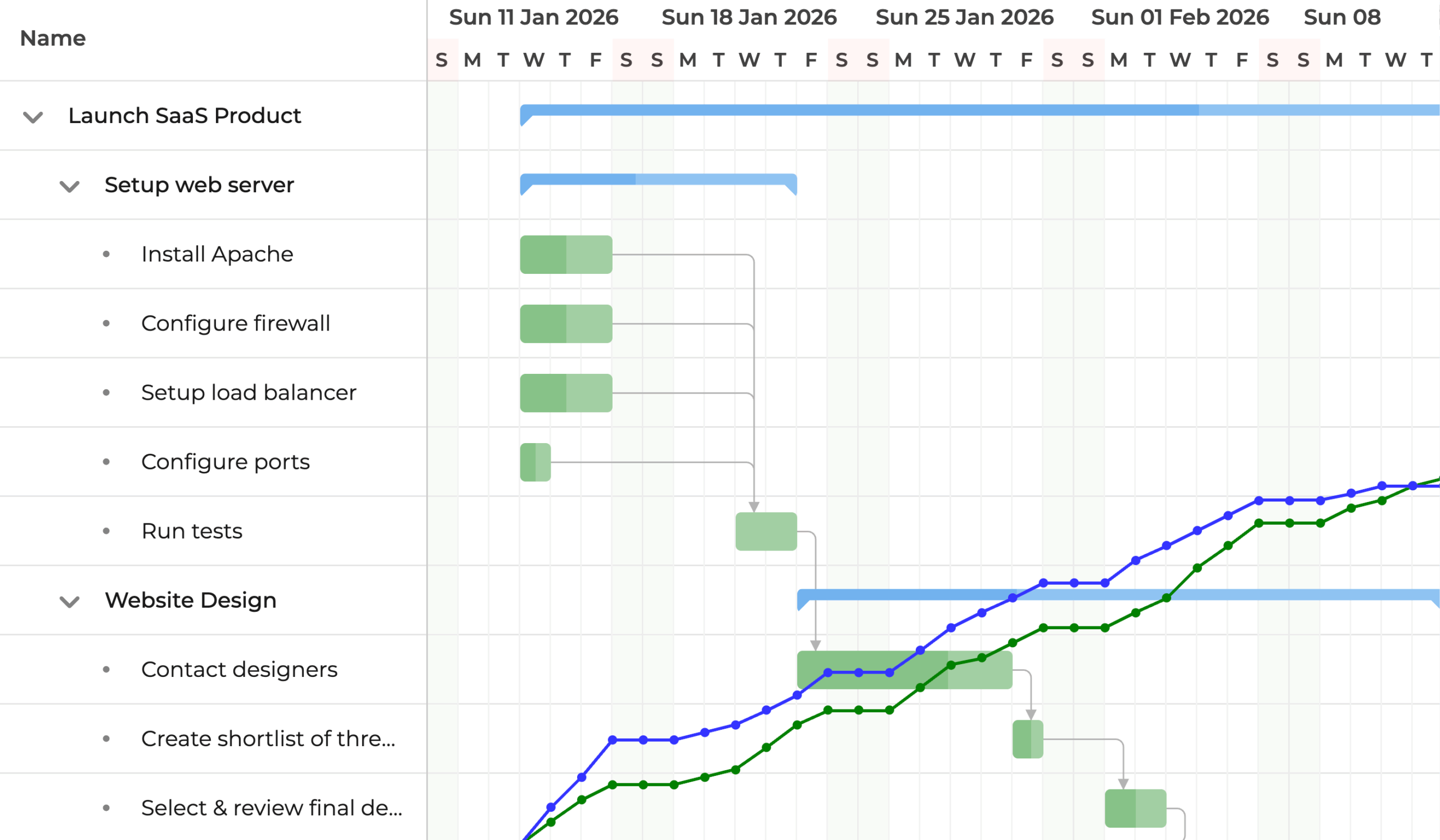
Its scheduling engine is independent of the DOM and can also run in Node.js. This is useful for teams that want scheduling calculations outside the browser or need the same project logic in multiple environments.
Pros
- Mature project scheduling engine
- Strong dependencies, constraints, calendars, baselines, and critical path support
- Resource assignments and project-management semantics
- Performance-oriented implementation for complex projects
- Customizable task editor, menus, task bars, labels, tooltips, and themes
- JavaScript, React, Angular, and Vue support
- Scheduling engine can run server-side in Node.js
Cons
- Commercial-only product
- The broad engine, stores, configuration surface, and component APIs take time to learn
- Can be a larger dependency than teams need for a focused product workflow
- Teams should review the current license terms for their developer count and distribution model
Best fit
Bryntum is an excellent choice for enterprise planning products where advanced scheduling semantics are the central requirement and the team is comfortable adopting a dedicated project engine.
Verdict
Bryntum is the strongest alternative when scheduling-engine maturity is more important than a grid-first architecture. RevoGrid is the better fit when the planning UI must integrate deeply with a wider editable data workflow.
For a focused comparison, read Bryntum Gantt Alternative: RevoGrid vs Bryntum.
3. DHTMLX Gantt: best mature standalone Gantt component
DHTMLX Gantt is a long-established JavaScript Gantt component with a large feature set, extensive examples, and a framework-agnostic JavaScript core.
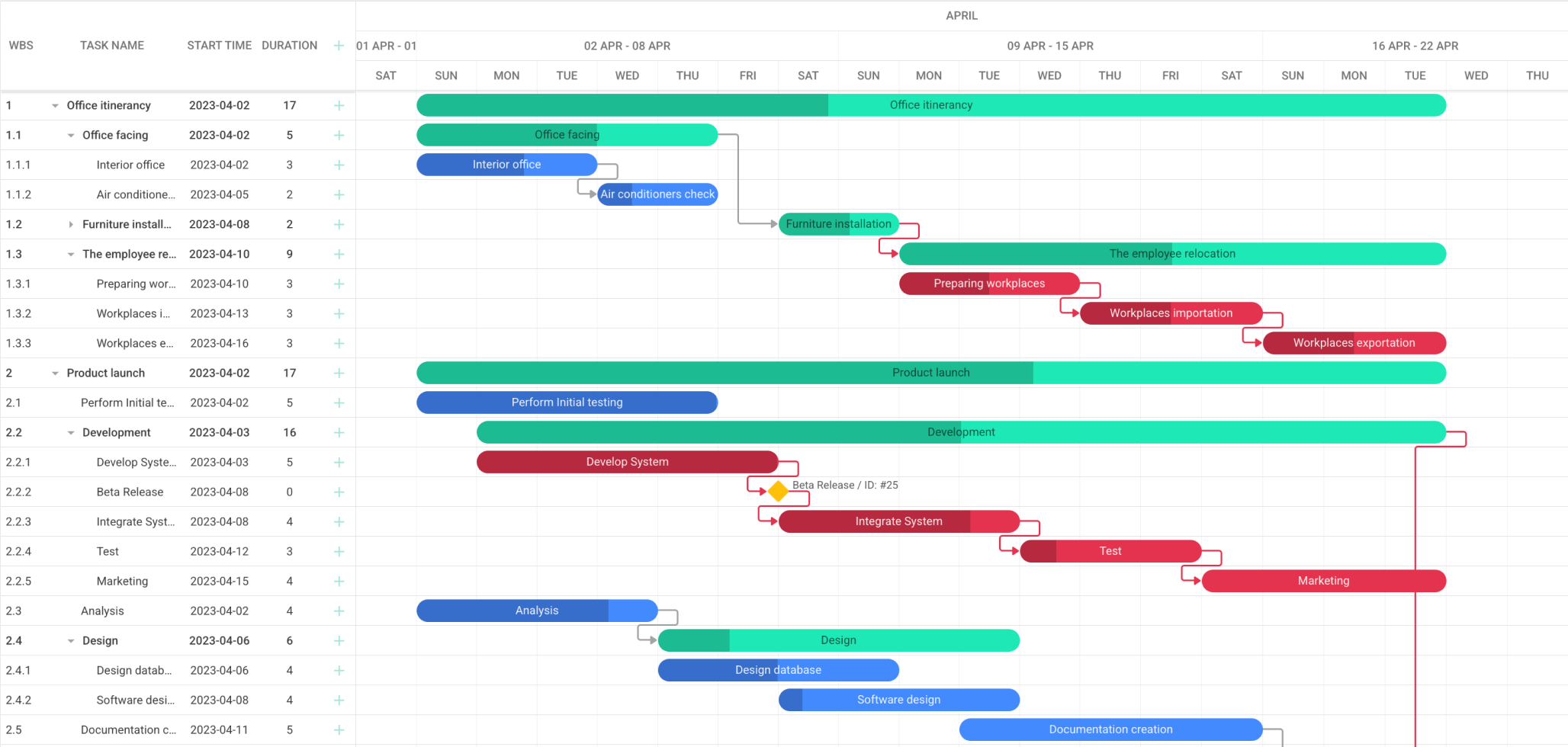
The Community Edition covers core functionality under the MIT license. The commercial Pro edition adds the advanced capabilities required by many enterprise applications, including deeper scheduling, critical path, resource management, baselines, constraints, and professional support.
Pros
- Mature and widely used dedicated Gantt component
- Core Community Edition available under MIT
- Four dependency types, milestones, drag-and-drop, and configurable grid/timeline UI
- Advanced auto-scheduling, backward planning, critical path, resources, and baselines in Pro
- TypeScript definitions and integrations for major frameworks
- Smart rendering and dynamic-loading options for large projects
- Broad import/export story and optional server-side scheduling capabilities
- Extensive documentation, samples, and support options
Cons
- Many features that distinguish an enterprise planner require Pro
- The traditional Gantt-widget model can require more adaptation when the grid must behave like the rest of a custom data application
- A large configuration surface can grow complex as product-specific rules accumulate
- Community and Pro capabilities must be compared carefully during evaluation
Best fit
DHTMLX is a strong choice for teams that want a mature, recognizable Gantt component with a conventional project-planning model and a path from an MIT community edition to a commercial edition.
Verdict
DHTMLX remains one of the safest established Gantt choices. RevoGrid becomes more attractive when the task table is as important as the timeline and must participate in a broader editable product workflow.
See DHTMLX Gantt Alternative: RevoGrid vs DHTMLX for the detailed trade-offs.
4. Syncfusion Gantt Chart: best for teams buying a complete UI suite
Syncfusion Gantt Chart is part of the broader Syncfusion component ecosystem. It supports project scheduling, task relationships, critical path, resource management, editing, responsive layouts, and framework-specific packages for React, Angular, Vue, and Blazor.
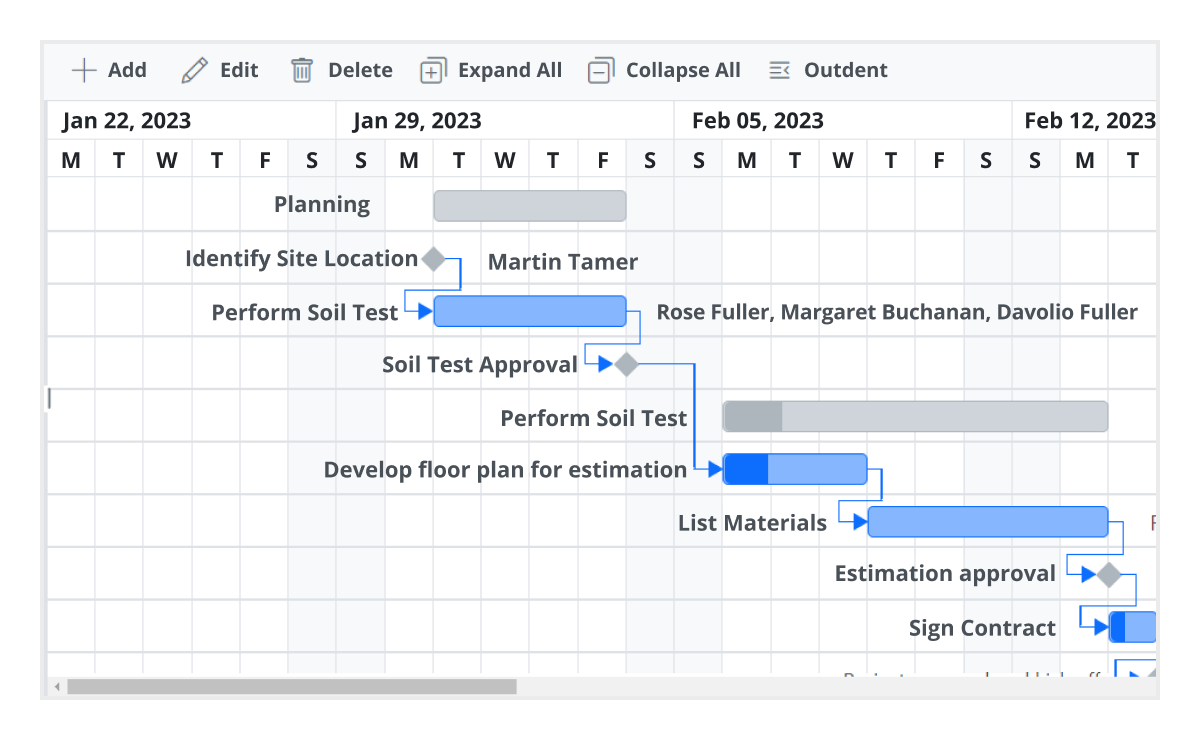
Its biggest strategic advantage is not only the Gantt itself. Teams can acquire grids, charts, schedulers, editors, document tools, and many other controls from the same vendor.
Pros
- Broad enterprise feature set
- Strong React, Angular, Vue, JavaScript, and Blazor options
- Critical path, resources, task editing, dependencies, and project monitoring
- Touch-friendly and responsive behavior
- Large documentation and demo ecosystem
- Valuable when a company needs many UI components from one vendor
- A community license is available to organizations that meet Syncfusion's eligibility rules
Cons
- Commercial suite adoption is a bigger decision than selecting one focused Gantt component
- Package, module, theme, and suite conventions can add integration overhead
- The commercial value is strongest when the team uses multiple Syncfusion controls
- Teams should verify current community-license eligibility rather than assuming the product is free
Best fit
Syncfusion is best for companies standardizing on one enterprise UI vendor across many application areas.
Verdict
Choose Syncfusion when the Gantt is one item on a much larger UI-suite procurement list. Choose RevoGrid when the priority is a focused data-grid and planning platform with a single grid-first architecture.
5. Webix Gantt: best ready-made Gantt application widget
Webix Gantt is a commercial Gantt widget built in the Webix ecosystem. It offers task hierarchy, projects, milestones, dependencies, auto-scheduling, critical path, baselines, split tasks, working calendars, resource workload, zooming, and timeline markers.
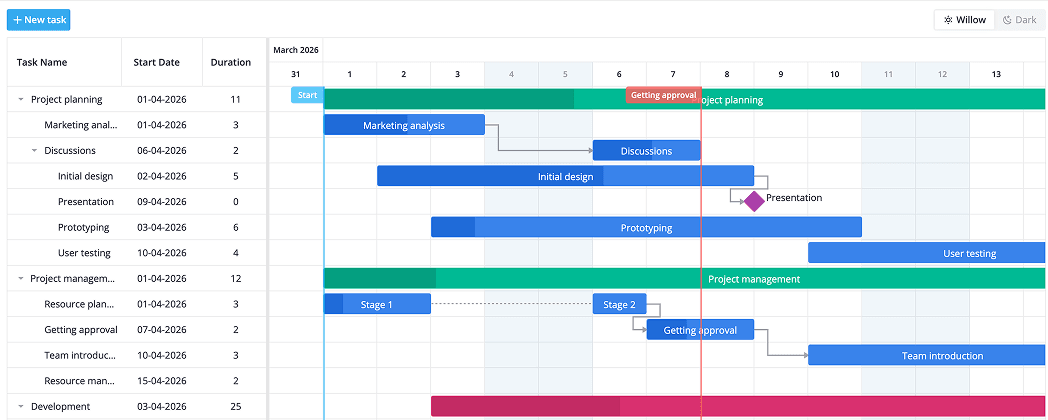
Webix positions the component as a ready-to-use project-management surface rather than only a chart renderer. That can shorten the path to a conventional Gantt interface.
Pros
- Complete Gantt application structure
- Task hierarchy, dependencies, calendars, baselines, split tasks, and critical path
- Resource assignment and workload views
- Lazy-loading support for large projects
- Compact mode and integration with other Webix widgets
- Can be integrated with major frameworks and different backends
Cons
- Commercial product
- The Webix application and view model is more opinionated than a low-level component
- Most attractive when the project is comfortable adopting Webix conventions
- Deeply custom data-grid behavior may require more adaptation than a grid-first product
Best fit
Webix Gantt suits teams that want a ready-made project-management interface and value consistency with the wider Webix suite.
Verdict
Webix can get a familiar Gantt application on screen quickly. RevoGrid offers a stronger foundation when the plan is only one part of a highly customized data application.
6. Highcharts Gantt: best for visualization and reporting
Highcharts Gantt extends the Highcharts ecosystem with interactive timeline charts. It supports milestones, percent-complete shading, current-day indicators, dependencies, drag-and-drop, an axis grid, exporting, and official integrations for popular frameworks.
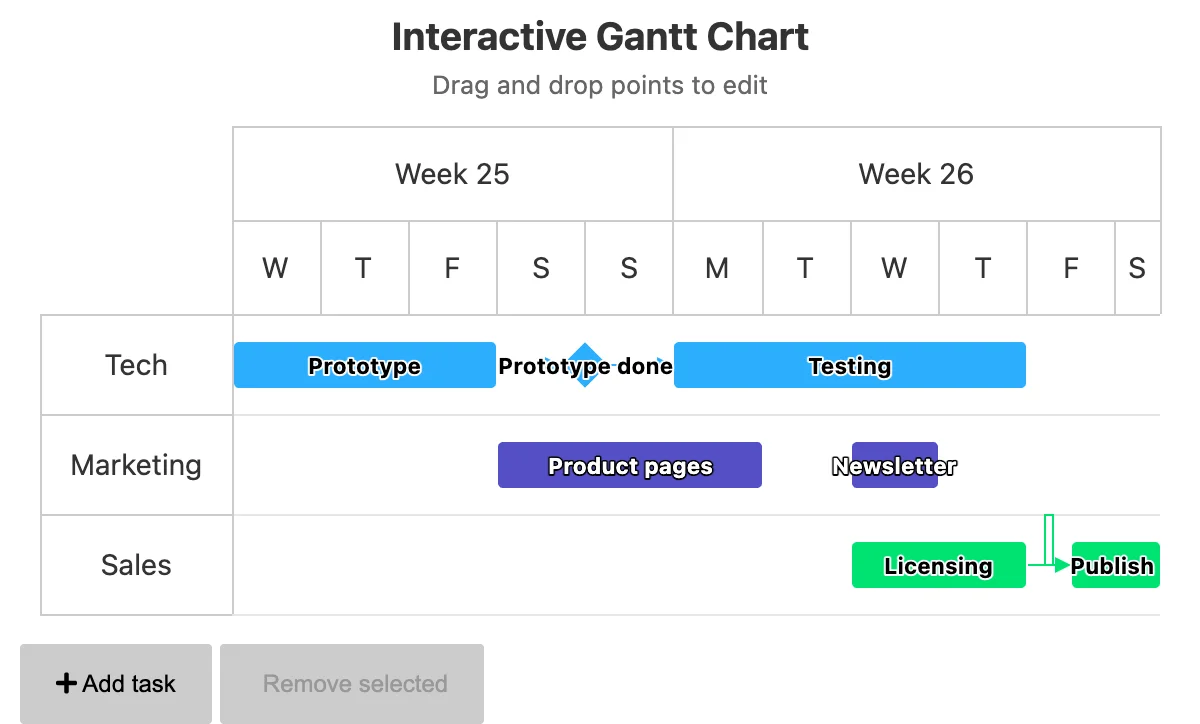
Highcharts is primarily a charting platform. This is an advantage when the goal is polished visualization, dashboards, reports, or a timeline that belongs beside other chart types.
Pros
- Polished interactive Gantt visualization
- Strong charting, theming, exporting, and responsive behavior
- Dependencies, milestones, progress, drag-and-drop, and task information in an axis grid
- Official React, Angular, Vue, Svelte, TypeScript, and JavaScript integrations
- Useful accessibility tooling and a large charting ecosystem
- Highcharts Core is included for additional chart types
Cons
- Not primarily a full project scheduling engine
- Advanced calendars, constraints, resource leveling, and complex schedule recalculation may require application logic
- The axis grid is not equivalent to a full editable enterprise data grid
- Commercial use requires an appropriate license
Best fit
Highcharts Gantt is ideal for dashboards, portfolio summaries, reporting, roadmap visualization, and interactive timelines where presentation is more important than end-to-end project scheduling.
Verdict
Choose Highcharts Gantt when you need a chart. Choose RevoGrid, Bryntum, or DHTMLX when users need to operate a project plan.
7. AnyGantt: best for project and resource timeline visualization
AnyGantt is the Gantt product in the AnyChart visualization suite. It supports project and resource Gantt views and is designed to present workflows, dependencies, activities, and resource allocation in interactive timelines.
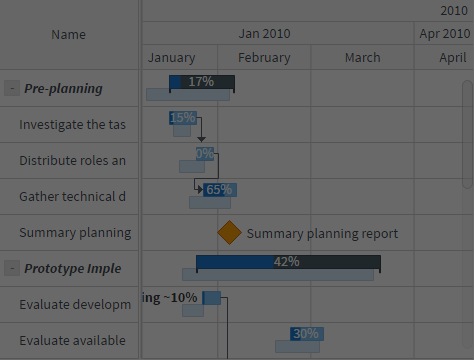
Like Highcharts Gantt, its natural center of gravity is data visualization rather than a complete project-management engine.
Pros
- Separate project and resource-oriented Gantt views
- Flexible chart styling and interactive visualization
- Fits naturally with the wider AnyChart charting ecosystem
- Useful for dashboards, reporting, and presenting schedule data
- Detailed chart configuration and documentation
Cons
- Commercial product
- Less suited to advanced schedule automation and workflow-heavy task editing
- A visualization grid is not a replacement for a full editable data grid
- Teams may need to implement more business and scheduling logic themselves
Best fit
AnyGantt is best for products that need configurable project or resource timelines as part of an analytics or reporting experience.
Verdict
AnyGantt is a capable visual layer. RevoGrid is the better fit for users who must edit, validate, and operate on rich task data in the same workspace.
8. Frappe Gantt: best lightweight open-source option
Frappe Gantt is a small, dependency-free, open-source JavaScript Gantt library. It provides interactive task bars, progress editing, multiple timeline modes, dependencies, configurable popups, and holiday handling without the weight of an enterprise planning suite.
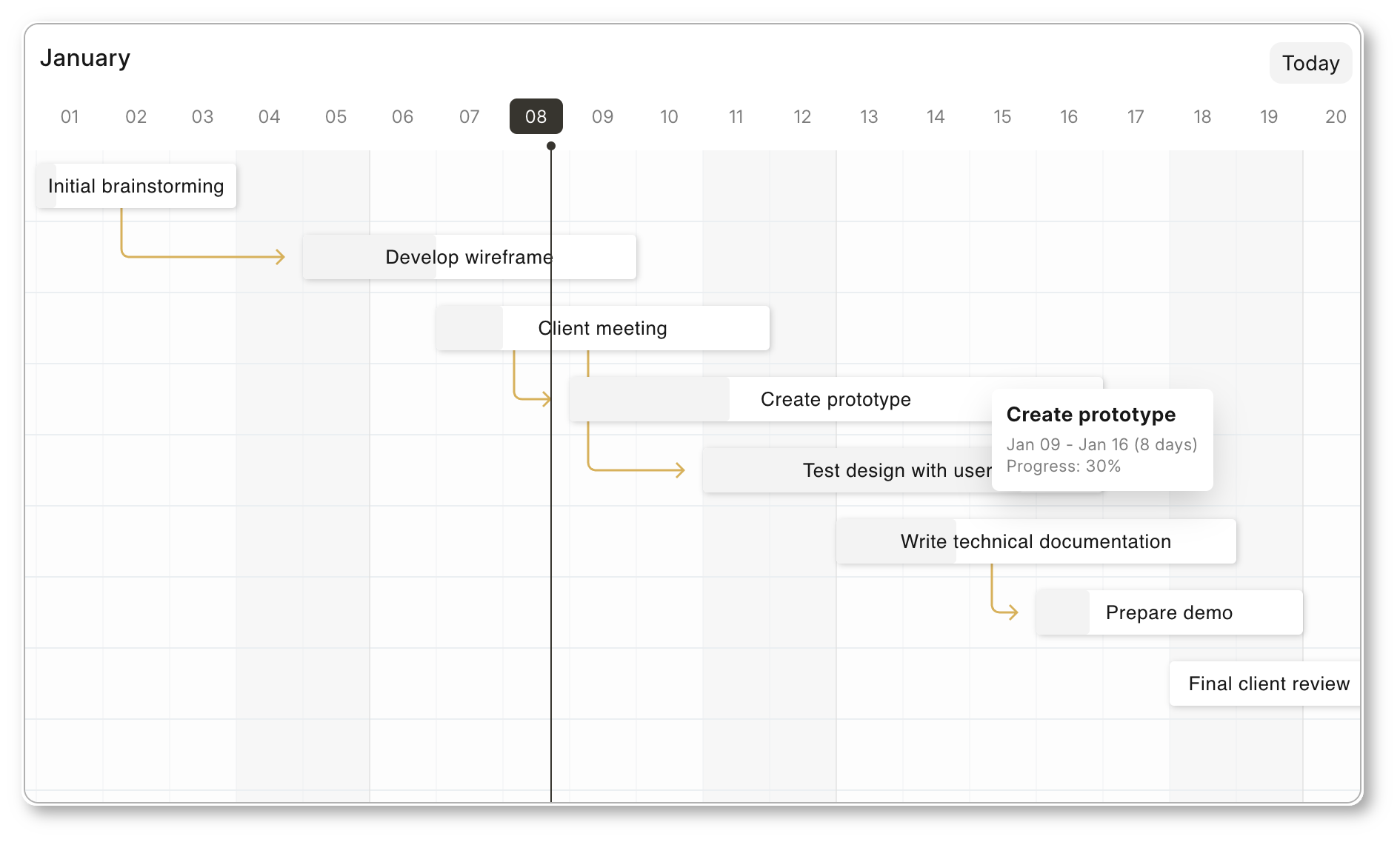
Its simplicity is the reason to choose it.
Pros
- Free and open source
- Zero dependencies
- Small and straightforward API
- Drag tasks, change dates, and edit progress
- Common and custom view modes
- Configurable popups and holiday handling
- Fast way to add a clean timeline to a web application
Cons
- No full editable data-grid workspace
- No advanced project scheduling engine comparable with commercial enterprise products
- Limited resource planning, baselines, constraints, and critical-path workflows
- Teams must build more editing, validation, persistence, and business behavior around it
- Not the best foundation for a complex PPM or ERP planning module
Best fit
Frappe Gantt is excellent for prototypes, internal tools, simple roadmaps, documentation, and products that need a lightweight visual timeline rather than a planning engine.
Verdict
Frappe Gantt is the best option in this list when minimal footprint and open-source simplicity are the priority. RevoGrid is the better choice when the Gantt is expected to become a central operational workspace.
Which JavaScript Gantt should you choose?
Choose RevoGrid Gantt if the grid is part of the product
Use RevoGrid when users must edit rich task data, work with custom columns, navigate a large structured plan, and connect scheduling with wider application workflows.
This is the strongest fit for SaaS, ERP, PPM, finance, construction, manufacturing, logistics, and operational software.
Choose Bryntum if scheduling depth is the dominant requirement
Use Bryntum when the project needs a mature dedicated scheduling engine, sophisticated project semantics, and possibly server-side Node.js calculations.
Choose DHTMLX if you want a mature conventional Gantt
Use DHTMLX when a long-established Gantt component, extensive documentation, and a Community-to-Pro adoption path are important.
Choose Syncfusion if you need an entire UI suite
Use Syncfusion when the organization wants one vendor for Gantt, grids, charts, schedulers, forms, document tools, and other controls.
Choose Webix if you want a ready-made project-management surface
Use Webix when a conventional Gantt application structure and the wider Webix ecosystem reduce development effort.
Choose Highcharts Gantt or AnyGantt for visualization
Use these products for dashboards, reports, portfolios, and interactive schedule presentation when a full scheduling engine is not required.
Choose Frappe Gantt for a lightweight open-source timeline
Use Frappe Gantt when the requirements are small, the budget is limited, and your application can own the missing business logic.
Best JavaScript Gantt by framework
Best React Gantt chart
React teams have many options, but architecture still matters.
- RevoGrid Gantt is the best fit for an editable data-heavy React product.
- Bryntum Gantt is strong for a deep dedicated scheduling engine.
- DHTMLX Gantt is strong for a mature conventional component.
- Syncfusion Gantt is attractive inside a Syncfusion React stack.
- Highcharts Gantt is strong for visualization.
- Frappe Gantt is useful for a small custom wrapper and simple timeline.
Best Vue Gantt chart
RevoGrid's Web Component foundation and Vue integration make it a strong choice when the same scheduling model may also be used outside Vue. Bryntum, DHTMLX, Syncfusion, and Highcharts provide Vue integration paths as well.
Best Angular Gantt chart
Angular teams building enterprise applications should shortlist RevoGrid, Bryntum, DHTMLX, and Syncfusion. The decision is less about Angular compatibility—all can be integrated—and more about whether the project needs a grid-first workspace, a dedicated engine, a mature widget, or a full UI suite.
Best Svelte Gantt chart
The market has fewer Svelte-first enterprise Gantt products. RevoGrid is particularly useful because its Web Component architecture does not depend on a React- or Angular-specific rendering model. Highcharts and DHTMLX also document Svelte-compatible integration paths.
Best vanilla JavaScript Gantt chart
RevoGrid, DHTMLX, Webix, Highcharts, AnyGantt, and Frappe can all be used from JavaScript. Frappe is the simplest lightweight option; RevoGrid and DHTMLX are more appropriate when planning behavior must grow substantially.
Why the editable grid matters as much as the timeline
A Gantt screenshot naturally draws attention to the colored bars. In production software, however, much of the actual work happens in the table.
Users may need to:
- edit several dates or durations quickly
- paste task data from a spreadsheet
- filter by owner, status, department, or project
- validate mandatory business fields
- compare planned, actual, and forecast values
- calculate costs and capacity
- navigate a work breakdown structure
- use custom editors for domain-specific fields
- review warnings without leaving the plan
- perform bulk changes
This is the central argument for RevoGrid Gantt. It does not treat the task table as a label column attached to a chart. It treats the Gantt as another way to work with structured application data.
That difference becomes more valuable as the product becomes more specialized.
Performance: test the workflow, not only the row count
Vendor performance claims are difficult to compare because each demo uses different tasks, dependencies, columns, row heights, timeline ranges, and hardware.
A useful Gantt benchmark should measure more than initial rendering:
- Load the real task and dependency model.
- Expand a large hierarchy.
- Scroll vertically and horizontally across the timeline.
- Edit a task in the grid.
- Drag a task with several successors.
- Trigger schedule recalculation.
- Change zoom levels.
- Apply filters and restore the view.
- Render custom cells and task content.
- Measure memory use after repeated edits.
Virtualization matters, but the scheduling engine and application integration also matter. A component can scroll smoothly yet pause during dependency recalculation. Another can calculate quickly but become expensive after custom framework renderers are added.
Always test a representative project with your real customizations.
Open-source vs commercial Gantt libraries
Open-source Gantt libraries are attractive because they lower the cost of experimentation and allow teams to inspect the implementation. They are often the right choice for simple timelines.
The cost appears elsewhere when the requirements expand. Teams may need to build:
- scheduling and constraint logic
- resource workload calculations
- baselines and variance fields
- validation and conflict resolution
- accessible keyboard behavior
- scalable grid editing
- import and export adapters
- undo and redo
- reliable cross-browser interactions
- long-term maintenance for project-planning edge cases
Commercial components are not automatically better, but they can be much cheaper than owning a scheduling engine internally.
The practical choice is:
- use Frappe Gantt or a community edition when the timeline is genuinely simple
- use a commercial Gantt when planning rules are part of the product's value
- compare license terms using the actual number of developers, products, customers, and deployment scenarios
Do not choose an open-source library only to avoid a license fee if it creates a permanent scheduling backlog for the engineering team.
Questions to ask during a proof of concept
Before committing to a JavaScript Gantt library, build one representative workflow and answer these questions:
Scheduling
- Does it support every dependency type you need?
- How does it handle lag, lead, constraints, deadlines, and manual tasks?
- Can it plan forward and backward?
- Are calendars attached at project, task, and resource level?
- Can you explain every recalculated date to the user?
Data and editing
- Can the grid represent your real domain fields?
- Can users edit and validate those fields efficiently?
- Can you paste or import realistic task data?
- Can grid edits and timeline edits use the same validation rules?
- Can the component integrate with your state and backend model?
Resources
- Can a task have multiple assignments?
- Can resources use different calendars and capacities?
- How are overloads displayed and resolved?
- Does the library provide workload views or only task labels?
Performance
- Does it remain responsive with your hierarchy, dependencies, columns, and timeline range?
- What happens when a task with many successors moves?
- Can large projects be loaded incrementally?
- Are custom renderers still fast?
Product fit
- Does the Gantt match your design system?
- Can you customize editors, menus, task bars, tooltips, and timeline headers?
- Is accessibility sufficient for your users and procurement requirements?
- Can your coding agents find and understand the official documentation?
- Are the license terms clear for SaaS, OEM, internal, and customer-facing use?
Final verdict
The best JavaScript Gantt chart library in 2026 depends on what sits around the timeline.
If you are building a visualization, Highcharts Gantt, AnyGantt, or Frappe Gantt may be enough.
If you are building a conventional project-management application around a mature dedicated scheduling engine, Bryntum and DHTMLX deserve serious evaluation.
If your organization wants a broad component suite, Syncfusion or Webix may align with a wider procurement strategy.
But if you are building a data-heavy product where users must edit, analyze, validate, and schedule work in one interface, RevoGrid Gantt offers the strongest overall foundation.
Its advantage is not a longer checkbox list. It is the combination of a serious Gantt model with a serious data grid:
- one editable task workspace
- one synchronized timeline
- one framework-independent component foundation
- one architecture that can grow into wider operational workflows
That is why RevoGrid ranks first for modern SaaS, ERP, PPM, manufacturing, construction, logistics, financial, and internal planning products.
Start with the RevoGrid Gantt overview, try the interactive Gantt demo, or review the Gantt implementation guides.
FAQ
Frequently asked questions
Related guides
- RevoGrid Gantt overview
- How scheduling works in a Gantt chart
- Best JavaScript Scheduler libraries in 2026
- DHTMLX Gantt alternative
- Bryntum Gantt alternative
- Microsoft Project Gantt alternative
- RevoGrid comparison hub
Methodology and official product sources
This comparison was reviewed against the vendors' public product pages and documentation in July 2026. Feature availability and commercial terms can change, so confirm final requirements directly with each vendor.