Skip to content

The Best JavaScript Schedulers in 2026

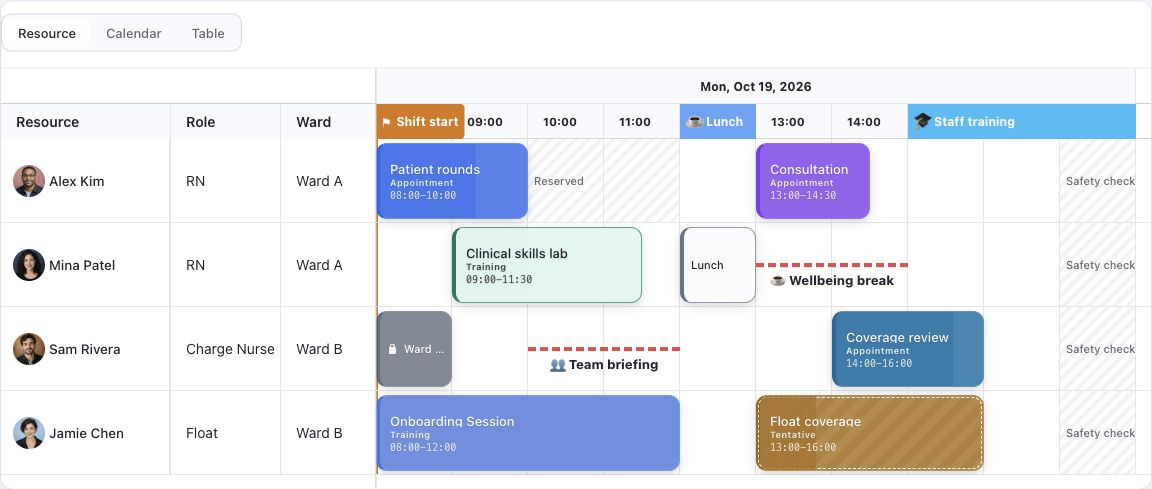
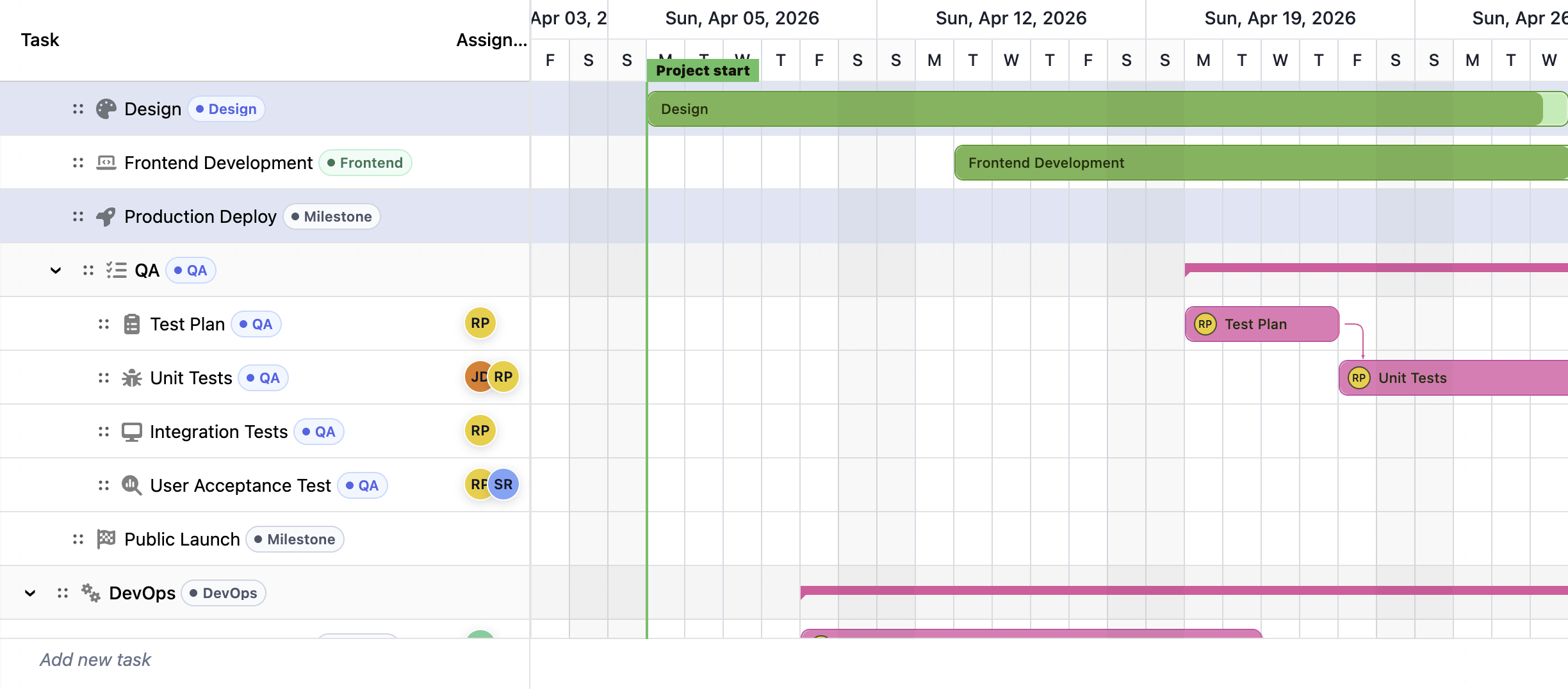
RevoGrid Scheduler and Gantt planning preview

Building a scheduler looks simple until the product grows.

At first, you need a timeline, a few resources, and drag-and-drop. Then users ask for dependencies, task hierarchy, baselines, critical path, resource allocation, inline editing, keyboard navigation, filtering, pinned columns, large data sets, and export.

At that point, you are no longer building “a calendar”. You are building a planning interface.

This article compares the strongest JavaScript Scheduler and Gantt options in 2026:

  • RevoGrid Scheduler / Gantt
  • Bryntum Gantt / Scheduler
  • DHTMLX Gantt / Scheduler
  • DayPilot Scheduler
  • Syncfusion Scheduler
  • FullCalendar Scheduler
  • KendoReact Scheduler

The focus is not only feature count. We compare architecture, implementation complexity, licensing simplicity, AI-assisted development, and how close each product gets to the Microsoft Project-style scheduling standard.

What makes a scheduler good in 2026?

A modern scheduler needs to solve more than rendering bars on a timeline.

The strongest schedulers usually need:

AreaWhy it matters
VirtualizationLarge schedules can include thousands of tasks, resources, and timeline cells.
Reactive updatesMoving one task should not force the whole scheduler to redraw.
Grid + timeline modelReal planning apps need editable task metadata next to the visual schedule.
DependenciesFinish-to-start, start-to-start, finish-to-finish, and start-to-finish links matter in project planning.
BaselinesTeams need to compare planned vs actual execution.
Critical pathProject managers need to see what affects the final delivery date.
Resource managementTasks are not isolated; people, machines, rooms, and teams have capacity limits.
Framework flexibilityReact, Vue, Angular, Svelte, and vanilla JS teams should not need different mental models.
AI-friendly APIsAI tools work better with clear, typed, composable APIs and predictable examples.
Licensing simplicityTeams do not want to count deployments, server instances, or unclear redistribution cases.

This is why scheduler architecture matters.

A scheduler is not just a widget. It often becomes the center of an ERP, PPM, resource planning, construction planning, manufacturing, logistics, finance, or internal operations product.

Quick comparison

SchedulerBest forMain strengthMain limitation
RevoGrid SchedulerProduct teams building data-heavy scheduling appsReactive Web Component architecture, grid-first design, smart recombination, framework independenceNewer scheduler/Gantt layer compared with older dedicated Gantt vendors
BryntumDeep project scheduling enginesVery mature Gantt engine with strong project-management semanticsHeavier product and more complex commercial model for some use cases
DHTMLXMature Gantt apps with many ready-made featuresStrong Gantt feature set and wide adoptionMore traditional widget architecture; customization can become complex
DayPilotBooking, resource calendars, fast prototypesVery quick to build a working schedulerLess close to Microsoft Project-style planning
Syncfusion SchedulerEnterprise calendar apps inside a full UI suiteBroad ecosystem and polished calendar featuresMore calendar/resource scheduler than project planning engine
FullCalendar SchedulerEvent calendars and resource timelinesPopular, open-core, simple mental modelNot a full Gantt/project scheduler
KendoReact SchedulerReact enterprise calendar workflowsStrong React integration and enterprise UI ecosystemMore Outlook-style scheduler than MSP-style planner

1. RevoGrid Scheduler

RevoGrid Scheduler is built on top of RevoGrid’s high-performance data grid foundation.

That matters because real scheduling interfaces are usually not just timelines. They are grids with a timeline attached.

A Microsoft Project-like interface, for example, has:

  • task name
  • start date
  • end date
  • duration
  • progress
  • owner
  • resource assignment
  • dependency links
  • baseline
  • status
  • cost
  • priority
  • custom fields

The timeline is only one part of the experience. The editable structured grid is equally important.

RevoGrid approaches this from the grid side first.

The scheduler/Gantt layer sits on top of a reactive Web Component grid engine with virtual scrolling, pinned regions, custom cells, editing, keyboard navigation, and framework-independent usage. You can see the product surface on the RevoGrid Scheduler page or compare it with the RevoGrid Gantt page when your use case is more project-plan oriented.

Pros

Grid-first architecture

RevoGrid starts from a high-performance editable grid, not from a calendar. This makes it a natural fit for planning systems where the table and the timeline must work together.

Reactive rendering model

RevoGrid uses a reactive approach where updates can be applied selectively. In scheduling interfaces, this is important because changes are often local: one task moves, one resource changes, one dependency updates, one row becomes dirty.

A full redraw is wasteful. Smart recombination is better.

Web Component foundation

RevoGrid works as a Web Component. That makes it easier to use across React, Vue, Angular, Svelte, and vanilla JavaScript without rewriting the scheduling model for every framework.

Light cache approach

A scheduler should not keep unnecessary DOM or duplicated state alive. RevoGrid’s virtualized model keeps the visible UI small and lets the application own the domain data.

This is especially useful for:

  • large schedules
  • server-side data
  • real-time updates
  • collaborative editing
  • AI-generated configurations
  • enterprise apps with custom business rules

AI-friendly structure

RevoGrid is easier for AI tools to work with because the architecture is declarative and composable. Columns, rows, plugins, events, and custom renderers can be described as structured configuration.

That is a big advantage in 2026.

AI can help generate:

  • scheduler columns
  • task models
  • custom cell renderers
  • validation rules
  • resource views
  • project templates
  • import/export workflows
  • integration code

The easier the API is to describe, the better AI can help.

Simple commercial usage story

For product teams, simplicity matters. RevoGrid is positioned around a straightforward commercial model without making teams think in terms of deployment counting or server-side licensing complexity.

For SaaS and internal tools, this removes friction early.

Cons

Scheduler layer is newer than older Gantt-focused vendors

Bryntum and DHTMLX have been focused on scheduler/Gantt products for a long time. RevoGrid Scheduler is a newer part of the RevoGrid Pro ecosystem.

For teams that need every advanced project-management edge case immediately, this should be validated with a prototype.

Not only a drop-in calendar

RevoGrid is strongest when you want to build a real planning application. If all you need is a basic appointment calendar, a simpler calendar-first library may be faster.

Best fit

Choose RevoGrid Scheduler if you are building:

  • project planning software
  • resource planning tools
  • PPM interfaces
  • internal ERP modules
  • financial planning timelines
  • construction or manufacturing planning
  • custom Microsoft Project-like interfaces
  • data-heavy scheduling products
  • spreadsheet-like scheduling apps

RevoGrid wins when the scheduler is part of a larger data application.

To validate the fit quickly, open the scheduler landing page, try the live Gantt and scheduler demo, or review the scheduler integration docs.

2. Bryntum Scheduler / Gantt

Bryntum is one of the strongest scheduler and Gantt vendors in the JavaScript market.

It has a mature scheduling engine, strong documentation, and deep support for project planning concepts. If your top priority is buying a ready-made advanced Gantt engine, Bryntum is hard to ignore.

Pros

Very mature Gantt engine

Bryntum has strong support for advanced project-management behavior, including dependencies, calendars, constraints, baselines, critical path, resources, and scheduling calculations.

Strong Microsoft Project-style semantics

Among JavaScript scheduler vendors, Bryntum is one of the closest to a traditional project-management engine.

Good framework support

It supports modern frontend frameworks and provides polished examples.

Suitable for complex enterprise scheduling

For large enterprise planning systems, Bryntum has the depth many teams expect.

Cons

Heavier mental model

The depth comes with complexity. Developers need to understand Bryntum’s data model, scheduling engine, stores, configuration system, and component lifecycle.

Less lightweight than Web Component-first approaches

Bryntum is powerful, but it feels more like adopting a full scheduling platform than adding a lightweight reactive scheduling layer to your own app.

Commercial complexity can matter

For some SaaS, OEM, or redistribution scenarios, buyers may need more commercial discussion before they fully understand what applies to them.

Best fit

Choose Bryntum if you need:

  • the deepest ready-made Gantt engine
  • advanced project-management logic today
  • mature dependency scheduling
  • critical path and constraints
  • enterprise-grade planning features out of the box

Bryntum wins for mature project scheduling depth.

3. DHTMLX Gantt / Scheduler

DHTMLX is another mature option with a long history in JavaScript UI components.

DHTMLX Gantt is more project-planning focused, while DHTMLX Scheduler is more calendar/resource-scheduling focused.

Pros

Mature Gantt feature set

DHTMLX Gantt includes many expected planning features: tasks, dependencies, critical path, auto scheduling, resource management, baselines, and timeline controls.

Good documentation and examples

It has a lot of examples, integrations, and recipes. This makes it easier to find a starting point.

Strong practical adoption

DHTMLX has been used in many business applications. It is a known option for teams that want a traditional JavaScript Gantt library.

AI tooling direction

DHTMLX has invested in AI-assisted documentation access, which helps developers use official examples more accurately.

Cons

Traditional widget model

DHTMLX is powerful, but its architecture is more traditional. Deep customization can require learning the internal API and lifecycle.

Grid integration is not as naturally central as RevoGrid

DHTMLX Gantt has a grid area, but RevoGrid’s advantage is that the grid is the core engine. If your app is mostly data-grid driven, RevoGrid feels more natural.

Advanced behavior may still require custom logic

Resource planning, load balancing, and enterprise-specific rules often require product-specific customization.

Best fit

Choose DHTMLX if you need:

  • a mature Gantt library
  • many built-in examples
  • classic JavaScript Gantt behavior
  • a proven project planning component

DHTMLX wins when you want a mature Gantt widget without adopting the deepest enterprise engine.

4. DayPilot Scheduler

DayPilot is strong for calendar and resource scheduling use cases.

It is often fast to prototype and practical for booking-style applications.

Pros

Fast time to first scheduler

DayPilot is one of the quickest options for getting a scheduler UI running.

Good for resource calendars

It works well for rooms, people, machines, appointments, bookings, shifts, and operational planning.

Simple practical API

The API is approachable, especially for classic scheduling scenarios.

Cons

Less close to Microsoft Project

DayPilot can support Gantt-style views, but it is not primarily a deep Microsoft Project-style scheduling engine.

Less suitable for complex planning logic

If your requirements include baselines, complex dependencies, critical path analysis, constraints, and resource leveling, you may need more custom work.

Not as grid-first

For spreadsheet-like planning interfaces, RevoGrid Scheduler has a stronger grid foundation.

Best fit

Choose DayPilot if you need:

  • appointment scheduling
  • resource booking
  • room planning
  • shift planning
  • operations calendars
  • fast prototypes

DayPilot wins for quick operational scheduling.

5. Syncfusion Scheduler

Syncfusion Scheduler is part of the larger Syncfusion Essential Studio ecosystem.

It is a strong calendar scheduler, especially when your team already uses Syncfusion components.

Pros

Large enterprise UI ecosystem

Syncfusion gives you many components beyond scheduling: grids, charts, forms, document tools, and more.

Polished calendar features

It is strong for calendar views, recurring events, time zones, resources, drag-and-drop, and event editing.

Good framework coverage

Syncfusion supports major frontend frameworks and has many examples.

AI tooling direction

Syncfusion has invested in AI coding assistant workflows, which can help with implementation.

Cons

More calendar than project scheduler

Syncfusion Scheduler is not primarily a Microsoft Project-style Gantt planning engine.

Suite-oriented dependency

If you only need a focused scheduler/grid engine, the broader suite may feel heavier than necessary.

Less natural for spreadsheet-like planning

For planning interfaces where inline grid editing and timeline data must be tightly integrated, RevoGrid Scheduler has a stronger architectural fit.

Best fit

Choose Syncfusion Scheduler if you need:

  • enterprise calendar scheduling
  • broad UI suite coverage
  • event management
  • recurring appointments
  • resource calendars
  • existing Syncfusion stack compatibility

Syncfusion wins when the scheduler is one component inside a larger enterprise UI suite.

6. FullCalendar Scheduler

FullCalendar is one of the most popular JavaScript calendar libraries.

Its premium scheduler features add resource and timeline views, making it useful for many scheduling interfaces.

Pros

Popular and widely understood

Many developers already know FullCalendar. It is easy to find examples and community knowledge.

Great for event calendars

For events, appointments, resources, and timeline calendars, FullCalendar is a clean and proven choice.

Open-core model

The core is widely used and easy to start with.

Good plugin architecture

FullCalendar’s plugin model is clear and practical for calendar use cases.

Cons

Not a full project scheduler

FullCalendar Scheduler is not designed to replace Microsoft Project.

It does not focus on advanced Gantt concepts such as:

  • dependency scheduling
  • critical path
  • baselines
  • task constraints
  • resource leveling
  • project recalculation

Limited grid-first planning experience

You can customize it, but it is not built around a high-performance editable data grid.

Less suitable for complex ERP/PPM interfaces

For advanced planning products, you may quickly need a deeper scheduler foundation.

Best fit

Choose FullCalendar Scheduler if you need:

  • event calendars
  • resource timelines
  • booking views
  • simple schedule visualization
  • a familiar calendar API

FullCalendar wins for calendar-first products.

7. KendoReact Scheduler

KendoReact Scheduler is part of the Progress KendoReact ecosystem.

It is a polished React scheduler component for business applications.

Pros

Strong React integration

If your product already uses KendoReact, the scheduler fits naturally.

Enterprise UI consistency

KendoReact gives you many components with consistent styling, theming, and support.

Good calendar functionality

It supports common scheduler features such as multiple views, editing, resources, recurrence, and time zones.

AI tooling direction

Progress has invested in AI coding assistants and MCP-style workflows for its component ecosystem.

Cons

React-centric

KendoReact is excellent for React teams, but less universal than a Web Component-first scheduler.

More calendar than Gantt

Like Syncfusion Scheduler, it is mainly an enterprise calendar scheduler rather than a Microsoft Project-style planning engine.

Less flexible as a scheduling foundation

If your product needs a custom scheduler deeply connected to a data grid, RevoGrid Scheduler is a better architectural base.

Best fit

Choose KendoReact Scheduler if you need:

  • React enterprise calendar scheduling
  • a polished component suite
  • standard appointment/event management
  • consistent UI across a React app

KendoReact wins for React calendar applications inside the Kendo ecosystem.

Microsoft Project as the golden standard

When people say they want a “real scheduler”, they often mean something close to Microsoft Project.

That usually means support for:

  • task hierarchy
  • task dependencies
  • critical path
  • baselines
  • scheduling rules
  • resource assignments
  • resource conflicts
  • project calendars
  • editable grid columns
  • timeline visualization
  • drag-and-drop task changes
  • progress tracking
  • planned vs actual comparison

This is where many calendar-first libraries fall short.

A calendar scheduler can show events by time and resource. A project scheduler needs to understand how work moves through time.

That difference is important.

Calendar scheduler vs project scheduler

CapabilityCalendar SchedulerProject Scheduler / Gantt
Events and appointmentsYesSometimes
Resource rowsYesYes
Timeline viewYesYes
Task hierarchyUsually limitedYes
DependenciesUsually limitedYes
Critical pathRareExpected
BaselinesRareExpected
ConstraintsRareExpected
Resource levelingRareAdvanced
Editable task gridSometimesCore feature
MSP-like workflowNoYes

This is why RevoGrid Scheduler is strategically interesting.

It is not trying to be only a calendar. It is closer to the grid + scheduler model that users expect from Microsoft Project-like tools.

Why RevoGrid Scheduler wins

RevoGrid Scheduler wins when the scheduler is not an isolated component, but a central part of a data-heavy product.

That is the difference.

Most scheduler libraries start from the visual timeline. RevoGrid starts from the data grid.

For modern enterprise apps, that is often the better foundation.

1. The grid is the real product surface

In planning tools, users spend a lot of time editing the left side of the scheduler:

  • task names
  • dates
  • owners
  • progress
  • status
  • dependencies
  • priorities
  • costs
  • custom fields

The timeline is important, but the grid is where much of the work happens.

RevoGrid is already built for:

  • inline editing
  • virtual rows
  • virtual columns
  • pinned columns
  • custom renderers
  • keyboard navigation
  • large datasets
  • framework integrations

That gives RevoGrid Scheduler a strong base.

2. Reactive recombination is better for large schedules

Schedulers generate many partial updates.

A user drags one task. A dependency changes. A resource assignment updates. A server patch arrives. A task becomes delayed. A baseline changes. A filter hides part of the project.

The wrong architecture redraws too much.

RevoGrid’s reactive model is designed around updating only what needs to change. Smart recombination keeps the UI responsive by avoiding unnecessary DOM work.

For large project plans, this matters.

3. Web Components reduce framework lock-in

Many enterprise products live for years.

During that time, frontend stacks change:

  • Angular to React
  • Vue 2 to Vue 3
  • React to micro-frontends
  • legacy pages mixed with modern pages
  • vanilla JS integrations inside existing products

A Web Component scheduler is easier to reuse across these environments.

RevoGrid can work as a native browser component while still offering framework integrations. That gives teams more flexibility than framework-specific schedulers.

4. The application owns the business logic

For complex scheduling apps, the scheduler should not own everything.

The application often needs to control:

  • server sync
  • permissions
  • audit history
  • undo/redo
  • validation
  • custom scheduling rules
  • collaboration
  • AI actions
  • import/export
  • domain-specific constraints

RevoGrid’s architecture fits this pattern well. It acts as a fast rendering and interaction layer while the host application keeps ownership of the domain model.

That is the right separation for serious products.

5. AI can build faster on clear primitives

AI is changing how developers build UI.

But AI works best when the library has:

  • clear component boundaries
  • typed APIs
  • predictable configuration
  • simple data structures
  • reusable examples
  • framework-independent concepts

RevoGrid’s model is naturally AI-friendly because a scheduler can be described through structured pieces:

  • columns
  • rows
  • task models
  • dependencies
  • plugins
  • renderers
  • events
  • editors
  • validation rules

This makes it easier for AI to generate useful code without inventing a completely new architecture.

6. Licensing simplicity matters for product teams

A scheduler is often used inside commercial software.

That means teams care about questions like:

  • Can we use it in production?
  • Can we use it in SaaS?
  • Do we need to count deployments?
  • Do we need a separate server license?
  • Can we ship it inside our product?
  • Will procurement become complicated?

RevoGrid’s advantage is that it keeps this story simple.

That simplicity matters. It reduces buyer friction and makes adoption easier.

Where RevoGrid wins clearly

RevoGrid Scheduler is the strongest choice when you need:

A scheduler inside a data-heavy app

If your users need to edit many fields, filter rows, pin columns, update data inline, and work with large datasets, RevoGrid is a better foundation than a calendar-first scheduler.

A Microsoft Project-like interface

RevoGrid is closer to the MSP-style mental model because it combines a task grid with a timeline and planning concepts like dependencies, baselines, resources, and critical path.

Framework-independent delivery

If you need one scheduler foundation across React, Vue, Angular, Svelte, and vanilla JS, RevoGrid’s Web Component architecture is a major advantage. For framework-free projects, the JSScheduler page covers the same scheduling direction for plain JavaScript and TypeScript apps.

AI-assisted development

If your team uses AI tools to generate UI, examples, plugins, and integrations, RevoGrid’s composable model makes the implementation easier to reason about.

Long-term product flexibility

If the scheduler is part of your core product, you want control. RevoGrid gives more architectural control than many black-box scheduler widgets.

Where RevoGrid may not be the first choice

RevoGrid is not always the right answer.

Choose another scheduler if:

  • you only need a simple event calendar
  • you need the most mature Gantt engine immediately
  • you do not need grid-like editing
  • your app is already fully committed to a UI suite
  • you want a ready-made appointment scheduler with minimal customization

For example:

  • choose FullCalendar for a simple resource calendar
  • choose DayPilot for fast booking/resource prototypes
  • choose Syncfusion or Kendo if you already use those suites
  • choose Bryntum if you need the deepest mature project scheduling engine today
  • choose DHTMLX if you want a classic mature Gantt component

But if you are building a product-grade scheduler around data, RevoGrid is the stronger architectural bet.

Final verdict

The best JavaScript Scheduler in 2026 depends on what you are building.

If you need a calendar, choose a calendar library.

If you need a mature standalone Gantt engine, Bryntum and DHTMLX are strong options.

But if you are building a modern scheduling product — something closer to Microsoft Project, ERP planning, resource planning, PPM, finance planning, operations planning, or a spreadsheet-like scheduling interface — RevoGrid Scheduler has the most interesting foundation.

It combines:

  • a high-performance grid
  • reactive rendering
  • smart recombination
  • virtual scrolling
  • Web Component portability
  • framework integrations
  • custom cells and editors
  • scheduler/Gantt concepts
  • AI-friendly configuration
  • simple commercial adoption

That combination is rare.

RevoGrid Scheduler wins where the scheduler is not just a visual calendar, but the core interactive surface of a complex business application.

In other words:

Use RevoGrid Scheduler when you want to build the scheduler your product actually needs — not just embed someone else’s calendar.

Next, explore the RevoGrid Scheduler product page, compare the Gantt planning page, or try the interactive scheduler demo.