No. Its July 2026 public implementation imports GanttPlugin and evaluates Gantt task and resource-planning views. RevoGrid Scheduler is a separate EventSchedulerPlugin.
RevoGrid Scheduler vs Bryntum Scheduler: 2026 Comparison
Disclosure
We link to Bryntum's article, current product documentation, our public RevoGrid validation repository, and the RevoGrid Scheduler review samples used throughout this article. This is a current capability and product-fit comparison, not a shared-code or automated head-to-head benchmark.
RevoGrid source code, samples, and live demo
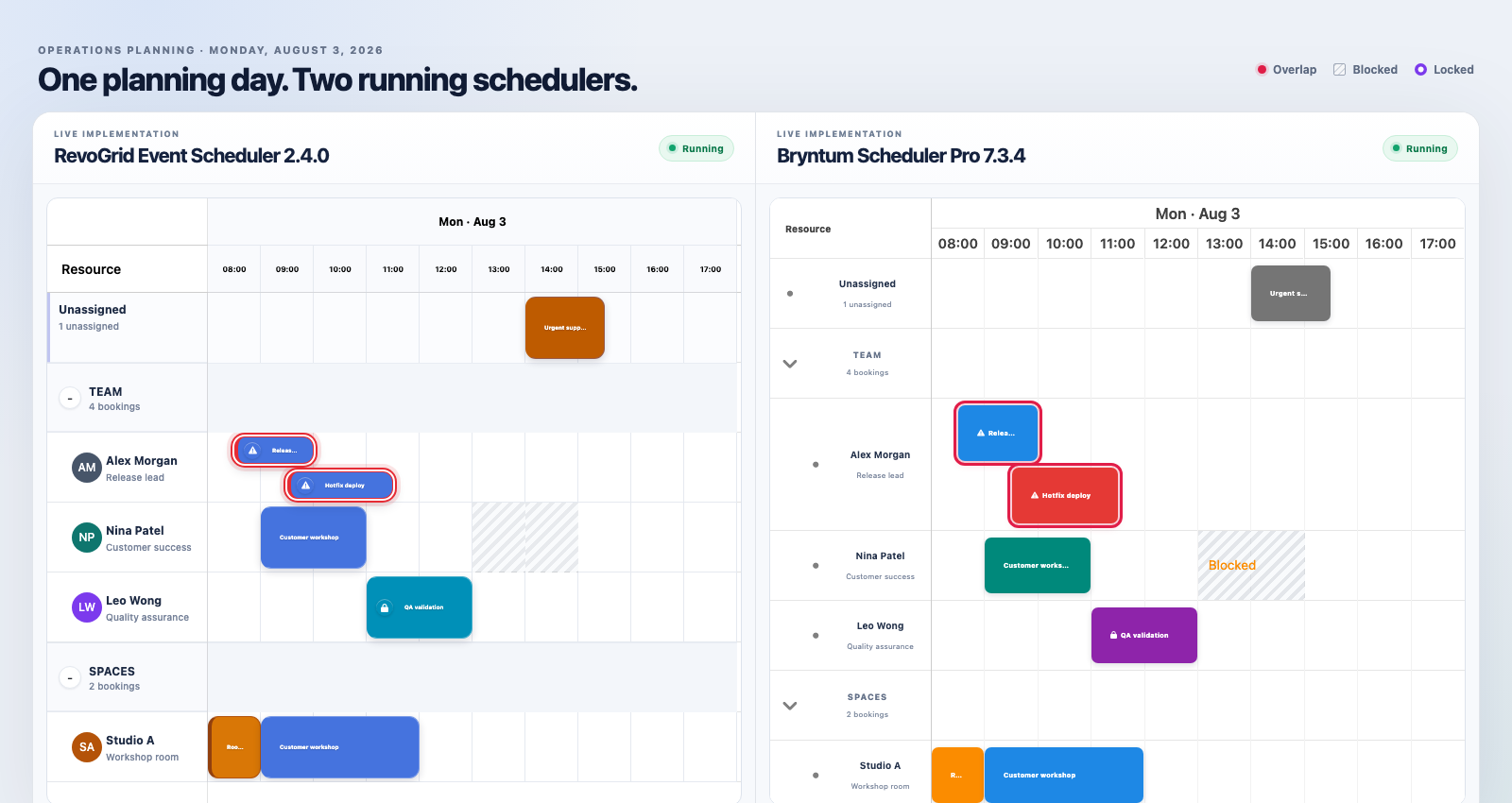
Browse the Scheduler review samples for all RevoGrid examples shown in this comparison. The separate validation repository and live GitHub Pages demo demonstrate the distinction between RevoGrid Gantt’s resource-planning view and RevoGrid Scheduler's resource timeline using the same neutral source data. The live demo is public; local installation requires access to the RevoGrid GitHub Packages trial distributions and a package token.
Bryntum recently published a detailed RevoGrid Scheduler vs Bryntum Scheduler comparison. We were pleased to see RevoGrid included. That level of effort gives buyers useful scenarios to evaluate and shows that RevoGrid is now part of serious scheduling comparisons.
The article also raises the right kinds of questions. Resource availability, reassignment, overlaps, dependencies, manual scheduling, utilization, and undo are exactly the behaviors teams should validate before selecting a scheduling component.
For buyers evaluating the products today, there is an important scope distinction:
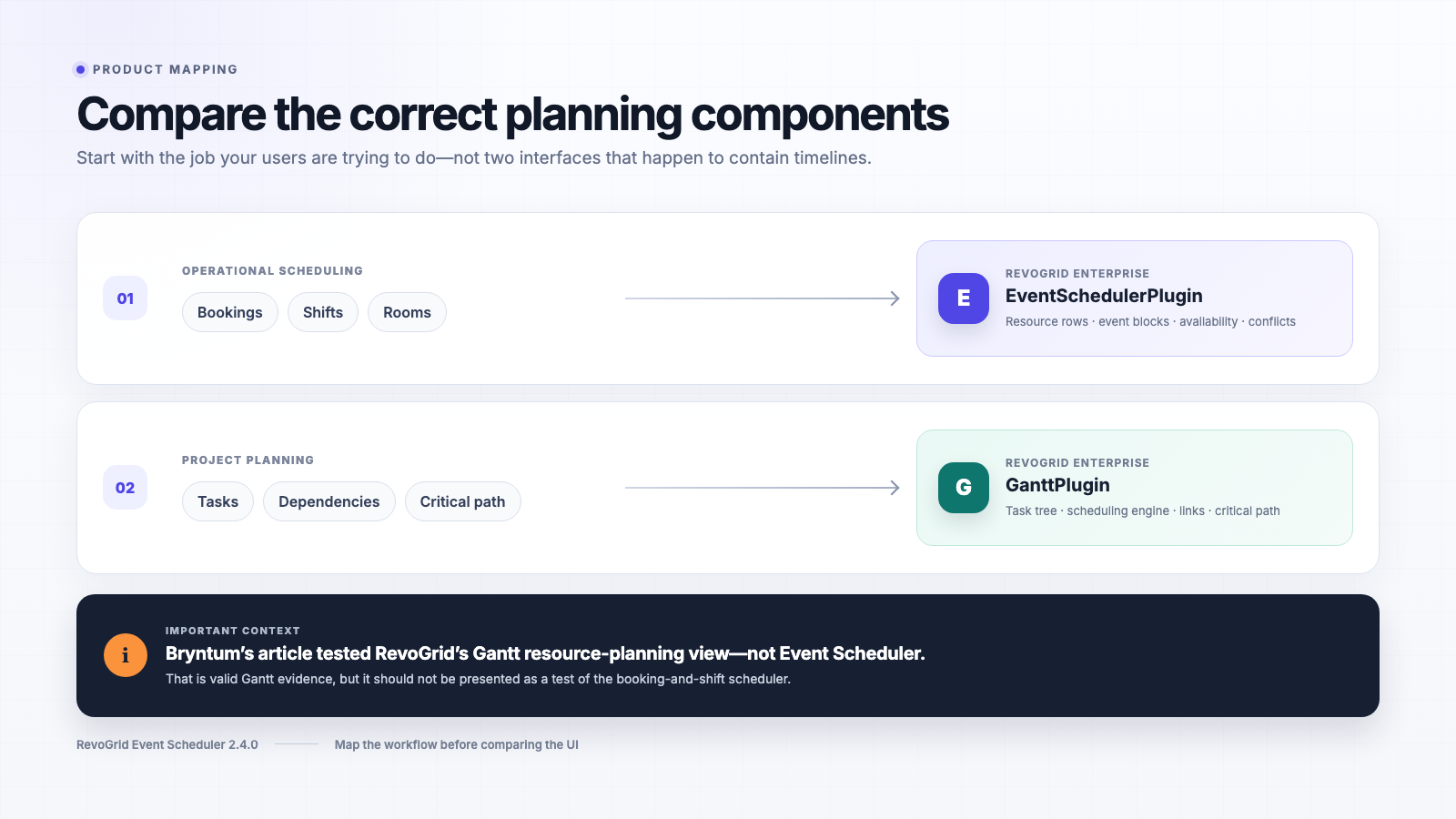
Bryntum's published comparison mounted RevoGrid's
GanttPluginand its resource-planning view. RevoGrid's current event and resource scheduling product is the separateEventSchedulerPlugin.
This article therefore focuses on the question buyers actually have today:
How do the current RevoGrid Scheduler and Bryntum Scheduler Pro compare for a real product being built now?
This article reviews the current documented capabilities of:
- RevoGrid Enterprise 2.4.0 using
EventSchedulerPlugin; - Bryntum Scheduler Pro 7.3.4;
- current documented product capabilities and the correct component mapping for each workflow.
The short answer
Both products can support serious resource-scheduling interfaces, but they come from different product philosophies.
Bryntum Scheduler Pro is the stronger fit when the scheduling engine itself is the center of the application. It provides mature dependency-driven scheduling, resource calendars, constraints, conflict-resolution workflows, utilization widgets, nested events, travel time, and a large set of ready-made scheduling behaviors.
RevoGrid Scheduler is the stronger fit when scheduling is one part of a larger data-heavy product. It brings event and resource planning into the same grid-native platform used for advanced data screens, Pivot, Gantt, editing, customization, and host-owned application data.
The original 13/13 versus 8/13 score does not answer this current Scheduler-to-Scheduler question because the RevoGrid side mounted GanttPlugin, not EventSchedulerPlugin.
What is being compared now
This article uses a current-product scope.
| RevoGrid | Bryntum | |
|---|---|---|
| Product | RevoGrid Scheduler | Bryntum Scheduler Pro |
| Version | 2.4.0 | 7.3.4 |
| Main component | EventSchedulerPlugin | SchedulerPro |
| Primary workflow | Shifts, bookings, rooms, equipment, dispatch, resource timelines, operational capacity | Resource scheduling with automatic dependency, calendar, constraint, and utilization logic |
| Evidence in this article | Current JavaScript Scheduler documentation, API, and implementation contracts | Current product documentation and Bryntum's published comparison |
The goal is to give current buyers evidence about the products they can evaluate and purchase today.
Versions and documented capabilities reviewed on July 31, 2026.
First, compare the correct components
Product-mapping examples and supporting code: RevoGrid Scheduler review samples.
The RevoGrid application in Bryntum's public repository imports and mounts GanttPlugin:
ts
import { GanttPlugin } from '@revolist/rv-enterprise-trial';

grid.plugins = [GanttPlugin];
That is a real RevoGrid component, but it is the project-planning component.
The current resource and event scheduler uses a different plugin:
ts
import { EventSchedulerPlugin } from '@revolist/scheduler';

grid.plugins = [EventSchedulerPlugin];
Those plugins are not aliases for the same surface.
| Workflow | RevoGrid component | Closest Bryntum comparison |
|---|---|---|
| Staff shifts, bookings, rooms, equipment, field crews, and resource timelines | RevoGrid Scheduler | Bryntum Scheduler or Scheduler Pro |
| Dependency-driven project plans, task hierarchy, constraints, critical path, and baselines | RevoGrid Gantt | Bryntum Gantt or Scheduler Pro |
| General editable data screens and analytics around the schedule | RevoGrid Data Grid and Pivot on the same platform | Bryntum Grid and related products |
A Gantt resource-load view answers questions such as:
- Which resources are over capacity?
- How much load is assigned by day or week?
- Which tasks produce that load?
A JavaScript Scheduler resource timeline answers different questions:
- What is booked against each resource?
- Can an event be moved or resized?
- Can it be reassigned to another person, room, or machine?
- Does it overlap another booking, blocked time, or unavailable hours?
Testing the first view does not establish that the second view is missing.
The validation repository places both RevoGrid surfaces over the same neutral source data so buyers can see the Gantt resource-load view alongside the separate JavaScript Scheduler resource timeline, including cross-resource movement and blocked-time behavior.
What RevoGrid Scheduler provides
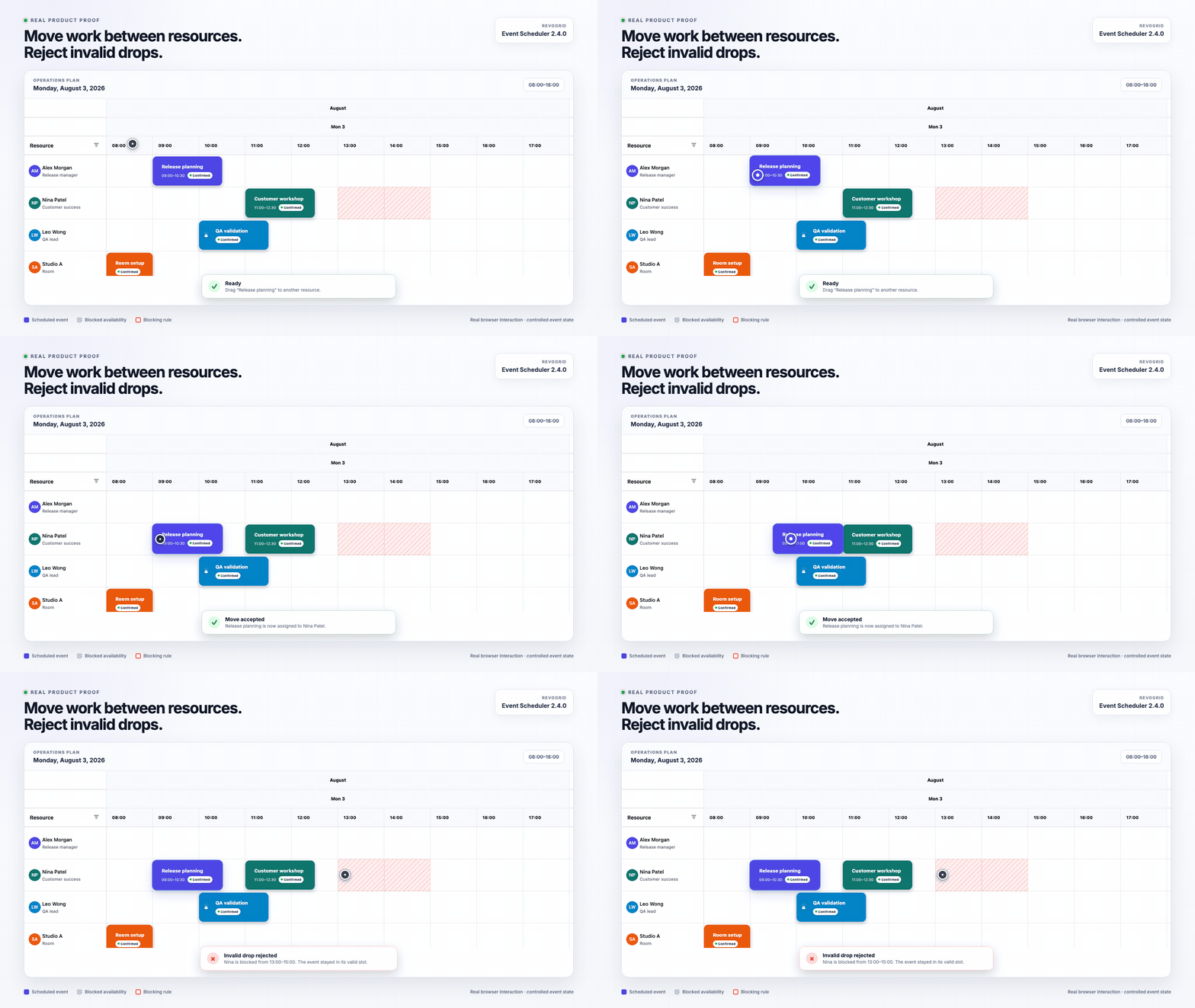
The interactions shown above are documented with the other article examples in the RevoGrid Scheduler review samples.
A minimal current resource-timeline setup looks like this:
ts
import { EventSchedulerPlugin } from '@revolist/scheduler';

grid.plugins = [EventSchedulerPlugin];

grid.eventScheduler = {
  view: 'resourceTimeline',
  weekStartDate: '2026-08-03',
  dateRange: {
    start: '2026-08-03',
    end: '2026-08-03',
  },
  slotMinutes: 60,
  timeRange: {
    start: '08:00',
    end: '18:00',
  },
  editable: true,
  allowCreate: true,
  allowMove: true,
  allowResize: true,
  allowDelete: true,
  conflicts: {
    enabled: true,
    policy: 'mark',
    scope: 'same-resource',
    rules: {
      overlap: 'error',
      'outside-availability': 'error',
      'blocked-time': 'error',
    },
  },
};

grid.eventSchedulerResources = [
  { id: 'room-a', name: 'Room A' },
  { id: 'room-b', name: 'Room B' },
];

grid.eventSchedulerEvents = [
  {
    id: 'booking-1',
    resourceId: 'room-a',
    title: 'Customer workshop',
    startDateTime: '2026-08-03T09:00:00.000Z',
    endDateTime: '2026-08-03T11:00:00.000Z',
  },
];
The current JavaScript Scheduler includes:
- day, week, month, and
resourceTimelineviews; - resource rows and editable event blocks;
- event creation, movement, resizing, editing, deletion, selection, clipboard operations, and duplication;
- event reassignment across schedulable resources, subject to permissions and validation;
- recurring calendars and dated working, blocked, holiday, and break windows;
- overlap, availability, blocked-time, capacity, duration, and custom validation rules;
- resource grouping, parent-child resource trees, filtering, coverage, and utilization projections;
- undo and redo through the shared history infrastructure;
- local data ownership or remote range loading, validation, commit, rejection, and rollback;
- custom event content, styles, headers, labels, editors, menus, tooltips, and keyboard actions.
See the JavaScript Scheduler documentation and JavaScript Scheduler API for the current contracts.
Current documented capability comparison
A useful comparison should explain not only whether a checkbox exists, but also how each product expects the application to behave.
| Buyer concern | RevoGrid Scheduler 2.4.0 | Bryntum Scheduler Pro 7.3.4 |
|---|---|---|
| Interactive resource timeline | Resource rows, event blocks, movement, resizing, and reassignment | Mature resource timeline with drag-and-drop scheduling and reassignment |
| Calendar-style scheduling | Day, week, and month views alongside resource timeline | Multiple scheduling layouts and time scales |
| Working time and availability | Calendars plus resource-specific working, blocked, holiday, and break windows | Project, event, and resource calendars interpreted by its scheduling engine |
| Overlap and rule enforcement | Configurable warning, confirm, error, or ignored outcomes, plus cancelable hooks | Validation and scheduling-engine rules with mature built-in conflict workflows |
| Dependencies and automatic cascades | Dependency-driven planning belongs primarily to RevoGrid Gantt | Core Scheduler Pro capability with four dependency types and automatic rescheduling |
| Resource utilization | Coverage and utilization projections inside the JavaScript Scheduler platform | Dedicated Resource Histogram and Resource Utilization widgets |
| Data ownership | Host application can own canonical event data and persistence; local and remote flows are supported | Project and store model with load, sync, and application-integration APIs |
| Custom business rules | Permission hooks, mutation validation, conflict rules, before events, and custom editors | Extensive component configuration, features, editors, validation, and scheduling APIs |
| Broader application platform | Data Grid, Pivot, Gantt, and JavaScript Scheduler share the RevoGrid foundation | Scheduler Pro integrates with Bryntum Grid, Gantt, and the wider Bryntum suite |
| Product maturity | Newer dedicated scheduling layer, best validated with the target workflow | Long-established specialist scheduling product with a broad turnkey feature set |
This table shows why a single numerical score is not enough. The products overlap, but their default contracts and strongest use cases are not identical.
Where Bryntum is stronger today
Bryntum Scheduler Pro deserves credit for the depth of its specialist scheduling product.
A more mature automatic scheduling engine
Dependencies, constraints, working calendars, and task movement are tightly integrated. When a product requires Microsoft Project-style automatic scheduling directly inside a resource timeline, Bryntum has a mature ready-made implementation.
More turnkey scheduling UX
Bryntum provides polished built-in workflows such as conflict-resolution interfaces, Resource Histogram, Resource Utilization, nested events, travel time, and extensive task-editing surfaces.
A team that needs these exact workflows immediately may reach production faster with Bryntum than by composing them from lower-level rules and host-owned UI.
Longer specialization in scheduling
Bryntum has spent many years building Scheduler, Scheduler Pro, and Gantt products. That maturity appears in its examples, edge-case coverage, documentation, and the number of specialized features available out of the box.
We do not think a credible comparison should hide those advantages.
Where RevoGrid is the stronger fit
RevoGrid's advantage is not that it reproduces every Bryntum workflow. Its advantage is the way scheduling fits into a wider data product.
Grid-first product architecture
Many business applications are not primarily schedulers. They combine:
- editable operational tables;
- resource and booking timelines;
- project plans;
- analytics and Pivot views;
- custom cells and editors;
- server-backed business rules;
- permissions, audit, and application-specific workflows.
RevoGrid is designed around that wider interface. The scheduler uses the same RevoGrid rendering, editing, and interaction foundation as the rest of the platform.
Application-owned data and persistence
The host application can remain the source of truth. RevoGrid can accept event and resource data, project it into scheduler rows and blocks, emit accepted mutations, and let the application persist either the complete next state or incremental changes.
Remote hooks can load only the visible range and can validate, accept, reject, canonicalize, or roll back a mutation. This is useful when the backend—not the frontend component—owns scheduling authority.
Flexible operational rules
Not every operational scheduler should automatically move a booking because a calendar says it is invalid.
Some products should:
- block the move;
- display a warning;
- require user confirmation;
- ask a backend service;
- route the change through an approval workflow;
- allow an exception while recording the conflict.
RevoGrid exposes these decisions as configurable conflict policies and mutation hooks. That is a strong fit for SaaS and enterprise products with domain-specific rules.
One platform for Grid, Pivot, Gantt, and Scheduler
A customer can use RevoGrid for ordinary data screens and add Pivot, Gantt, or JavaScript Scheduler where the workflow requires them. This can reduce integration work when one application also needs advanced grid, Pivot, Gantt, and Scheduler views.
What the earlier 13/13 versus 8/13 score can tell us
Bryntum's earlier benchmark is useful evidence about the specific RevoGrid Gantt surface and configuration it tested.
It does not establish that the current RevoGrid Scheduler lacks:
- interactive resource rows;
- event bars on a resource timeline;
- cross-resource reassignment;
- resource availability rules;
- overlap prevention;
- scheduler-specific editing and persistence flows.
Those behaviors belong to EventSchedulerPlugin, which was not mounted in that benchmark.
The score also combines different categories:
- missing functionality;
- genuine defects;
- different scheduling policies;
- behavior tested on a different product surface.
Those categories should not all become a simple failed scenario.
This article therefore does not turn those categories into a replacement score. A new head-to-head score would require both products to be implemented against the same neutral scenarios and tested under the same published methodology.
The RevoGrid Scheduler validation repository contains two RevoGrid surfaces: the GanttPlugin resource-planning view and the EventSchedulerPlugin resource timeline. Three browser tests validate that distinction and selected JavaScript Scheduler behaviors. It does not contain a current Bryntum 7.3.4 implementation.
Is RevoGrid Scheduler a Bryntum Scheduler alternative?
Yes—for products where resource scheduling is part of a larger data-heavy SaaS, ERP, PPM, manufacturing, or operations interface. The better choice still depends on whether you primarily need a specialist automatic scheduling engine or a scheduler embedded into a broader data application.
| Choose Bryntum Scheduler Pro when… | Choose RevoGrid Scheduler when… |
|---|---|
| Automatic dependency-driven scheduling is central to the product. | The resource scheduler is one part of a larger data-heavy product. |
| You need mature built-in conflict-resolution, histogram, utilization, nested-event, or travel-time workflows immediately. | You need scheduling, advanced grid screens, Pivot, and Gantt on one shared platform. |
| You prefer a highly developed specialist scheduling model and ready-made UX. | Your application should own data, persistence, validation, approvals, and backend rules. |
| The scheduler itself is the primary product surface. | The scheduler must feel native to an existing SaaS, ERP, PPM, manufacturing, or operations interface. |
| Your required Bryntum features have already been proven in a realistic prototype. | Your required RevoGrid workflows have been proven with your own data, scale, and integration model. |
A good procurement decision should not start with a vendor score. It should start with five questions:
- Are you building an operational event scheduler or a dependency-driven project planner?
- Should the component automatically calculate the schedule, or should the application control exceptions and approvals?
- How much ready-made scheduling UX do you need?
- Is the scheduler the whole product, or one part of a broader data interface?
- Which product has passed a prototype using your real data and rules?
Practical conclusion
Bryntum's comparison contains valuable engineering work, and Bryntum Scheduler Pro remains one of the strongest specialist scheduling products available.
Its broad conclusion about RevoGrid Scheduler is nevertheless incomplete because the RevoGrid side used GanttPlugin and did not evaluate the current EventSchedulerPlugin.
For a current buying decision, the correct comparison is:
- RevoGrid Scheduler
2.4.0versus Bryntum Scheduler Pro7.3.4for event and resource scheduling; - RevoGrid Gantt versus Bryntum Gantt or Scheduler Pro for dependency-driven project planning.
This article does not assign a replacement benchmark score because we have not run both products through a shared automated test suite. Its purpose is to correct the component mapping and help teams choose the right products for their own prototype.
Evaluate the correct RevoGrid component
Use JavaScript Scheduler for shifts, bookings, rooms, machines, dispatch, and resource timelines. Use RevoGrid Gantt for task hierarchy, dependencies, constraints, critical path, baselines, and project scheduling.
Ready to test the current product with your own workflow? Start a RevoGrid trial.
Materials and source code
- RevoGrid Scheduler review samples — all RevoGrid examples and supporting materials used in this comparison.
- RevoGrid Scheduler validation repository and live demo — the Gantt resource-planning and JavaScript Scheduler resource-timeline validation surfaces.
- RevoGrid Scheduler documentation and API reference — current documented RevoGrid contracts.
- Bryntum's published comparison, Scheduler Pro product page, and changelog — primary Bryntum materials reviewed for this article.
FAQ
Frequently asked questions
Bryntum is a trademark of its respective owner. This article references publicly available Bryntum product information and the public comparison repository reviewed on July 31, 2026. Product capabilities, versions, and commercial terms can change; verify the current documentation and license before purchasing.