
RevoGrid is a strong AG Grid alternative for teams that need a fast JavaScript data grid with virtual scrolling, spreadsheet-like editing, custom cells, framework support, an MIT core, and commercial features that can scale with the product.
AG Grid Alternative: RevoGrid vs AG Grid (2026)
AG Grid vs RevoGrid — quick answer
Choose RevoGrid for an MIT-licensed core, cross-framework reuse, and no deployment counting. AG Grid is best understood as a mature choice for teams already standardized on its APIs and Enterprise features.
This comparison is for teams evaluating AG Grid against RevoGrid for a new product or an AG Grid migration.
Last reviewed: August 13, 2026. Vendor pricing, license terms, and feature packaging can change. Verify official vendor pages before purchase.
Short answer: which grid fits?
Both grids can power serious data-heavy applications. The better choice depends on what your team is optimizing for.
| Choose RevoGrid when you need | Choose AG Grid when you need |
|---|---|
| An MIT-licensed core you can evaluate and use in production | A mature enterprise grid your organization already knows |
| One Web Component foundation across React, Vue, Angular, Svelte, and JavaScript | Specific AG Grid APIs, row models, or Enterprise behavior |
| Spreadsheet-style product workflows with optional Pro modules | An existing AG Grid implementation that is already working well |
| Commercial licensing without counting deployments or end users | A vendor and license already approved by procurement |
Start with your goal
| Your goal | Best next action |
|---|---|
| See how RevoGrid behaves before reading the details | Explore the live demos |
| Move an existing AG Grid screen | Follow the AG Grid migration guide |
| Compare Community and paid capabilities | Jump to the feature matrix |
| Check open-source and commercial terms | Review RevoGrid licensing and pricing |
| Validate Pro features in your own application | Get Pro Trial |
Product interface preview
See both product interfaces
Use these product snapshots to compare the interaction style before you work through the detailed feature and licensing matrix.
RevoGridProduct workflows
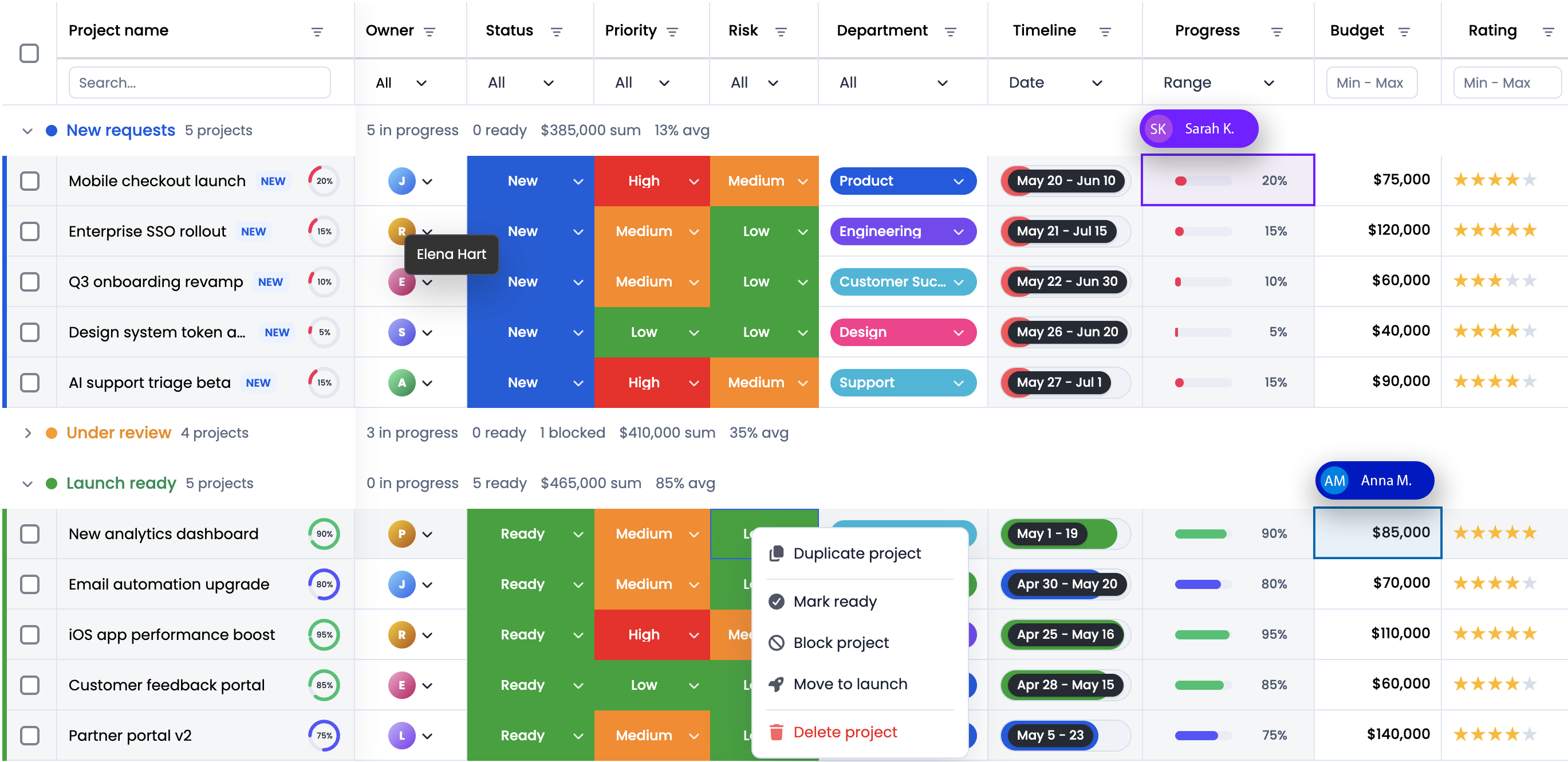
A RevoGrid product workspace combining grouped records, column filters, custom cells, progress, ratings, and row actions in one virtualized grid.
Explore RevoGrid demosAG GridEnterprise grid
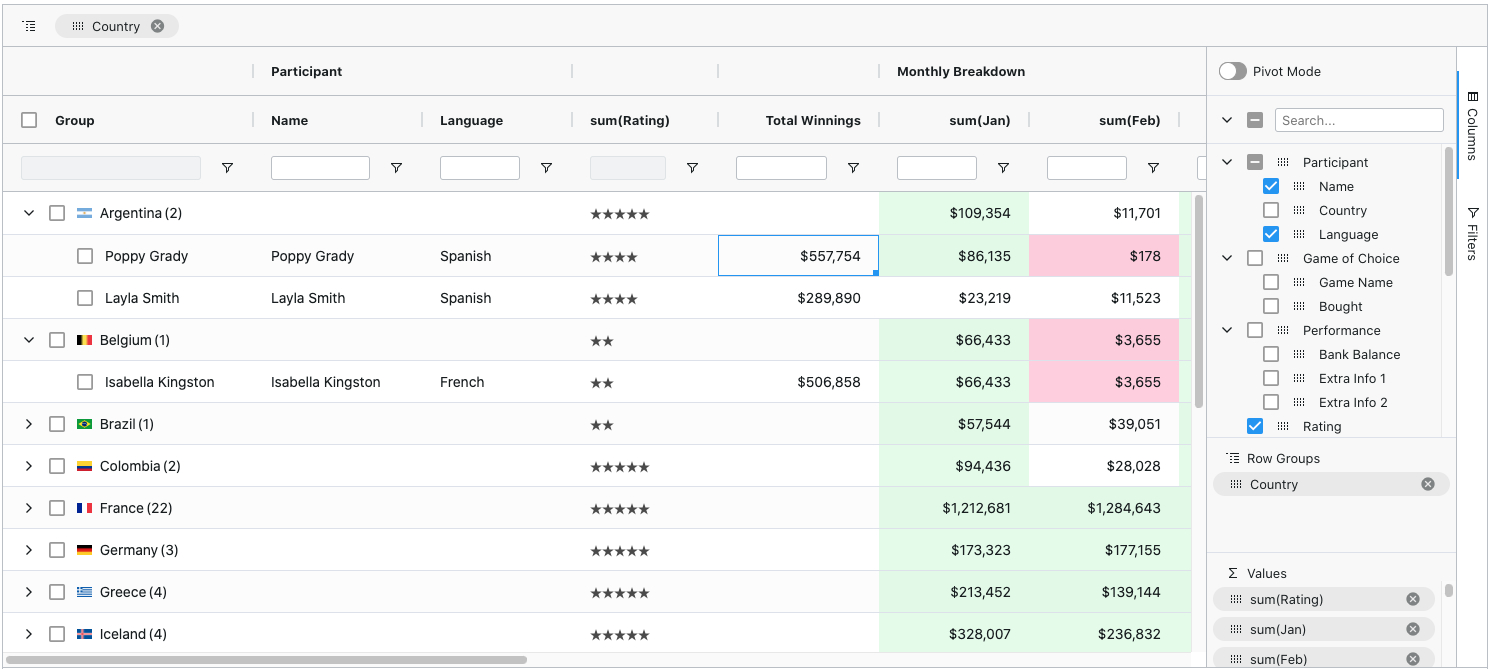
An AG Grid configuration showing grouped rows, column filters, pivot mode, and the columns tool panel for an enterprise-style reporting workflow.
Visit the AG Grid websiteThese are product snapshots, not like-for-like benchmarks. Feature availability can vary by tier and configuration.
Quick comparison
| Category | AG Grid | RevoGrid |
|---|---|---|
| Core positioning | Mature enterprise JavaScript data grid | High-performance, extensible data grid for complex web apps |
| Free version | Community edition available for production use | MIT-licensed Community core |
| Commercial version | Enterprise licence for advanced production features | RevoGrid Pro and Pro Advanced for advanced product workflows |
| Framework support | JavaScript, React, Angular, Vue | Web Component foundation with React, Vue, Angular, Svelte, and JavaScript support |
| Large datasets | Strong virtualization and enterprise row models | Virtualized rendering for large row and column counts |
| Spreadsheet UX | Available through Community and Enterprise features depending on requirement | Editing, keyboard navigation, range workflows, formulas, Excel import/export, smart autofill, and advanced Pro modules |
| SaaS friendliness | Enterprise licensing can involve developer and deployment considerations | Designed around no deployment counting and no end-user licensing |
| Upgrade path | Community to Enterprise | MIT core to Pro/Pro Advanced without changing the grid foundation |
| Best for | Enterprise teams already standardized on AG Grid | SaaS, product teams, internal tools, and engineering teams that want speed, flexibility, and simpler scaling |
Why teams evaluate AG Grid alternatives
AG Grid is capable, but another grid can be a better fit when your product needs:
- a faster path from prototype to production;
- one grid foundation across React, Vue, Angular, Svelte, and JavaScript;
- an MIT-licensed core for early development or open-source-friendly usage;
- advanced spreadsheet features without building a custom grid engine;
- simpler commercial scaling across staging, production, customer portals, and internal environments;
- deep customization without rebuilding the table layer.
If these are not your priorities and AG Grid already works well for your team, staying with AG Grid may be the lower-risk choice.
Advanced feature support matrix
Legend:
✅ = built-in / officially supported
⚠️ = partial, custom implementation, third-party example, or depends on configuration
— = not positioned as a built-in feature in the referenced product tier
AG Grid Enterprise / Bundle = AG Grid Enterprise unless the note explicitly says Enterprise Bundle.
| Feature | RevoGrid | AG Grid Community | AG Grid Enterprise / Bundle | Notes |
|---|---|---|---|---|
| MIT-licensed core | ✅ Core | ✅ | — Commercial EULA | RevoGrid uses an open-core model; AG Grid Community is MIT, Enterprise is commercial. |
| No deployment counting | ✅ | ✅ Community | — | RevoGrid pricing explicitly positions no deployment counting; AG Grid Enterprise is per-developer, per-deployment. |
| No server licence | ✅ | ✅ Community | ⚠️ Deployment-based terms | Strong RevoGrid positioning point for SaaS and internal platforms. |
| Unlimited production usage | ✅ | ✅ Community | ⚠️ Depends on licence/deployment terms | RevoGrid pricing states unlimited production usage for paid plans. |
| Royalty-free hosted apps / commercial solutions | ✅ | ✅ Community | ⚠️ Review EULA | Strong RevoGrid SaaS positioning point. |
| Fair-use / scale-with-company-size positioning | ✅ | — | ⚠️ More complex | Recommended RevoGrid messaging: avoid pay-per-deployment friction. |
| Commercial licence for advanced features | ✅ Pro | — | ✅ | Both vendors commercialize advanced features. |
| Per-developer licence | ✅ Pro | — | ✅ | Both paid models are developer-seat oriented. |
| Enterprise procurement / custom contracts | ✅ Pro | — | ✅ | Both can support larger enterprise customers. |
| Self-serve paid purchase | ✅ Pro | — | ✅ | RevoGrid has self-serve Pro pricing. |
| Custom enterprise plan | ✅ Pro | — | ✅ | For procurement, security, custom terms, and larger teams. |
| Free production use | ✅ | ✅ | ✅ Paid | RevoGrid core and AG Grid Community both provide free production usage. |
| SaaS usage | ✅ | ✅ Community | ✅ With enterprise licence | RevoGrid should emphasize no end-user or deployment friction. |
| Per-deployment fee | — | — | ⚠️ Per-deployment licence basis | RevoGrid should contrast clearly here. |
| Feature | RevoGrid | AG Grid Community | AG Grid Enterprise / Bundle | Notes |
|---|---|---|---|---|
| Svelte support | ✅ | ⚠️ Custom / vanilla integration | ⚠️ Custom / vanilla integration | RevoGrid has stronger official Svelte positioning. |
| Web Component foundation | ✅ | ⚠️ JavaScript integration | ⚠️ JavaScript integration | RevoGrid can be positioned as framework-portable through its Web Component architecture. |
| SSR-aware usage | ✅ | ⚠️ Depends on framework setup | ⚠️ Depends on framework setup | RevoGrid docs include SSR guidance. |
| Stencil support | ✅ | ⚠️ Custom integration | ⚠️ Custom integration | Useful for Web Component-heavy apps. |
| TanStack integration examples | ✅ | ⚠️ Custom integration | ⚠️ Custom integration | RevoGrid docs include TanStack-oriented examples. |
| Vanilla JavaScript support | ✅ | ✅ | ✅ | Both support plain JavaScript usage. |
| TypeScript support | ✅ | ✅ | ✅ | Both are TypeScript-friendly. |
| React support | ✅ | ✅ | ✅ | Both officially support React. |
| Angular support | ✅ | ✅ | ✅ | Both officially support Angular. |
| Vue support | ✅ | ✅ | ✅ | Both officially support Vue. |
| Native framework cell components | ✅ | ✅ | ✅ | Both support custom framework components in cells. |
| Native framework editors | ✅ | ✅ | ✅ | Both support custom editors. |
| One grid API across frameworks | ✅ | ✅ | ✅ | Both offer cross-framework consistency; RevoGrid can highlight Web Component portability. |
| Feature | RevoGrid | AG Grid Community | AG Grid Enterprise / Bundle | Notes |
|---|---|---|---|---|
| Trimmed rows | ✅ | ⚠️ Filtering / row model | ⚠️ Filtering / row model | RevoGrid lists Trimmed Rows as core. |
| Infinite scroll | ✅ Pro | ⚠️ Infinite Row Model / Viewport Model | ✅ | RevoGrid Pro lists Infinite Scroll. |
| Value cache / performance cache | ✅ Core | ✅ | ✅ | RevoGrid applies internal performance caching through its rendering engine; AG Grid exposes an opt-in Value Cache API. |
| Row virtualization | ✅ | ✅ | ✅ | Core requirement for large datasets. |
| Column virtualization | ✅ | ✅ | ✅ | Both support virtualized rendering. |
| Intelligent virtual DOM | ✅ | ✅ | ✅ | RevoGrid pricing lists Intelligent Virtual DOM as a core feature. |
| Massive row count support | ✅ | ✅ | ✅ | Both are built for large datasets. |
| Large column count support | ✅ | ✅ | ✅ | Important for spreadsheet-style products. |
| Smooth scrolling | ✅ | ✅ | ✅ | Both target performant scrolling. |
| High-frequency data updates | ✅ | ✅ | ✅ | AG Grid documents high-frequency updates; RevoGrid supports real-time updates. |
| Real-time updates | ✅ | ✅ | ✅ | Both can be used for real-time data apps. |
| Cell flash / change highlight | ✅ Pro | ✅ | ✅ | RevoGrid Pro lists Cell Flash; AG Grid documents highlighting changes. |
| Row animation | ✅ Pro | ✅ | ✅ | AG Grid has explicit row animation feature. |
| Pagination | ✅ Pro | ✅ | ✅ | RevoGrid Pro lists pagination; AG Grid Community includes pagination. |
| Remote pagination | ✅ Pro | ✅ Basic | ✅ Advanced | RevoGrid Pro lists Pagination Remote. |
| Viewport / range loading | ✅ Pro | ✅ Viewport Row Model | ✅ | Both support large remote-data workflows. |
| Feature | RevoGrid | AG Grid Community | AG Grid Enterprise / Bundle | Notes |
|---|---|---|---|---|
| Advanced column stretching | ✅ Pro | ⚠️ Sizing APIs | ⚠️ Sizing APIs | RevoGrid Pro-specific positioning. |
| Column collapse / expand / drill-down | ✅ Pro | ⚠️ Column groups / custom | ⚠️ Column groups / custom | RevoGrid Pro lists Column Collapse & Expand. |
| Custom column menu | ✅ Pro | — | ✅ | AG Grid Enterprise includes column menu / tool panels. |
| Column definitions | ✅ | ✅ | ✅ | Core feature in both. |
| Column resizing | ✅ | ✅ | ✅ | Core feature in both. |
| Column autosizing | ✅ | ✅ | ✅ | Core feature in both. |
| Column ordering / moving | ✅ | ✅ | ✅ | Core feature in both. |
| Column pinning | ✅ | ✅ | ✅ | Core feature in both. |
| Column groups | ✅ | ✅ | ✅ | Core feature in both. |
| Custom column header templates | ✅ | ✅ | ✅ | Both support custom headers/components. |
| Custom header properties | ✅ | ✅ | ✅ | Core customization feature. |
| Column readonly | ✅ | ✅ | ✅ | Can be handled through configuration. |
| Column stretch / last column stretch | ✅ Core | ✅ Column sizing | ✅ Column sizing | The Core last-column stretch option fills remaining width; Pro adds all-column, selected-column, and size-preservation modes. |
| Column hide | ✅ Pro | ✅ | ✅ | RevoGrid Pro lists Column Hide. |
| Column group reorder | ✅ Pro | ✅ Column moving | ✅ Column moving | RevoGrid Pro lists Column Group Reorder. |
| Multilevel columns | ✅ Pro | ✅ | ✅ | RevoGrid Pro hierarchy messaging includes multilevel columns. |
| Column spanning | ✅ Pro | ✅ | ✅ | AG Grid has column spanning docs; RevoGrid has merge/grid-structure tools. |
| Column selection | ✅ Pro | ✅ Cell/column selection APIs | ✅ | RevoGrid Pro lists Column Selection. |
| Feature | RevoGrid | AG Grid Community | AG Grid Enterprise / Bundle | Notes |
|---|---|---|---|---|
| Custom row heading | ✅ Pro | ⚠️ Custom component | ⚠️ Custom component | RevoGrid Pro lists Row Custom Heading. |
| Row transpose | ✅ Pro | ⚠️ Custom transformation | ⚠️ Custom transformation | RevoGrid Pro lists Row Transpose. |
| Row grouping drag and drop | ✅ Pro | — | ✅ | AG Grid row grouping is Enterprise. |
| Nested rows / hierarchical rows | ✅ Pro | — | ✅ Tree Data | RevoGrid Pro lists Hierarchical Data View. |
| Tree data | ✅ Pro | — | ✅ | AG Grid Tree Data is Enterprise; RevoGrid has tree examples and Pro hierarchy features. |
| Self-referential tree data | ✅ Pro | — | ✅ | AG Grid explicitly documents self-referential tree records. |
| Row definitions | ✅ | ✅ | ✅ | Core feature in both. |
| Row height | ✅ | ✅ | ✅ | Core feature in both. |
| Row auto size | ✅ Pro | ✅ | ✅ | RevoGrid Pro lists Row Auto Size. |
| Row pinning | ✅ | ✅ | ✅ | Core feature in both. |
| Pinned / sticky rows | ✅ | ✅ | ✅ | RevoGrid Pro lists Sticky Cells and Rows. |
| Row headers | ✅ | ✅ Row numbers | ✅ Row numbers | Both support row identity/display patterns. |
| Row ordering | ✅ | ✅ Row dragging | ✅ Row dragging | Core RevoGrid row ordering; AG Grid supports row dragging. |
| Advanced row drag and drop | ✅ Pro | ✅ Basic row dragging | ✅ Advanced row/group dragging | RevoGrid Pro lists advanced row drag/drop. |
| Row checkbox selection | ✅ Pro | ✅ | ✅ | RevoGrid Pro lists Row Checkbox Selection. |
| Full-width rows | ✅ Pro | ✅ | ✅ | AG Grid has full-width rows. |
| Row spanning | ✅ Pro | ✅ | ✅ | AG Grid has row spanning; RevoGrid Pro has merge tools. |
| Feature | RevoGrid | AG Grid Community | AG Grid Enterprise / Bundle | Notes |
|---|---|---|---|---|
| Cell merge | ✅ Pro | ⚠️ Cell spanning/custom | ⚠️ Cell spanning/custom | RevoGrid Pro explicitly lists Merge Cells. |
| Auto merge | ✅ Pro | ⚠️ Custom logic | ⚠️ Custom logic | RevoGrid Pro explicitly lists Auto Merge. |
| Basic cell formats | ✅ | ✅ | ✅ | Core feature in both. |
| Text format | ✅ | ✅ | ✅ | Core feature. |
| Number format | ✅ | ✅ | ✅ | Core feature. |
| Date format | ✅ | ✅ | ✅ | Core feature. |
| Selection format | ✅ | ✅ | ✅ | Core feature. |
| Custom cell properties | ✅ | ✅ | ✅ | Core customization feature. |
| Custom cell templates | ✅ | ✅ | ✅ | Both support custom cell rendering. |
| Custom cell renderers/components | ✅ | ✅ | ✅ | Both support framework components in cells. |
| Custom cell editors | ✅ | ✅ | ✅ | Both support custom editors. |
| Cell readonly | ✅ | ✅ | ✅ | Common grid configuration. |
| Cell text selection | ✅ | ✅ | ✅ | Useful for copy-heavy interfaces. |
| Sticky cells | ✅ Pro | ✅ Pinned rows/columns | ✅ Pinned rows/columns | RevoGrid Pro explicitly lists Sticky Cells and Rows. |
| Overlay layers | ✅ Pro | ✅ Overlays | ✅ Overlays | Both have overlay patterns. |
| Cell flash | ✅ Pro | ✅ | ✅ | Both support change-highlighting style workflows. |
| Notes / cell annotations | ⚠️ Custom | ✅ | ✅ | AG Grid has Notes docs; RevoGrid can implement via custom cells/plugins. |
| Feature | RevoGrid | AG Grid Community | AG Grid Enterprise / Bundle | Notes |
|---|---|---|---|---|
| Dynamic form editing | ✅ Pro | ⚠️ Custom detail/editor | ⚠️ Custom detail/editor | RevoGrid Pro lists Dynamic Form Editing. |
| Slider editor | ✅ Pro | ⚠️ Custom editor | ⚠️ Custom editor | RevoGrid Pro lists Cell Slider Editor. |
| Counter editor | ✅ Pro | ⚠️ Custom editor | ⚠️ Custom editor | RevoGrid Pro lists Cell Counter Editor. |
| Timeline editor | ✅ Pro | ⚠️ Custom editor | ⚠️ Custom editor | RevoGrid Pro lists Timeline Editor. |
| Edit history | ✅ Pro | ⚠️ Custom | ⚠️ Custom / undo-redo | RevoGrid Pro lists History. |
| Audit trail history | ✅ Pro | ⚠️ Custom | ⚠️ Custom | RevoGrid Pro explicitly lists Audit Trail History. |
| Collaborative mode | ✅ Pro | ⚠️ Custom application logic | ⚠️ Custom application logic | RevoGrid Pro lists collaborative editing workflows. |
| Batch editing | ✅ Pro | — | ✅ | AG Grid Enterprise pricing lists Batch Editing. |
| Rich select editor | ✅ Pro | — | ✅ | AG Grid Enterprise lists Rich Select / Advanced Select. |
| Undo / redo | ✅ Pro | — | ✅ | RevoGrid Pro audit/history stack; AG Grid Enterprise lists undo/redo. |
| Inline cell editing | ✅ | ✅ | ✅ | Core editing feature. |
| Full row editing | ✅ Pro | ✅ | ✅ | RevoGrid Pro lists Full Row Editing; AG Grid supports full-row editing. |
| Checkbox editor | ✅ Pro | ✅ | ✅ | Both support checkbox-style editing. |
| Validation | ✅ Pro | ✅ | ✅ | RevoGrid Pro lists Cell/Input Validation; AG Grid supports validation. |
| Input validation | ✅ Pro | ✅ | ✅ | RevoGrid Pro lists Input Validation. |
| Cell validation | ✅ Pro | ✅ | ✅ | RevoGrid Pro lists Cell Validation. |
| Async editor values | ⚠️ Custom editor | — | ✅ | AG Grid documents async values for rich select. |
| Feature | RevoGrid | AG Grid Community | AG Grid Enterprise / Bundle | Notes |
|---|---|---|---|---|
| Range apply preview | ✅ Pro | ⚠️ Custom | ⚠️ Custom | RevoGrid Pro lists Range Apply Preview. |
| Range copy preview | ✅ Pro | ⚠️ Custom | ⚠️ Custom | RevoGrid Pro feature positioning. |
| Clipboard with JSON | ✅ Pro | ⚠️ Custom parser | ⚠️ Custom parser | RevoGrid Pro explicitly lists Clipboard with JSON. |
| 100+ Excel formulas | ✅ Pro | ⚠️ Formula engine supports built-ins | ⚠️ Formula engine supports built-ins | RevoGrid Pro positioning explicitly says 100+ Excel formulas. |
| Excel-style import | ✅ Pro | ⚠️ Third-party example | ⚠️ Third-party example | AG Grid docs show Excel import using a third-party library; RevoGrid Pro lists Excel Export/Import. |
| Range selection | ✅ | — | ✅ | AG Grid range selection is Enterprise; RevoGrid lists range selection in core positioning. |
| Cell range selection | ✅ | — | ✅ | Strong spreadsheet UX feature. |
| Multi-range selection | ✅ Pro | — | ✅ | RevoGrid Pro lists multi-range selection; AG Grid has cell selection/ranges in Enterprise. |
| Range handle | ✅ | — | ✅ | AG Grid Range Handle is Enterprise. |
| Fill handle | ✅ | — | ✅ | AG Grid Fill Handle is Enterprise. |
| Smart auto-fill | ✅ Pro | — | ✅ Fill Handle | RevoGrid Pro explicitly lists Smart Auto Fill. |
| Clipboard copy/paste | ✅ | — | ✅ | AG Grid clipboard operations are Enterprise. |
| Excel-like clipboard behavior | ✅ Pro | — | ✅ | AG Grid Enterprise includes enhanced clipboard operations. |
| Formula support | ✅ Pro | — | ✅ | Both offer commercial formula support. |
| Formula editor | ✅ Pro | — | ✅ | AG Grid formula editor is Enterprise. |
| Custom formula functions | ✅ Pro | — | ✅ | Both can support custom formula logic commercially. |
| Formula-aware fill handle | ✅ Pro | — | ✅ | AG Grid formulas support fill handle interactions. |
| Spreadsheet-style expressions | ✅ Pro | — | ✅ | Both support commercial spreadsheet-style formulas. |
| Excel-style export | ✅ Pro | — | ✅ | AG Grid Excel Export is Enterprise. |
| Export matching grid view | ✅ Pro | — | ✅ Advanced export options | Both support advanced export workflows in paid tiers. |
| Keyboard navigation | ✅ | ✅ | ✅ | Core productivity feature. |
| Feature | RevoGrid | AG Grid Community | AG Grid Enterprise / Bundle | Notes |
|---|---|---|---|---|
| Selection filter cascade | ✅ Pro | — | ⚠️ Set Filter / custom cascade | RevoGrid Pro lists Selection Filter Cascade. |
| Advanced slider filtering | ✅ Pro | ⚠️ Custom filter | ⚠️ Custom filter | RevoGrid Pro lists Advanced Slider Filtering. |
| Mini filter | ✅ Pro | — | ✅ | RevoGrid Pro's selection filter includes a searchable mini-filter input; AG Grid's Mini Filter is Enterprise. |
| Advanced selection filtering | ✅ Pro | — | ✅ Set Filter | RevoGrid Pro lists Advanced Selection Filtering; AG Grid has Set Filter Enterprise. |
| Set filter | ✅ Pro | — | ✅ | AG Grid Set Filter is Enterprise. |
| Multi filter | ✅ Pro | — | ✅ | AG Grid Multi Filter is Enterprise. |
| Advanced filter builder | ✅ Pro | — | ✅ | Both can cover advanced filter workflows commercially. |
| Tree list filter | ✅ Pro | — | ✅ | AG Grid Enterprise Set Filter supports tree list patterns. |
| Basic sorting | ✅ | ✅ | ✅ | Core feature in both. |
| Multi-column sorting | ✅ | ✅ | ✅ | Both support multi-column sorting. |
| Additive multi-sort UX | ✅ | ✅ | ✅ | RevoGrid positions additive multi-column sorting in core. |
| Server-side sorting | ✅ Pro | ✅ Basic | ✅ Advanced SSRM | Both can work with server-side sorting. |
| Basic column filters | ✅ | ✅ | ✅ | Core feature in both. |
| Text filter | ✅ | ✅ | ✅ | Core feature. |
| Number filter | ✅ | ✅ | ✅ | Core feature. |
| Date filter | ✅ Pro | ✅ | ✅ | RevoGrid Pro lists Date Filter; AG Grid has Date Filter. |
| Quick filter | ✅ | ✅ | ✅ | AG Grid Community includes Quick Filter. |
| External filter | ✅ Pro | ✅ | ✅ | Common enterprise app pattern. |
| Header input filtering | ✅ Pro | ✅ Floating filters | ✅ Floating filters | Similar UX via floating/header filters. |
| AND/OR condition trees | ✅ | ✅ Basic conditions | ✅ Advanced | RevoGrid positions AND/OR condition trees in core. |
| Filter tool panel | ⚠️ Custom plugin | — | ✅ | AG Grid Enterprise includes Filters Tool Panel. |
| Excel-mode filtering | ⚠️ Custom | — | ✅ | AG Grid Enterprise has Excel Mode for filters. |
| Feature | RevoGrid | AG Grid Community | AG Grid Enterprise / Bundle | Notes |
|---|---|---|---|---|
| Server-side row model | ✅ Pro | — | ✅ | AG Grid Enterprise has SSRM; RevoGrid Pro lists server-side workflows. |
| Server-side grouping | ✅ Pro | — | ✅ | RevoGrid Pro lists Server-side Grouping; AG Grid SSRM supports grouping. |
| Server-side pivoting | ✅ Pro | — | ✅ | RevoGrid Pro includes server-side analytics contracts. |
| Server-side tree data | ✅ Pro | — | ✅ | Both can handle remote hierarchy with paid/advanced patterns. |
| Server-side master-detail | ✅ Pro | — | ✅ | AG Grid SSRM supports master-detail; RevoGrid Pro has Master Detail. |
| Load retry | ✅ Pro | — | ✅ | AG Grid SSRM includes load retry. |
| Remote analytics contract | ✅ Pro | — | ✅ SSRM pivot/grouping | RevoGrid Pro explicitly positions remote analytics contracts. |
| Deterministic cache keys | ✅ Pro | ⚠️ App-level | ✅ SSRM cache patterns | Mostly implementation architecture. |
| Client-side row data | ✅ | ✅ | ✅ | Core feature. |
| Single row / cell updates | ✅ | ✅ | ✅ | Both support targeted updates. |
| Server-side pagination | ✅ Pro | ✅ Basic | ✅ Advanced | RevoGrid Pro lists remote pagination. |
| Server-side filtering | ✅ Pro | ✅ Basic | ✅ Advanced | Both can delegate filtering to server. |
| Transactions | ⚠️ Event/update APIs | ✅ | ✅ | AG Grid has explicit transaction APIs. |
| Server-side selection | ⚠️ Custom | ✅ Basic | ✅ Advanced | AG Grid documents server-side selection. |
| Feature | RevoGrid | AG Grid Community | AG Grid Enterprise / Bundle | Notes |
|---|---|---|---|---|
| Row grouping | ✅ Pro | — | ✅ | AG Grid Row Grouping is Enterprise. |
| Group rows by any column | ✅ | — | ✅ | RevoGrid positions this in core; AG Grid Enterprise supports it. |
| Group display types | ✅ Pro | — | ✅ | AG Grid Enterprise has group display types. |
| Row group panel | ✅ Pro | — | ✅ | AG Grid Enterprise includes Row Group Panel. |
| Expanding groups | ✅ | — | ✅ | Both support grouped/hierarchical expansion. |
| Hierarchy selection | ✅ Pro | — | ✅ | Useful for tree/group workflows. |
| Group row drag/drop | ✅ Pro | — | ✅ | RevoGrid Pro lists Row Grouping Drag and Drop. |
| Aggregation | ✅ Pro | — | ✅ | AG Grid Aggregation is Enterprise. |
| Grouping aggregation | ✅ Pro | — | ✅ | RevoGrid Pro lists Grouping Aggregation. |
| Custom aggregation functions | ✅ Pro | — | ✅ | RevoGrid Pro includes custom aggregations. |
| Total rows / subtotals | ✅ Pro | — | ✅ | AG Grid Enterprise and RevoGrid Pro support advanced totals. |
| Grand totals | ✅ Pro | — | ✅ | Relevant for pivot/reporting workflows. |
| Editing groups | ⚠️ Custom | — | ✅ | AG Grid documents editing groups. |
| Feature | RevoGrid | AG Grid Community | AG Grid Enterprise / Bundle | Notes |
|---|---|---|---|---|
| Pivot table | ✅ Pro | — | ✅ | RevoGrid Pro includes Pivot Table; AG Grid Pivoting is Enterprise. |
| Pivot Table component | ✅ Pro | — | ✅ | RevoGrid Pro Advanced component. |
| Pivot result columns | ✅ Pro | — | ✅ | AG Grid Enterprise supports pivot result columns. |
| Pivot column groups | ✅ Pro | — | ✅ | Both cover pivot-style grouped columns. |
| Pivot totals | ✅ Pro | — | ✅ | AG Grid Enterprise supports pivot totals; RevoGrid Pro includes totals. |
| Field panels | ✅ Pro | — | ✅ Tool Panels | RevoGrid Pro includes field panels. |
| Drag dimensions into rows / columns / values | ✅ Pro | — | ✅ | Strong reporting/BI positioning. |
| Drill-down | ✅ Pro | — | ✅ | RevoGrid Pro includes drill-down. |
| Client-side analytics | ✅ Pro | — | ✅ | AG Grid Enterprise supports pivot/aggregation. |
| Server-side analytics | ✅ Pro | — | ✅ SSRM pivot/grouping | Both support advanced server-side analytics patterns in paid tiers. |
| BI-style embedded reporting | ✅ Pro | — | ✅ | RevoGrid positions Advanced Reporting as an embedded BI alternative. |
| Saved state | ✅ Pro | ✅ Grid state | ✅ Grid state | Both can persist grid state. |
| Feature | RevoGrid | AG Grid Community | AG Grid Enterprise / Bundle | Notes |
|---|---|---|---|---|
| Nested grid | ✅ Pro | ⚠️ Custom | ✅ | AG Grid Master Detail is Enterprise. |
| Master-detail panels | ✅ Pro | — | ✅ | Both support commercial master-detail workflows. |
| Custom detail view | ✅ Pro | — | ✅ | Both support custom detail content. |
| Detail grids | ✅ Pro | — | ✅ | AG Grid Enterprise supports detail grids. |
| Detail height control | ✅ Pro | — | ✅ | AG Grid Enterprise documents detail height. |
| Detail refresh | ✅ Pro | — | ✅ | AG Grid Enterprise documents detail refresh. |
| Nested master-detail | ✅ Pro | — | ✅ | AG Grid Enterprise supports nesting. |
| Drill-down row UX | ✅ Pro | — | ✅ | RevoGrid Pro and AG Grid Enterprise both cover nested data exploration. |
| Feature | RevoGrid | AG Grid Community | AG Grid Enterprise / Bundle | Notes |
|---|---|---|---|---|
| Excel import | ✅ Pro | ⚠️ Third-party example | ⚠️ Third-party example | RevoGrid Pro lists Excel Export/Import; AG Grid shows Excel import via third-party library. |
| Excel export | ✅ Pro | — | ✅ | AG Grid Excel Export is Enterprise. |
| Export with styles | ✅ Pro | — | ✅ | AG Grid Enterprise has advanced Excel export styles. |
| Export formulas | ✅ Pro | — | ✅ | Both support formula-aware export in advanced workflows. |
| CSV export | ✅ Pro | ✅ | ✅ | AG Grid Community includes CSV export. |
| Drag and drop import/export workflows | ✅ Pro | ✅ | ✅ | Feature meaning depends on implementation. |
| Export extra content | ⚠️ Custom | — | ✅ | AG Grid Enterprise has extra content export options. |
| Export images | ⚠️ Custom | — | ✅ | AG Grid Enterprise documents images in Excel export. |
| Multiple sheets export | ⚠️ Custom | — | ✅ | AG Grid Enterprise documents multiple sheets. |
| Excel tables export | ⚠️ Custom | — | ✅ | AG Grid Enterprise documents Excel tables. |
| Freeze exported content | ⚠️ Custom | — | ✅ | AG Grid Enterprise documents freezing content. |
| Data protection in export | ⚠️ Custom | — | ✅ | AG Grid Enterprise documents data protection. |
| Printing | ⚠️ Browser / custom | ✅ | ✅ | AG Grid documents printing. |
| Feature | RevoGrid | AG Grid Community | AG Grid Enterprise / Bundle | Notes |
|---|---|---|---|---|
| Multi-cell formatting | ✅ Pro | ⚠️ Cell styling | ⚠️ Cell styling | RevoGrid Pro lists Multi-Cell Formatting. |
| Conditional formatting | ✅ Pro | ⚠️ Cell styling rules | ⚠️ Cell styling rules | RevoGrid Pro explicitly lists Conditional Formatting. |
| Heat & cold maps | ✅ Pro | ⚠️ Cell styling | ⚠️ Cell styling | RevoGrid Pro explicitly lists Heat&Cold Maps. |
| Charts | ✅ Pro | — | ✅ Integrated Charts | RevoGrid Pro lists Charts; AG Grid Integrated Charts are Enterprise. |
| Integrated charts | ✅ Pro | — | ✅ | AG Grid also has Integrated Charts. |
| Pivot charts | ✅ Pro | — | ✅ | AG Grid Enterprise supports Pivot Chart. |
| Range charts | ✅ Pro | — | ✅ | AG Grid Enterprise supports Range Chart. |
| Sparklines | ✅ Pro | — | ✅ | AG Grid Sparklines are commercial; RevoGrid Pro supports inline cell charts. |
| Inline cell charts | ✅ Pro | — | ✅ Sparklines | RevoGrid Pro explicitly mentions inline cell charts. |
| Cell highlighting / flash | ✅ Pro | ✅ | ✅ | Useful for real-time dashboards. |
| Enterprise charts | ⚠️ Pro | — | ✅ Enterprise Bundle | AG Grid Enterprise Bundle adds AG Charts Enterprise / Integrated Enterprise Charts. |
| Standalone charting library | — | — | ✅ Enterprise Bundle | AG Charts is separate from AG Grid. |
| Chart image export | ⚠️ Custom | — | ✅ | AG Grid Integrated Charts support image export. |
| Chart tool panels | ⚠️ Custom | — | ✅ | AG Grid Enterprise chart tool panels. |
| Save / restore charts | ⚠️ Custom | — | ✅ | AG Grid Enterprise charts support state workflows. |
| Feature | RevoGrid | AG Grid Community | AG Grid Enterprise / Bundle | Notes |
|---|---|---|---|---|
| Gantt chart module | ✅ Pro | — | — | RevoGrid Pro has Gantt Charts; AG Grid is not positioned as a Gantt product. |
| Dependencies | ✅ Pro | — | — | RevoGrid Gantt positioning includes dependencies. |
| Auto scheduling | ✅ Pro | — | — | Dedicated RevoGrid Gantt capability. |
| Manual scheduling | ✅ Pro | — | — | Dedicated RevoGrid Gantt capability. |
| Baselines | ✅ Pro | — | — | Dedicated RevoGrid Gantt capability. |
| Resources | ✅ Pro | — | — | Dedicated RevoGrid Gantt capability. |
| Critical path | ✅ Pro | — | — | Dedicated RevoGrid Gantt capability. |
| Capacity warnings | ✅ Pro | — | — | Dedicated RevoGrid Gantt capability. |
| MS Project-style task editor | ✅ Pro | — | — | Strong differentiator versus AG Grid. |
| Task tree | ✅ Pro | — | ⚠️ Tree data only | AG Grid can show tree data but not a dedicated Gantt scheduler. |
| Timeline editor | ✅ Pro | ⚠️ Custom editor | ⚠️ Custom editor | RevoGrid Pro lists Timeline Editor separately from Gantt. |
| Feature | RevoGrid | AG Grid Community | AG Grid Enterprise / Bundle | Notes |
|---|---|---|---|---|
| Next line focus / WCAG | ✅ Pro | ⚠️ Keyboard navigation / ARIA | ⚠️ Keyboard navigation / ARIA | RevoGrid Pro explicitly lists Next Line Focus (WCAG). |
| Context menu | ✅ Pro | — | ✅ | AG Grid Context Menu is Enterprise; RevoGrid Pro lists Context Menu. |
| Cell selection | ✅ | — | ✅ | AG Grid Cell Selection is Enterprise. |
| Tooltip | ✅ Pro | ✅ | ✅ | Both support tooltips. |
| Touch support | ✅ | ✅ | ✅ | Both can support touch interactions. |
| RTL support | ✅ | ✅ | ✅ | Both document RTL support. |
| Localization | ✅ | ✅ | ✅ | RevoGrid pricing lists Localization as core; AG Grid pricing lists localisation. |
| Accessibility | ✅ | ✅ | ✅ | Both support accessibility; AG Grid mentions ARIA and keyboard navigation. |
| Row selection | ✅ | ✅ | ✅ | Core feature. |
| Multi-row selection | ✅ | ✅ | ✅ | Core feature. |
| Checkbox selection | ✅ Pro | ✅ | ✅ | RevoGrid Pro lists Row Checkbox Selection. |
| Aligned grids | ⚠️ Custom sync | ✅ | ✅ | AG Grid documents aligned grids. |
| Custom sidebars | ⚠️ Plugin/custom | — | ✅ | AG Grid Enterprise includes sidebars. |
| Status bar | ⚠️ Custom | — | ✅ | AG Grid Enterprise includes Status Bar. |
| Quick access toolbar | ⚠️ Custom | — | ✅ | AG Grid Enterprise includes Quick Access Toolbar. |
| Feature | RevoGrid | AG Grid Community | AG Grid Enterprise / Bundle | Notes |
|---|---|---|---|---|
| Early access to modules | ✅ Pro | — | ⚠️ Enterprise relationship | RevoGrid Pro lists early access to new modules. |
| AI Agent support | ✅ Pro | — | ✅ AI Toolkit | AG Grid AI Toolkit is Enterprise; RevoGrid Pro lists AI Agent Support. |
| Natural-language grid manipulation APIs | ✅ Pro | — | ✅ AI Toolkit | AG Grid AI Toolkit supports LLM-driven grid state manipulation. |
| Roadmap influence | ✅ Pro | — | ✅ Enterprise support route | RevoGrid Pro pricing lists roadmap influence. |
| Plugin system | ✅ | ✅ Modules/components | ✅ Modules/components | RevoGrid explicitly lists Plugin System as core. |
| Event manager | ✅ Pro | ✅ Events/API | ✅ Events/API | RevoGrid Pro lists Event Manager. |
| Hooks and events | ✅ | ✅ | ✅ | Both have event APIs. |
| Programmatic control API | ✅ | ✅ | ✅ | Core developer experience feature. |
| Lifecycle events | ✅ | ✅ | ✅ | Both expose lifecycle/event patterns. |
| Theme support | ✅ | ✅ | ✅ | Both support theming. |
| Custom CSS / design-system styling | ✅ | ✅ | ✅ | Both support styling customization. |
| Security guidance | ✅ | ✅ | ✅ | Both publish security-related docs/policies. |
| MCP server / AI-native docs | ✅ Pro | ✅ MCP Server | ✅ MCP Server | Both now have MCP/AI-oriented developer tooling. |
| Grid state | ⚠️ App-level/API | ✅ | ✅ | AG Grid explicitly documents Grid State. |
| Grid context | ⚠️ Framework context / app state | ✅ | ✅ | AG Grid documents Grid Context. |
| Theme builder | ⚠️ Theme Manager | ✅ | ✅ | AG Grid has Theme Builder; RevoGrid has Theme Manager docs. |
| Feature | RevoGrid | AG Grid Community | AG Grid Enterprise / Bundle | Notes |
|---|---|---|---|---|
| Flexible contractor-team licensing | ✅ Pro | ⚠️ Custom | ⚠️ Custom | RevoGrid Enterprise pricing includes flexible contractor-based development-team licensing. |
| Pro portal / advanced documentation | ✅ Pro | — | ✅ Docs/support | RevoGrid Pro includes portal access. |
| Email support | ✅ Pro | — | ✅ Zendesk | Position RevoGrid Pro for direct support. |
| Priority support | ✅ Pro | — | ✅ | RevoGrid Pro lists priority support. |
| Priority bug fix queue | ✅ Pro | — | ✅ | RevoGrid Pro lists priority bug fix queue. |
| Dedicated engineering contact | ✅ Pro | — | ✅ Enterprise | RevoGrid Enterprise and AG Grid Enterprise both fit this. |
| Security review support | ✅ Pro | — | ✅ Enterprise | RevoGrid Enterprise pricing includes security review support. |
| Procurement onboarding | ✅ Pro | — | ✅ Enterprise | Enterprise procurement feature. |
| Community support | ✅ Pro | ✅ GitHub/forums | ✅ Zendesk | AG Grid Community relies on community support; Enterprise uses Zendesk. |
| 1 year of updates | ✅ Pro | ✅ Community updates | ✅ | Both commercial models include update/support periods; details differ. |
| Use after update entitlement expires | ✅ | ✅ | ✅ Perpetual licence | Both have perpetual-style usage concepts; review active terms. |
| Trial / demos | ✅ Pro | ✅ Local test | ✅ Trial | AG Grid Enterprise can be tested locally; RevoGrid provides public demos and a publicly installable 30-day trial. |
| Feature | RevoGrid | AG Grid Community | AG Grid Enterprise / Bundle | Notes |
|---|---|---|---|---|
| Best for SaaS without deployment counting | ✅ | ⚠️ Community only | — | Strong RevoGrid differentiator. |
| Best for Gantt / scheduling inside grid product | ✅ Pro | — | — | RevoGrid differentiator. |
| Best for open-core product teams | ✅ | ✅ Community only | ⚠️ Enterprise commercial | RevoGrid has clearer open-core upgrade narrative. |
| Best for teams avoiding vendor complexity | ✅ | ✅ Community | ⚠️ More enterprise-oriented | RevoGrid messaging should emphasize simplicity. |
| Best for spreadsheet-like app UX | ✅ Pro | ⚠️ Core limited | ✅ Strong | Both strong in paid tiers; RevoGrid can emphasize Excel formulas/import/export plus no deployment friction. |
| Best for embedded reporting / pivot analytics | ✅ Pro | — | ✅ | Both compete here in advanced tiers. |
| Best for enterprise procurement | ✅ Pro | — | ✅ | Both can support procurement. |
| Best for basic editable grids | ✅ | ✅ | ✅ | Both can handle this. |
1. Open-source licensing and upgrade path
A good AG Grid alternative should not force your team into an enterprise licence before you know whether the grid fits your product.
RevoGrid starts with an MIT-licensed Community core. That means your team can evaluate the grid, build prototypes, create internal interfaces, and develop real product workflows without immediately committing to a commercial contract.
This matters for:
- startups validating a data-heavy product;
- open-source and developer-tooling projects;
- internal tools that may later become customer-facing;
- SaaS teams that want to avoid early vendor lock-in;
- engineering teams that prefer to evaluate through implementation, not only sales calls.
When your application needs more advanced features, RevoGrid Pro adds commercial modules on top of the same grid foundation.
The Core, Pro, and Pro Advanced feature table shows where each capability belongs before your team commits to a tier.
You do not need to replace the grid to upgrade the product.
2. Framework portability
Data grids are rarely isolated widgets. They become deeply integrated with your application state, design system, permission model, routing, validation, and backend APIs.
That is why framework flexibility matters.
RevoGrid is built to work across modern frontend stacks, including:
- React;
- Vue;
- Angular;
- Svelte;
- JavaScript;
- TypeScript-oriented projects.
The data loading and synchronization guide explains how data ownership, edits, and application state stay consistent across those frameworks.
This makes RevoGrid useful for teams that maintain multiple frontend applications or migrate frameworks over time.
For example, a company may have:
- a React customer dashboard;
- an Angular internal admin panel;
- a Vue reporting interface;
- a vanilla Web Component integration inside a legacy product.
With RevoGrid, teams can keep one grid foundation instead of adopting a different table strategy for each framework.
Framework-friendly by design
RevoGrid is especially useful when your organization wants a reusable grid architecture across multiple products, teams, or frontend stacks.
3. Large-dataset performance
Basic table components work until your data gets large.
Then you start seeing the real problems:
- slow scrolling;
- too many DOM nodes;
- expensive re-renders;
- frozen browser tabs;
- awkward pagination workarounds;
- custom virtualization logic;
- broken keyboard navigation;
- inconsistent selection behavior;
- difficult column resizing and pinned layout handling.
RevoGrid is designed for large, data-heavy interfaces. It uses virtualized rendering so the browser does not need to render every row and every column at once.
The performance and virtualization guide covers frame sizing, viewport settings, and application patterns for keeping large datasets responsive.
That makes it suitable for applications such as:
- financial data grids;
- trading and settlement dashboards;
- logistics systems;
- inventory platforms;
- enterprise resource planning tools;
- customer support consoles;
- billing and subscription dashboards;
- analytics workspaces;
- operational back-office tools;
- large admin panels;
- reporting and review workflows.
If your users need to scan, edit, filter, copy, validate, export, and analyze large volumes of data, a simple HTML table is not enough.
You need a grid engine.
4. Spreadsheet-like editing and workflows
Many business users already understand spreadsheets.
They expect:
- keyboard navigation;
- copy and paste;
- range selection;
- inline editing;
- column resizing;
- sorting;
- filtering;
- formulas;
- export;
- familiar data-entry patterns.
Use the cell editing guide for edit lifecycles and the clipboard guide for copy-and-paste behavior.
The problem is that building spreadsheet behavior from scratch is expensive.
A spreadsheet-like data grid is not just a visual table. It requires many connected systems:
- cell focus management;
- edit lifecycle events;
- keyboard shortcuts;
- range operations;
- clipboard parsing;
- column and row virtualization;
- validation;
- undo/redo behavior;
- custom renderers;
- custom editors;
- export logic;
- formula handling;
- performance safeguards.
RevoGrid gives your product a spreadsheet-style foundation without forcing your team to build the entire grid engine internally.
With RevoGrid Pro, teams can add advanced capabilities such as:
- Excel import and export;
- formulas;
- smart autofill;
- multi-range selection;
- merge cells;
- advanced filtering;
- validation;
- audit/history workflows;
- master-detail;
- row grouping;
- pivot analytics;
- Gantt and scheduling modules.
That is valuable because it lets your product grow naturally.
Start with a fast editable grid. Add spreadsheet and analytics workflows when your customers need them.
5. Deployment and licensing model
Licensing is one of the most important reasons teams compare AG Grid alternatives.
A data grid often lives inside a commercial product. It may be deployed to production, staging, testing, preview environments, customer-specific instances, internal tools, admin consoles, and multi-tenant SaaS applications.
When a grid licence creates uncertainty around deployments, tenants, or environments, it can slow down product and engineering decisions.
RevoGrid is intentionally positioned differently:
license the people and the product — not every deployment.
That means teams can build and scale without counting every environment as a licensing event.
This is especially important for SaaS companies.
A SaaS product might have:
- one core application;
- thousands of customer accounts;
- multiple preview deployments;
- staging and QA environments;
- internal admin tools;
- customer-facing dashboards;
- background operational interfaces.
The grid should support that architecture instead of making every deployment feel like a new commercial negotiation.
SaaS-friendly licensing
RevoGrid is a strong AG Grid alternative for SaaS teams because commercial usage can scale without charging per end user or per deployment.
6. Implementation complexity
A data grid should help your team ship faster.
It should not become a permanent source of uncertainty.
RevoGrid is designed for product teams that want a clear path:
- Start with the MIT core.
- Build the first production-ready grid.
- Customize cells, editors, layout, and data flows.
- Add Pro features when advanced workflows become necessary.
- Scale the application without deployment counting.
This model works well for teams that do not want to decide everything on day one.
You can begin with core grid functionality and grow into more advanced modules later.
That is useful for products where the roadmap is still evolving.
Maybe today you only need a fast editable table. In six months, customers may ask for Excel export, formulas, audit history, pivot reporting, or Gantt planning.
With RevoGrid, those features can grow from the same grid foundation.
7. SaaS product fit
SaaS products have different constraints from traditional enterprise software.
They need to move fast, support many customers, run many environments, and avoid licensing ambiguity that complicates growth.
RevoGrid is a good fit for SaaS because it supports the way SaaS products are actually built:
- one product can serve many customer tenants;
- users should not require separate grid licences;
- preview and staging environments should not slow development;
- customer growth should not create grid licensing complexity;
- teams should be able to add advanced features as plans mature;
- product usage should scale without deployment counting.
The enterprise dashboard design guide shows how these architecture choices work in real data-heavy SaaS interfaces.
For SaaS companies, the best data grid is not only the one with the longest feature list.
It is the one that keeps product, engineering, and commercial teams aligned.
8. Value beyond the license price
Choosing a grid only because it is cheaper is risky.
The grid becomes too important.
It touches your:
- data model;
- UI architecture;
- keyboard interactions;
- validation;
- permissions;
- exports;
- backend API contracts;
- customer workflows;
- accessibility requirements;
- analytics and reporting experience.
The right AG Grid alternative should be chosen because it improves your product architecture.
RevoGrid is compelling because it combines several advantages:
- performance for large datasets;
- spreadsheet-like interaction patterns;
- modern framework support;
- extensibility through custom cells and plugins;
- MIT core availability;
- advanced Pro modules;
- SaaS-friendly licensing;
- clear upgrade path.
The RevoGrid best-practices guide covers virtualization-safe renderers, state ownership, editing flows, and maintainable large-dataset architecture.
That combination makes it more than a low-cost replacement.
It makes RevoGrid a product infrastructure choice.
9. Best-fit product use cases
Some applications only need to display a simple list.
For that, a basic table component may be enough.
But many products need the grid to become a serious workspace.
Examples include:
Fintech and trading tools
Use RevoGrid for position tables, settlement workflows, portfolio views, P&L dashboards, reconciliation screens, and audit-oriented financial interfaces.
Important features:
- virtualized rows and columns;
- cell flash for changing values;
- pinned rows and columns;
- keyboard navigation;
- copy/paste;
- validation;
- audit history;
- formulas;
- Excel workflows.
For live position and market-data workflows, use the real-time grid updates guide.
B2B SaaS dashboards
Use RevoGrid for customer records, billing data, subscription metrics, user management, entitlement tables, workflow queues, and operational dashboards.
Important features:
- custom cells;
- inline editing;
- filtering workflows;
- row grouping;
- master-detail;
- export;
- framework-native components;
- SaaS-friendly licensing.
Internal tools and admin panels
Use RevoGrid for internal operations, support tooling, data review, moderation workflows, inventory management, and business process automation.
Important features:
- fast integration;
- editable cells;
- server-side data workflows;
- validation;
- custom editors;
- keyboard productivity;
- role-based UI customization.
For remote datasets, caching, cancellation, and edit synchronization, use the server-side data guide.
Analytics and reporting interfaces
Use RevoGrid for reporting tables, pivot-style analysis, grouped summaries, drill-down workflows, and embedded analytics.
Important features:
- pivot analytics;
- grouping aggregation;
- tree data;
- master-detail;
- charts;
- conditional formatting;
- Excel export.
Test grouping, drill-down, charts, and reporting workflows in the live RevoGrid Pivot demo.
Planning and scheduling products
Use RevoGrid for project planning, resource allocation, roadmap tools, production schedules, manufacturing planning, and workflow scheduling.
Important features:
- Gantt;
- dependencies;
- task hierarchy;
- baselines;
- resource planning;
- timeline interactions;
- scheduling logic.
Test dependencies, baselines, resources, and critical-path planning in the live RevoGrid Gantt demo.
10. When AG Grid is the right choice
A fair comparison should be honest: AG Grid is a strong data grid.
It may be the right choice if:
- your organization already uses AG Grid successfully;
- your team already has AG Grid expertise;
- your company already approved AG Grid Enterprise licensing;
- you need a specific AG Grid Enterprise feature exactly as implemented;
- your deployment and licensing model already fits AG Grid;
- your application depends on AG Grid-specific APIs or extensions.
If AG Grid is already working well for your product, there may be no urgent reason to migrate.
If your team is still forming a broader shortlist, compare the best JavaScript data grids in 2026 before narrowing the decision to RevoGrid and AG Grid.
But if you are starting a new product, reviewing licensing, consolidating frontend components, or looking for a more SaaS-friendly data grid, RevoGrid is worth evaluating.
11. When to choose RevoGrid
RevoGrid is usually the better fit when your team wants:
- a high-performance JavaScript data grid;
- an MIT-licensed core;
- advanced commercial modules only when needed;
- React, Vue, Angular, Svelte, and JavaScript support;
- spreadsheet-like editing inside the application;
- custom cells and custom editors;
- virtualized rendering for large datasets;
- Excel import/export and formula workflows;
- pivot, master-detail, tree, and Gantt modules;
- no deployment counting;
- no end-user licensing;
- a cleaner commercial story for SaaS.
In other words, choose RevoGrid when you want the grid to support product growth instead of complicating it.
12. Migration checklist
If you are comparing RevoGrid and AG Grid for an existing application, use this checklist.
Data and rendering
- How many rows do you need to support?
- How many columns can be visible at once?
- Do users need pinned rows or columns?
- Do you need remote loading or infinite scrolling?
- Do users work with deeply nested data?
- Do you need tree data or master-detail views?
Editing and interaction
- Do users edit cells inline?
- Do they need keyboard navigation?
- Do they copy and paste from spreadsheets?
- Do they need range selection?
- Do they expect autofill?
- Do they need formulas?
- Do they need undo/redo or edit history?
Product workflow
- Is the grid only a table, or is it a core workspace?
- Do users need to export data?
- Do users need to import Excel files?
- Do you need validation rules?
- Do you need custom cell renderers?
- Do you need custom editors?
- Do you need auditability?
Framework and architecture
- Which frontend frameworks do you use today?
- Will your framework stack change later?
- Do you need one grid across multiple applications?
- Do you need TypeScript-friendly APIs?
- Do you need custom plugins?
- Do you need SSR-aware integration?
Licensing and commercial fit
- Is your product SaaS?
- Do you deploy to multiple environments?
- Do you have preview deployments?
- Do you support multiple customer tenants?
- Do internal users and customer users share the same grid?
- Do you need predictable pricing as the product grows?
If deployment counting, end-user ambiguity, or framework fragmentation are concerns, RevoGrid should be high on your shortlist.
13. Build vs buy
Some teams consider building their own grid instead of choosing AG Grid, RevoGrid, or another JavaScript data grid.
That can sound attractive at first.
A basic table is simple.
A production data grid is not.
To build your own serious grid, your team may need to implement:
- row virtualization;
- column virtualization;
- column resizing;
- pinned columns;
- pinned rows;
- keyboard navigation;
- focus management;
- inline editing;
- custom editors;
- custom renderers;
- copy and paste;
- range selection;
- filtering;
- sorting;
- grouping;
- tree views;
- export;
- import;
- validation;
- undo/redo;
- accessibility;
- responsive layout;
- testing across browsers;
- performance safeguards.
That work can consume months of engineering time before your team even starts building the product-specific workflow.
RevoGrid gives you the grid foundation so your team can focus on what makes your product valuable.
14. AI-assisted development
Modern teams increasingly use AI coding tools to generate components, wire up APIs, and build interface variations.
That makes clear APIs and consistent architecture more important.
A grid with predictable concepts, typed configuration, and reusable integration patterns is easier for developers and AI tools to work with.
RevoGrid is designed around a consistent grid model that can be extended with custom cells, editors, plugins, and Pro modules. This makes it practical for teams that want to combine human engineering with AI-assisted implementation.
Connect coding assistants through the RevoGrid MCP guide, then use the data-grid AI prompt library for implementation and evaluation tasks.
AI can help generate boilerplate.
RevoGrid provides the actual grid engine.
15. Decision framework
Use this framework if your team is deciding between AG Grid and RevoGrid.
| Choose AG Grid if... | Choose RevoGrid if... |
|---|---|
| You already use AG Grid and it works well | You are starting a new data-heavy product |
| Your enterprise procurement process is already aligned | You want a simpler SaaS-friendly commercial path |
| You need a specific AG Grid Enterprise feature | You want an MIT core with optional Pro modules |
| Your team has deep AG Grid experience | You want fast integration across multiple frameworks |
| Deployment-based licensing is not a concern | You do not want to count deployments or end users |
| You prefer a long-established enterprise grid suite | You want a modern, flexible grid engine for product teams |
The best choice depends on your product, team, and commercial model.
But if the words SaaS, multi-tenant, fast integration, open-core, framework flexibility, or no deployment counting describe your situation, RevoGrid is likely the better fit.
FAQ
AG Grid alternative FAQ
Build your next data-heavy product with RevoGrid
The right data grid is not just a table.
It is the interface where users review, edit, validate, organize, export, and act on business data.
AG Grid is a strong enterprise grid, but it is not the only option. If your team wants a fast, flexible, open-core, framework-friendly, and SaaS-friendly alternative, RevoGrid is built for that path.
Start with the MIT core. Add Pro features when your product needs them. Scale without deployment counting.
Official sources checked
Official vendor pages reviewed for AG Grid pricing, licensing, feature positioning, and support claims:
- AG Grid license and pricing — official pricing page showing AG Grid Community, AG Grid Enterprise from $999 USD per developer, and Enterprise Bundle from $1,498 USD per developer.
- AG Grid Enterprise data grid — official Enterprise overview and feature comparison for Enterprise and Enterprise Bundle.
- AG Grid Community vs Enterprise — official feature split between Community and Enterprise.
- AG Grid Enterprise support — official pricing/support area linked from the AG Grid pricing page.
- AG Grid GitHub repository — official public repository and package information.
- RevoGrid pricing — RevoGrid plan, licensing, and support positioning used for the RevoGrid side of this comparison.
- RevoGrid GitHub repository — official RevoGrid core repository and MIT license source.
AG Grid is a trademark of AG Grid Ltd. This page is an independent comparison intended to help teams evaluate JavaScript data grid options. Product names, pricing, and licensing terms may change; always review current vendor terms before purchasing.