
RevoGrid Pro 2+: New Foundation
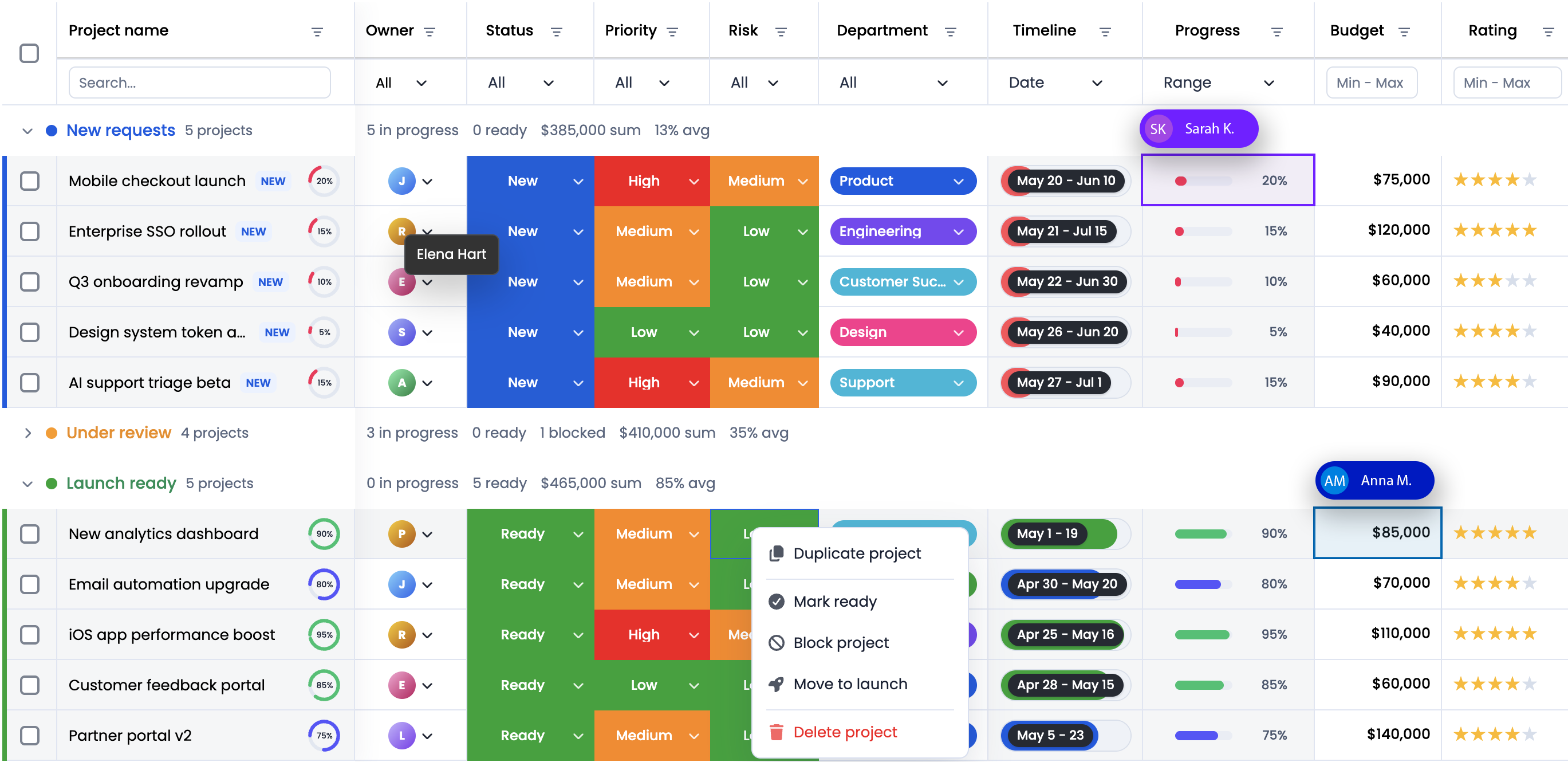
RevoGrid Pro 2+ is the start of the next generation of RevoGrid Pro: a more structured, more stable, and more capable foundation for teams building complex data-heavy applications.
This release is not only about adding isolated features. It is about making the full Pro ecosystem easier to understand, easier to adopt, and easier to scale in production. That includes clearer commercial plans, stronger advanced modules, better AI-assisted development workflows, improved documentation, and a larger demo surface for teams evaluating or integrating RevoGrid.
If you already use the open-source RevoGrid core, the 2+ generation gives you a clearer path into commercial workflows such as Pivot analytics, Gantt scheduling, formulas, Excel import/export, audit history, advanced filtering, server-side grouping, and richer editing experiences.
The Short Version
RevoGrid Pro 2+ focuses on five areas:
| Area | What changed |
|---|---|
| Product structure | Clearer Pro Lite, Pro Advanced, and Enterprise paths with portal access and commercial support options. |
| Advanced modules | Pivot and Gantt are now positioned as major Pro Advanced capabilities for reporting and planning workflows. |
| Spreadsheet workflows | Formula engine, smart autofill, multi-range selection, validation, Excel import/export, and range preview are easier to discover together. |
| Enterprise readiness | Audit history, server-side grouping, infinite scroll, remote Pivot patterns, and stronger docs support larger production apps. |
| AI and developer experience | RevoGrid MCP gives AI coding tools structured access to docs, examples, feature availability, migration notes, and typed API context. |
The goal is simple: help teams build serious data grid-driven products without assembling a dozen unrelated table, spreadsheet, reporting, and scheduler components.
A Clearer Pro Product Line
The RevoGrid core remains MIT-licensed and open source. Pro builds on top of that core with commercial modules, premium workflows, and support.
The 2+ generation makes the commercial structure easier to understand:
| Plan | Best fit |
|---|---|
| Pro Lite | Teams that need production-ready Pro plugins, portal access, MCP support, and advanced grid workflows. |
| Pro Advanced | Teams that need major modules such as the Pivot Table component and Gantt Chart, plus priority support and early module access. |
| Enterprise | Larger teams that need custom contracts, procurement support, security review help, dedicated engineering contact, and flexible licensing. |
This structure matters because teams often start with a fast data grid and later need reporting, planning, auditability, and enterprise procurement. RevoGrid Pro 2+ gives that growth path a clearer shape.
Spreadsheet Power Without Rebuilding a Spreadsheet
Many business applications eventually become spreadsheet-like. Users want formulas, copy/paste, range selection, fill handles, validation, Excel export, rich editors, and clear undo/redo behavior.
RevoGrid Pro 2+ groups these workflows into a stronger product story:
| Capability | Why users notice it |
|---|---|
| Formula engine | Supports Excel-like calculations and formula-driven workflows inside the grid. |
| Smart autofill | Lets users fill values and patterns across ranges without repetitive editing. |
| Multi-range selection | Makes copy/paste and batch workflows feel familiar to spreadsheet users. |
| Range apply preview | Helps users confirm bulk copy, paste, or fill operations before applying them. |
| Cell and input validation | Prevents invalid edits and highlights data quality problems directly in the grid. |
| Excel import/export | Preserves grid-facing layout details such as visible columns, order, frozen panes, and styling. |
| Audit history and undo/redo | Gives teams traceability and recovery for important editing flows. |
The result is not a generic spreadsheet clone. It is a grid engine with spreadsheet-grade workflows that can live inside SaaS products, back-office systems, financial tools, healthcare operations, and internal platforms.
Stronger Data Loading and Server-Side Patterns
Large applications cannot always load all rows into the browser. RevoGrid Pro 2+ gives more attention to server-side data patterns that keep the UI responsive while your backend owns the heavy work.
Important areas include:
- infinite scroll for remote-first row loading
- pagination and remote pagination
- server-side grouping
- remote sorting and filtering metadata
- Pivot server-side contracts
- drilldown responses for fact rows
- cacheable request shapes for analytics workflows
This matters for products with large datasets, permissioned data, expensive aggregations, or backend-owned reporting logic. The grid should render the active workspace, not force the browser to become your database.
Better Layout, Presentation, and Interaction Features
RevoGrid Pro 2+ also improves the everyday building blocks that make complex grids feel polished.
The feature catalog includes:
- hierarchical tree data
- row transpose
- merge cells and auto merge
- column collapse and expand
- column hiding and grouped column reorder
- column stretch
- sticky cells and rows
- row autosize
- multilevel and grouped headers
- charts inside cells
- heat and cold maps
- conditional formatting
- nested grids
- master-detail rows
- context menus
- tooltips
- row grouping drag and drop
- advanced row drag and drop
- row checkbox selection
- column selection
- next-line focus for faster keyboard editing
- overlay layers
- dynamic form editing
- full-row editing
- checkbox, slider, counter, and timeline editors
These are the details that decide whether a grid feels like a simple table or a real application workspace.
Audit, Collaboration, and Traceability
Enterprise grid applications need more than editing. They need to explain what changed, help users recover from mistakes, and support team workflows.
RevoGrid Pro 2+ highlights several areas here:
- Audit Trail History records and reviews data-change history for traceability, review, and compliance-oriented workflows.
- History supports undo and redo operations.
- Event Manager gives developers a structured place to handle, customize, and optimize grid events.
- Cell Flash helps users notice live data updates.
- Collaborative Editing is listed as a beta Pro capability for real-time multi-user editing, live cursors, cell highlights, and conflict-aware shared updates.
For teams building finance, healthcare, operations, or admin products, these capabilities reduce the amount of custom infrastructure needed around the grid.
Pivot Becomes a First-Class Analytics Layer
RevoGrid Pivot is one of the largest parts of the Pro 2+ generation. It turns the grid into an embedded analytics surface where users can group, aggregate, drill down, and reshape reports without leaving your application.
Pivot includes:
- dynamic row, column, value, and filter dimensions
- built-in aggregations such as sum, count, average, min, and max
- custom aggregators
- hierarchical Pivot rows and generated column groups
- flat header mode
- grand totals and subtotals
- values-on-rows layouts
- row and column drill-down with persisted state
- drag-and-drop Pivot configuration
- compact in-grid field panel
- state save and load contracts
For larger datasets, RevoGrid Pro 2+ also strengthens remote Pivot concepts: server-side row and column windows, sorting, filtering, drilldown requests for fact rows, deterministic cache keys, field registry validation, and serializable errors.
That makes Pivot useful for product analytics, financial reports, operational dashboards, customer reporting, and internal tools where a separate BI iframe would feel disconnected from the rest of the app.
Try it on the Pivot demo page or read more on the Pivot product page.
Gantt Charts Move Into the Grid
RevoGrid Gantt brings scheduling and timeline planning into the same product family as the grid.
The key idea is that Gantt should not feel like a disconnected widget bolted onto the page. It should share the same application data mindset: editable rows, configurable columns, task hierarchy, custom rendering, and product-controlled behavior.
The Gantt module is marked as beta in the current Pro catalog and already covers a broad scheduling surface:
- project, task, dependency, calendar, resource, assignment, and baseline models
- summary tasks, regular tasks, and milestones
- WBS-style task hierarchy
- automatic scheduling
- working-day and holiday-aware durations
- manual, inactive, constrained, and deadline-aware scheduling
- dependency validation and cycle detection
- FS, SS, FF, and SF dependencies with lead and lag
- dependency arrows, selection, keyboard delete, and drag-to-connect flows
- critical path and slack calculation
- baseline overlays
- resource and assignment modeling
- interactive task creation, movement, resizing, progress editing, indent, and outdent
- timeline zoom levels from day/week views to multi-year views
- today line, project line, milestone lines, highlighted ranges, and non-working time shading
This opens the door to roadmap tools, PMO platforms, manufacturing planning, ERP scheduling, agency operations, resource planning, and internal delivery systems.
Explore the Gantt demo or the Gantt product page.
AI and MCP Support
RevoGrid Pro 2+ also improves how developers work with AI coding tools.
The RevoGrid MCP guide documents a hosted MCP endpoint:
https://mcp.rv-grid.comMCP gives AI agents a structured retrieval layer for:
- documentation search
- runnable examples
- Core vs Pro feature availability
- migration notes
- typed API context
- version-aware guidance
This is useful with tools such as Codex, Cursor, Claude Code, and VS Code MCP clients because it reduces guesswork. Instead of asking an assistant to invent RevoGrid configuration from memory, you can ask it to inspect RevoGrid MCP results first, then adapt the closest verified example to your framework.
For RevoGrid, this matters because the API is TypeScript-first and plugin-driven. The more structured the docs and feature metadata are, the easier it is for AI tools to generate smaller, more accurate integrations.
A Better Demo and Evaluation Experience
RevoGrid Pro 2+ puts more emphasis on discoverability. The docs site and demo pages now make it easier to inspect features by product area:
The broader demo platform is intended to make evaluation faster: teams can inspect a feature, compare framework usage, share links internally, and move from discovery to implementation with less context switching.
Who Should Pay Attention to RevoGrid Pro 2+
RevoGrid Pro 2+ is especially relevant if your product needs any of these workflows:
| You are building | Relevant RevoGrid Pro 2+ capabilities |
|---|---|
| Embedded analytics | Pivot, aggregations, drill-down, heatmaps, Excel export, saved state. |
| Planning tools | Gantt, task hierarchy, dependencies, resources, baselines, critical path. |
| Spreadsheet-style apps | Formulas, autofill, range selection, validation, copy/paste, undo/redo. |
| Operational dashboards | Infinite scroll, server-side grouping, cell flash, sticky rows, custom renderers. |
| Compliance-heavy tools | Audit history, validation, event manager, Excel export, traceable edits. |
| Multi-framework products | Web Component foundation with React, Vue, Angular, Svelte, and vanilla usage. |
| AI-assisted engineering teams | MCP, typed docs, examples, migration notes, and feature availability lookup. |
What This Release Means
RevoGrid Pro 2+ makes the Pro ecosystem easier to explain and easier to adopt:
- the open-source core stays the foundation
- Pro Lite gives teams commercial Pro workflows and portal access
- Pro Advanced brings the biggest modules, including Pivot and Gantt
- Enterprise supports larger procurement, security, and integration needs
- MCP makes AI-assisted development more accurate
- demos and docs make advanced features easier to evaluate
The direction is clear: RevoGrid is becoming more than a fast JavaScript data grid. It is becoming a grid-first application platform for analytics, planning, editing, validation, and enterprise data workflows.
Start with the RevoGrid Pro page, compare plans on Pricing, or go straight to the Pivot and Gantt demos.