
RevoGrid Pro AI Code Generation and MCP Agents
RevoGrid Pro includes hosted MCP access for AI coding tools that need more than public examples and basic docs. With the Pro MCP workflow, agents can work against richer RevoGrid knowledge: Pro-only guides, advanced examples, feature availability, migration notes, and typed plugin and API context.
This helps AI tools build with RevoGrid Pro more reliably instead of guessing:
- advanced plugins and Pro-only capabilities are resolved before code is suggested
- examples come from real RevoGrid Pro demos and docs
- TypeScript symbols and plugin APIs can guide implementation details
- migration work can use version-aware references instead of trial and error
Why use Pro MCP
The Pro MCP experience is designed for teams using advanced RevoGrid features such as:
- pivot and pivot configuration
- advanced filters and filter UI variants
- row master, row transpose, row order, and row selection workflows
- history, formula, validation, Excel export, and event manager flows
- Pro renderers, editors, charts, and plugin-driven customization
Instead of asking an agent to invent code for those features, you can give it access to the hosted MCP and let it retrieve the right docs, examples, and typed context first.
Hosted endpoint
Use the hosted RevoGrid MCP endpoint:
https://mcp.rv-grid.comWhen your client is configured for RevoGrid Pro access, the same hosted endpoint can return Pro-aware results and examples in addition to public content.
How to get Pro MCP access
RevoGrid Pro MCP uses the same hosted endpoint for everyone:
https://mcp.rv-grid.comWhat changes is your access level.
To use Pro-aware MCP results:
- Have an active RevoGrid Pro subscription or trial with access to Pro docs and examples.
- Make sure your team or account is provisioned for RevoGrid Pro MCP access.
- Add the hosted endpoint to your AI client.
- If your MCP client only returns public results, contact RevoGrid support to enable or verify Pro MCP access for your account.
In practice, you do not switch to a different MCP URL for Pro. The hosted endpoint stays the same, and RevoGrid enables Pro access on the account side.
If you are not yet a Pro customer, start here:
If you already have Pro access but are unsure whether MCP is enabled for your team, contact RevoGrid support or your RevoGrid point of contact.
Install in AI coding tools
Claude Code
claude mcp add --transport http revogrid https://mcp.rv-grid.comCodex
codex mcp add revogrid --url https://mcp.rv-grid.comCursor
Add this to .cursor/mcp.json:
{
  "mcpServers": {
    "RevoGrid": {
      "url": "https://mcp.rv-grid.com",
      "type": "http"
    }
  }
}
VS Code
Add this to .vscode/mcp.json or use MCP: Add Server...:
{
  "servers": {
    "RevoGrid MCP": {
      "url": "https://mcp.rv-grid.com",
      "type": "http"
    }
  },
  "inputs": []
}
What Pro users get
With Pro access, MCP can help agents retrieve and reason about:
- Pro-only documentation and examples
- feature availability across Core and Pro
- migration guidance for advanced plugins and workflows
- typed API surfaces and plugin symbols
- the best matching examples for React, Vue, Angular, Svelte, and vanilla integrations
This is especially useful when you want to ask an agent for:
- a pivot implementation
- a custom Pro renderer or editor
- advanced row or column interactions
- event-manager based behavior
- a framework-specific Pro example adapted to your app
Prompt patterns for RevoGrid Pro
Build a React pivot table component with RevoGrid Pro. Use MCP results first, then adapt the best matching example to my data model.Find the best RevoGrid Pro example for advanced filter headers in Vue and explain the plugin configuration.Use RevoGrid Pro docs and types to implement row master with editable nested content.Check whether this feature is Core or Pro before writing code, and show the best matching Pro example if it exists.Find the right RevoGrid Pro event-manager guidance for custom row actions and validate the final code against types.
Best workflow for Pro teams
For the best results, ask your AI tool to:
- query RevoGrid MCP before generating code
- prefer RevoGrid Pro examples over ad hoc implementation
- confirm whether a feature is Core or Pro
- use typed API and plugin context to validate naming and payloads
- cite the docs or examples it used in the answer
Need step-by-step usage?
If you already have access to RevoGrid Pro and want the practical setup and prompting guide, open the Pro documentation guide:
Upgrade path
RevoGrid Pro MCP is aimed at teams building advanced data workflows faster with AI assistance while staying aligned with the real RevoGrid feature set.
🚀 Advanced AI Code Generation
RevoGrid Pro now supports AI-powered code generation! 🚀
With our new Advanced Pro Plan, you can instantly generate plugins, renderers, templates, and complete grid configurations adopted to your specific needs.
🤖 What Can You Generate?
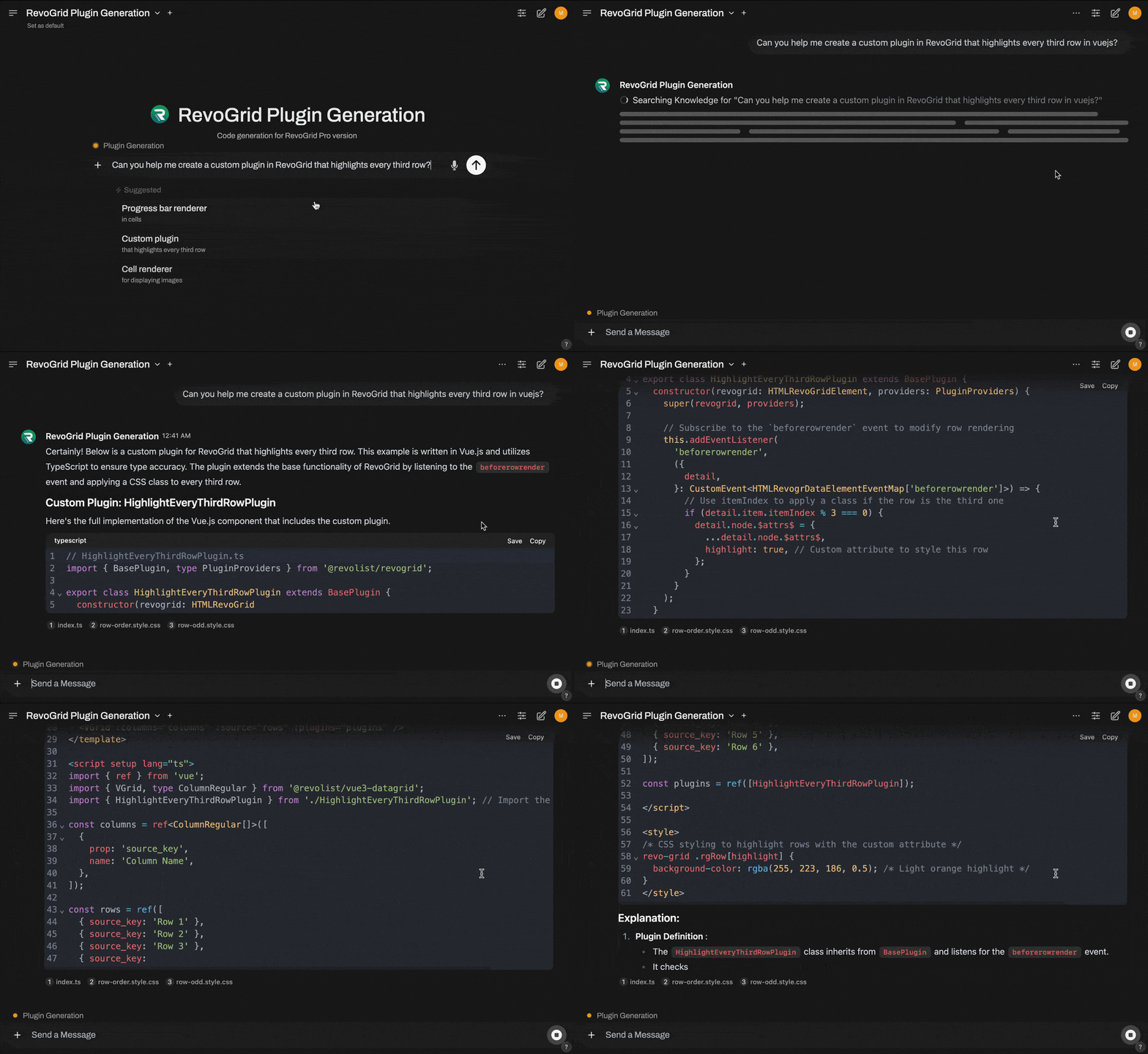
- Custom Plugins: Create advanced plugins with just a few prompts (e.g., row highlight, custom cell behaviors).
- Renderers: Generate cell and column templates like progress bars, star ratings, or color-coded statuses.
- Grid Examples: Configure grids with pinned columns, row grouping, filtering, sorting, and more.
🎯 Why Use RevoGrid AI Code Generation?
- Save Time: Skip manual setup and let AI handle repetitive tasks.
- Get Inspired: Explore new ideas for grid customization with auto-suggested code snippets.
- Boost Productivity: Quickly integrate your grid into any framework (React, Vue, Angular, Svelte, etc.).
🛡️ How to Access AI Code Generation
AI-powered code generation is exclusively available to users on the Advanced Pro Plan.
Steps to Access:
- Request access by email contact.
- Upgrade to Advanced Pro: Log in to your account and upgrade to the Advanced Pro Plan.
- Start Generating: Use our RevoGrid Code Generator in the Pro Portal to create code tailored to your needs.