
Data Grid
Build an Excel-like spreadsheet in React
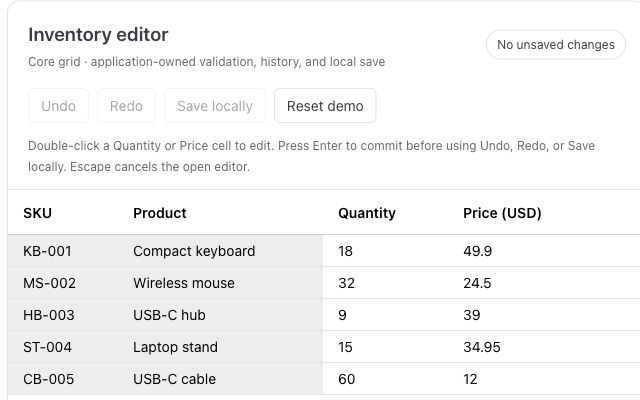
Paste from Excel, validate inventory, and add undo and redo to a working editor.
Daily we do not start by saying:
“Let’s build Google Sheets inside our application.”
We start:
“We need an editable table.”
Then the customer asks for one more thing.
And now things are getting complicated.
At that point, the table is no longer just a table.It becomes a collaborative spreadsheet workflow.
That means the grid must handle more than rendering rows and columns. It needs real-time editing, user presence, conflict resolution, validation, permissions, audit history, and safe recovery when something goes wrong.
We'll explain here how to think about collaborative spreadsheet-like applications with Data Grid, what features matter, and where RevoGrid helps you build this faster.
In many products, collaboration only means:
For a spreadsheet-like data grid, collaboration means something much deeper.
A collaborative grid should allow:
A basic editable grid asks:
Can this user edit this cell?
A collaborative grid asks:
Can this user edit this cell right now, while other users may also be editing related data, without losing work, breaking formulas, or violating permissions?
That is a much harder problem.
It is also where RevoGrid Pro becomes valuable.
The UI looks simple.
A user clicks a cell and changes a value:
Budget Q3 = 120,000But a collaborative application has to understand much more:
type CollaborativeCellChange = {
  documentId: string;
  sheetId: string;
  rowId: string;
  columnId: string;

  previousValue: unknown;
  nextValue: unknown;

  userId: string;
  clientId: string;
  operationId: string;

  baseVersion: number;
  createdAt: string;
};
Now imagine two users edit the same cell at nearly the same time.
Anna changes the value from 120,000 to 130,000. Mark changes the same value from 120,000 to 125,000.
What should happen?
There is no single correct answer.
For a note field, the latest value may be fine. For a finance field, silent overwrite is dangerous. For a workflow status, one edit may need to be rejected. For a locked row, neither edit should be allowed. For a formula cell, the system may need to recalculate dependent values.
A real collaborative grid does not just send edits over WebSocket.
It needs a clear product model.
RevoGrid gives you the high-performance spreadsheet-like grid surface:
The collaboration stack uses more than one package. RevoGrid Pro provides the grid-side helpers such as EventManagerPlugin and CollaborativePresencePlugin. Collaborative editing itself comes from the separate @revolist/revogrid-collaborative-editing package.
Together, they extend this foundation with advanced spreadsheet and workflow capabilities such as:
@revolist/revogrid-collaborative-editing;The important architectural point is simple:
RevoGrid should own the grid experience. Your application should own the business rules.
RevoGrid handles the editing surface, rendering, events, selection, custom cells, and spreadsheet-like UX.
Your application and backend handle:
This separation keeps the system scalable and maintainable.
A production-grade collaborative spreadsheet usually has several layers.
| Layer | Responsibility |
|---|---|
| RevoGrid | Rendering, editing, selection, virtual scrolling, keyboard UX |
EventManagerPlugin | Normalizes cell, range, paste, autofill, and source-edit operations |
CollaborativeEditingPlugin | Coordinates pending edits, commit adapter, conflicts, and acceptance |
CollaborativePresencePlugin | Renders remote user focus, ranges, labels, and optional row patches |
| Frontend app | State management, current user, pending UI, optimistic feedback |
| Collaboration service | Rooms, real-time synchronization, acknowledgements |
| Backend | Permissions, validation, persistence, conflict policy, accepted state |
| Audit/history storage | Durable record of who changed what and when |
A typical edit flow looks like this:
User edits cell
  ↓
RevoGrid edit event
  ↓
Collaborative editing layer
  ↓
Local pending change
  ↓
Backend commit adapter
  ↓
Server validates permission and business rules
  ↓
Server accepts, rejects, or rewrites the change
  ↓
Other users receive the normalized update
  ↓
Presence, history, formulas, and UI state update
The key idea is that the backend remains authoritative.
The frontend can be optimistic, but final truth should come from the server.
The first rule of collaborative grids:
Never use visual row indexes as the identity of real data.
This is dangerous:
updateCell({
  rowIndex: 4,
  columnIndex: 2,
  value: 100
});
Why?
Because another user may sort, filter, group, insert, or delete rows. Row index 4 can mean different records in different views.
Use stable row and column identifiers instead:
updateCell({
  rowId: 'customer-acme',
  columnId: 'forecast_may',
  value: 100
});
A good row model:
type GridRow = {
  id: string;
  customerName: string;
  owner: string;
  status: 'draft' | 'review' | 'approved';
  forecastJan: number;
  forecastFeb: number;
  forecastMar: number;
  locked?: boolean;
  updatedAt?: string;
  updatedBy?: string;
};
A good column model:
type GridColumn = {
  prop: string;
  name: string;
  type?: 'text' | 'number' | 'date' | 'select' | 'formula' | 'status';
  readonly?: boolean;
};
Example:
const columns = [
  { prop: 'customerName', name: 'Customer' },
  { prop: 'owner', name: 'Owner' },
  { prop: 'status', name: 'Status' },
  { prop: 'forecastJan', name: 'Jan Forecast' },
  { prop: 'forecastFeb', name: 'Feb Forecast' },
  { prop: 'forecastMar', name: 'Mar Forecast' }
];

const source = [
  {
    id: 'customer-acme',
    customerName: 'Acme Corp',
    owner: 'Anna',
    status: 'review',
    forecastJan: 12000,
    forecastFeb: 14000,
    forecastMar: 18000
  }
];
Stable identity is the foundation for:
If identity is unstable, collaboration becomes unsafe.
A collaborative spreadsheet should not save the whole document after every change.
Each important user action should become an operation.
A single cell update:
type CellSetOperation = {
  type: 'cell.set';

  operationId: string;
  documentId: string;
  sheetId: string;

  rowId: string;
  columnId: string;

  previousValue: unknown;
  nextValue: unknown;

  userId: string;
  clientId: string;

  baseVersion: number;
  createdAt: string;
};
A range paste:
type RangePasteOperation = {
  type: 'range.paste';

  operationId: string;
  documentId: string;
  sheetId: string;

  startRowId: string;
  startColumnId: string;

  values: unknown[][];

  userId: string;
  clientId: string;

  baseVersion: number;
  createdAt: string;
};
A row insert:
type RowInsertOperation = {
  type: 'row.insert';

  operationId: string;
  documentId: string;
  sheetId: string;

  row: GridRow;

  position: {
    beforeRowId?: string;
    afterRowId?: string;
  };

  userId: string;
  createdAt: string;
};
This operation model gives you:
This is the difference between a demo and a reliable collaborative product.
For a production collaborative grid, separate two jobs:
Those jobs map to different packages and plugin responsibilities:
| Concern | RevoGrid API | What it owns |
|---|---|---|
| Normalized edit stream | EventManagerPlugin from @revolist/revogrid-pro | Converts cell edits, range edits, paste, autofill, and source-edit operations into one normalized event stream. |
| Collaborative write workflow | CollaborativeEditingPlugin from @revolist/revogrid-collaborative-editing | Owns pending edits, backend commit, acceptance/rejection, conflict policy, and collaborative write state. |
| Remote awareness | CollaborativePresencePlugin from @revolist/revogrid-pro | Draws other users' focus/range markers and labels, filters stale users, and can apply remote row patches. |
CollaborativeEditingPlugin is not exported from @revolist/revogrid-pro. Import it from @revolist/revogrid-collaborative-editing.
This is an important distinction. CollaborativePresencePlugin is not the write engine. It should not decide whether a value is allowed, whether a conflict is safe, or whether an audit record exists. It is the visual collaboration layer.
CollaborativeEditingPlugin is the write side of the collaboration stack. It works with normalized grid edit events, sends changes through your commit adapter, and lets your application react to accepted edits, rejected edits, and conflicts.
A simplified setup may look like this:
import '@revolist/revogrid-pro/dist/revogrid-pro.css';

import {
  type CollaborativePresenceConfig,
  EventManagerPlugin,
  CollaborativePresencePlugin
} from '@revolist/revogrid-pro';

import {
  CollaborativeEditingPlugin,
  type CollaborativeEditingConfig
} from '@revolist/revogrid-collaborative-editing';

const grid = document.querySelector('revo-grid') as HTMLRevoGridElement;

grid.columns = [
  { prop: 'customerName', name: 'Customer' },
  { prop: 'owner', name: 'Owner' },
  { prop: 'status', name: 'Status' },
  { prop: 'forecastJan', name: 'Jan Forecast' },
  { prop: 'forecastFeb', name: 'Feb Forecast' },
  { prop: 'forecastMar', name: 'Mar Forecast' }
];

grid.source = [
  {
    id: 'customer-acme',
    customerName: 'Acme Corp',
    owner: 'Anna',
    status: 'review',
    forecastJan: 12000,
    forecastFeb: 14000,
    forecastMar: 18000
  }
];

grid.plugins = [
  EventManagerPlugin,
  CollaborativeEditingPlugin,
  CollaborativePresencePlugin
];

// Let the collaborative editing workflow own commit/review/rollback.
grid.eventManager = {
  applyEventsToSource: false
};

const collaborativeEditing: CollaborativeEditingConfig = {
  documentId: 'sales-forecast-2026',

  user: {
    id: 'user-anna',
    name: 'Anna Kowalska',
    color: '#2563eb',
    roles: ['sales-manager']
  } as any,

  rowIdProp: 'id',
  mode: 'review',
  conflictPolicy: 'manual',

  permissions: {
    canEditCell({ user, row, prop }) {
      if (row?.locked) return false;

      if (prop === 'status' && row?.status === 'approved') {
        return user.roles?.includes('finance-admin') ?? false;
      }

      if (String(prop).startsWith('forecast')) {
        return user.roles?.includes('sales-manager') ?? false;
      }

      return true;
    }
  },

  commitAdapter: {
    async commit(changes, context) {
      const response = await fetch('/api/grid/commit', {
        method: 'POST',
        headers: {
          'content-type': 'application/json'
        },
        body: JSON.stringify({
          documentId: context.documentId,
          user: context.user,
          changes
        })
      });

      return response.json();
    }
  }
};

(grid as HTMLRevoGridElement & {
  collaborativeEditing?: CollaborativeEditingConfig;
}).collaborativeEditing = collaborativeEditing;

const collaborativePresence: CollaborativePresenceConfig = {
  enabled: true,
  showLabels: true,
  staleAfterMs: 15000,
  users: [
    {
      id: 'user-mark',
      name: 'Mark Chen',
      initials: 'MC',
      color: '#16a34a',
      activity: 'editing',
      focus: { x: 4, y: 0 },
      range: { x: 3, y: 0, x1: 5, y1: 0 },
      lastActiveAt: Date.now()
    }
  ]
};

grid.collaborativePresence = collaborativePresence;

function updateRemotePresence(
  users: NonNullable<CollaborativePresenceConfig['users']>,
  remoteEdits: NonNullable<CollaborativePresenceConfig['remoteEdits']> = []
) {
  grid.collaborativePresence = {
    ...grid.collaborativePresence,
    users,
    remoteEdits
  };
}
The important part is the commitAdapter.
This is where your product connects the grid to the backend:
commitAdapter: {
  async commit(changes, context) {
    // Send changes to your backend.
    // Backend accepts, rejects, rewrites, or reports a conflict.
  }
}
The backend should decide:
That is how collaborative editing stays safe.
These two parts are related, but they should not be treated as the same plugin responsibility.
| Capability | Collaborative editing layer | CollaborativePresencePlugin |
|---|---|---|
| Main job | Decide what data changes are allowed and accepted. | Show where other users are active. |
| RevoGrid hook | CollaborativeEditingPlugin, supported by EventManagerPlugin. | grid.collaborativePresence / additionalData.collaborativePresence. |
| Data mutation | Yes, through accepted collaborative edits. | Only optional remoteEdits row patches; it does not own validation or conflict policy. |
| Typical backend role | Permission checks, version checks, conflict resolution, persistence, audit records. | Broadcast user focus, ranges, activity, and accepted remote patches. |
| User-facing UI | Pending changes, conflict dialogs, rejected edits, save status. | Colored outlines, remote active cell, selected ranges, labels, stale-user hiding. |
CollaborativePresencePlugin accepts a CollaborativePresenceConfig:
grid.collaborativePresence = {
  enabled: true,
  showLabels: true,
  staleAfterMs: 15000,
  users: [
    {
      id: 'user-mark',
      name: 'Mark Chen',
      initials: 'MC',
      color: '#16a34a',
      activity: 'editing',
      focus: { x: 4, y: 0 },
      range: { x: 3, y: 0, x1: 5, y1: 0 },
      lastActiveAt: Date.now()
    }
  ],
  remoteEdits: [
    {
      rowIndex: 0,
      data: { forecastMar: 19000 }
    }
  ]
};
Use users for awareness. Use remoteEdits when your collaboration service broadcasts accepted row patches that should be reflected in the grid. Use your backend, not the presence plugin, to decide whether those patches are valid.
Conflict resolution is one of the most important parts of collaborative editing.
A conflict happens when two or more users edit the same data before the system can safely reconcile the changes.
Example:
forecastMar from 18000 to 20000.18000 to 19000.The product must decide what to do.
Manual conflict review is the safest option for serious business data.
The system keeps the local change pending and shows the user that another value already exists.
Example UX:
Conflict detected

Anna changed this cell to: 20,000
You changed it to: 19,000

Choose:
- Keep Anna's value
- Apply your value
- Open cell history
This is useful for:
Example editing configuration:
const collaborativeEditing: CollaborativeEditingConfig = {
  // ...
  conflictPolicy: 'manual'
};
You can open a custom conflict dialog from the collaborative conflict event:
grid.addEventListener('collaborativeconflict', (event: CustomEvent) => {
  const conflict = event.detail;

  openConflictDialog({
    rowId: conflict.local.rowId,
    columnId: conflict.local.prop,
    localValue: conflict.local.newValue,
    remoteValue: conflict.remoteValue,
    remoteUser: conflict.remoteUser
  });
});
Manual conflict resolution is usually the best default for high-value B2B workflows.
The simplest model is last write wins.
The latest accepted edit becomes the final value.
Example:
const collaborativeEditing: CollaborativeEditingConfig = {
  // ...
  conflictPolicy: 'lastWriteWins'
};
This can be acceptable for:
It is usually not appropriate for:
Last write wins feels smooth, but it can silently overwrite another user’s work.
Use it deliberately.
Sometimes the product should not block the user.
It should warn them.
Example:
This value was changed by Anna 18 seconds ago.
Please review before saving.
This is useful for:
Soft warnings reduce friction while still giving users context.
Some workflows should prevent conflicts before they happen.
Example:
This row is currently being edited by Anna.Or:
This month is locked because Finance already approved it.Locks are useful for:
A lock can be strict:
type RowLock = {
  rowId: string;
  lockedBy: string;
  expiresAt: string;
};
Or advisory:
Anna is editing this row. You can continue, but your change may require review.For most real products, the best model is hybrid:
| Data type | Recommended strategy |
|---|---|
| Notes and drafts | Last write wins |
| Normal business values | Soft warning or manual review |
| Finance, pricing, inventory | Manual review |
| Approved rows or closed periods | Lock |
| Formula cells | Protected or review-only |
| Workflow status | Permission-aware manual review |
One global conflict strategy is rarely enough.
Presence makes collaboration visible.
A collaborative grid should show:
Example UI:
Anna is editing Forecast Mar
Mark selected B4:D8
Elena is viewing the Finance Review tab
A useful presence model:
type PresenceUser = {
  id: string;
  name: string;
  color: string;
  activity: 'viewing' | 'editing' | 'idle';

  focus?: {
    rowId: string;
    columnId: string;
  };

  range?: {
    startRowId: string;
    endRowId: string;
    startColumnId: string;
    endColumnId: string;
  };

  lastActiveAt: string;
};
Presence should be visual and temporary.
It should not be treated as authoritative business data.
Cell values are persistent. Presence is ephemeral.
This distinction matters.
In collaborative spreadsheets, permissions should not stop at page-level access.
You may need:
Example:
| Role | Can view | Can edit | Can approve |
|---|---|---|---|
| Sales rep | Own customers | Own forecast cells | No |
| Sales manager | Team customers | Team forecast cells | No |
| Finance | All customers | Approved values and formulas | Yes |
| Executive | Summary view | No | No |
The grid should show permissions visually.
Good patterns:
Bad UX:
Error: forbiddenBetter UX:
This value is locked because March has already been approved by Finance.Frontend permissions improve the user experience, but backend permissions are still mandatory.
Never trust only the browser.
The backend should be the authority for final data state.
A commit endpoint may look like this:
app.post('/api/grid/commit', async (req, res) => {
  const { documentId, user, changes } = req.body;

  const results = [];

  for (const change of changes) {
    const row = await db.rows.findById(change.rowId);

    if (!row) {
      results.push({
        id: change.id,
        status: 'rejected',
        reason: 'Row no longer exists'
      });
      continue;
    }

    const allowed = await canEditCell({
      user,
      documentId,
      row,
      prop: change.prop,
      value: change.newValue
    });

    if (!allowed) {
      results.push({
        id: change.id,
        status: 'rejected',
        reason: 'You do not have permission to edit this cell'
      });
      continue;
    }

    const validation = validateCellValue({
      row,
      prop: change.prop,
      value: change.newValue
    });

    if (!validation.valid) {
      results.push({
        id: change.id,
        status: 'rejected',
        reason: validation.reason
      });
      continue;
    }

    const saved = await db.rows.updateCell({
      rowId: change.rowId,
      prop: change.prop,
      value: change.newValue,
      updatedBy: user.id
    });

    await db.audit.insert({
      documentId,
      rowId: change.rowId,
      prop: change.prop,
      previousValue: change.oldValue,
      nextValue: saved.value,
      changedBy: user.id,
      changedAt: new Date().toISOString()
    });

    results.push({
      id: change.id,
      status: 'committed',
      value: saved.value
    });
  }

  res.json(results);
});
The backend can accept:
{
  "id": "change-1",
  "status": "committed",
  "value": 130000
}
Reject:
{
  "id": "change-1",
  "status": "rejected",
  "reason": "This month is locked"
}
Or rewrite:
{
  "id": "change-1",
  "status": "committed",
  "value": 100000,
  "reason": "Value was capped by approval policy"
}
This gives you real control over collaborative editing.
When several users edit the same grid, audit history becomes critical.
Users need to answer:
A useful audit record:
type AuditRecord = {
  id: string;
  documentId: string;
  sheetId: string;

  rowId: string;
  columnId: string;

  previousValue: unknown;
  nextValue: unknown;

  changedBy: string;
  changedAt: string;

  source: 'manual-edit' | 'range-paste' | 'autofill' | 'import' | 'restore';

  transactionId?: string;
};
Good audit UX examples:
Audit history is not only for compliance.
It builds trust.
If users know they can review and restore changes, they are more comfortable working in a shared grid.
RevoGrid Pro includes audit/history-related functionality that can help teams build accountable data workflows faster.
Undo is simple in a single-user spreadsheet.
It becomes more complex in collaboration.
Example:
Should Mark’s change remain? Should formulas recalculate? Should the undo create a new audit record? Should other users see the rollback?
A safe model is to separate:
| Feature | Purpose |
|---|---|
| Local undo/redo | Fast recovery for the current user’s recent edits |
| Audit restore | Accountable restoration of committed business data |
| Version history | Larger rollback or comparison between document states |
In collaborative business apps, undo should not silently rewrite other users’ work.
A better pattern:
This is safer and easier to explain.
For spreadsheet-like products, copy and paste is not a small feature.
It is one of the main adoption features.
Users bring data from:
A serious collaborative grid should support:
Example:
A user pastes this range:
| Customer | Jan | Feb | Mar |
|---|---|---|---|
| Acme Corp | 12000 | 14000 | 18000 |
| Globex | 8000 | 9000 | 11000 |
The system should treat it as a range operation:
type RangePatch = {
  type: 'range.patch';

  transactionId: string;

  patches: Array<{
    rowId: string;
    columnId: string;
    previousValue: unknown;
    nextValue: unknown;
  }>;
};
The backend can validate the entire transaction:
Good UX:
94 cells pasted.
3 cells were skipped because the period is locked.
2 cells need review because another user changed them.
This is much better than silently failing or overwriting data.
Formulas make a grid feel like a spreadsheet.
But formulas also make collaboration harder.
Example:
=SUM(forecastJan:forecastMar)or:
=IF(probability > 0.7, forecastValue, 0)For collaborative apps, define clear formula rules:
A useful formula cell model:
type FormulaCell = {
  raw: '=SUM(forecastJan:forecastMar)';
  result: 44000;
  dependencies: ['forecastJan', 'forecastFeb', 'forecastMar'];
  status: 'valid' | 'error' | 'pending';
};
A good product stores the raw formula, not just the calculated result.
That way you can:
RevoGrid formula support is useful when you want Excel-like calculations inside the grid.
Collaborative grids often need comments because users do not only edit data.
They discuss it.
Useful comment types:
| Type | Use case |
|---|---|
| Cell comment | Ask about a specific value |
| Row comment | Discuss a customer, task, order, or SKU |
| Range comment | Review a block of values |
| Document comment | Discuss the whole sheet or report |
Example:
Why did March forecast drop by 30%?or:
This supplier delivery date needs confirmation before approval.A good comment model should include:
Do not store comments as cell values.
Store them separately:
type CellComment = {
  id: string;
  documentId: string;
  sheetId: string;
  rowId: string;
  columnId: string;
  authorId: string;
  body: string;
  resolved: boolean;
  createdAt: string;
};
Then render a badge or indicator inside the RevoGrid cell.
This keeps the data model clean while still giving users spreadsheet-like collaboration.
In collaborative spreadsheets, filters and sorting can create confusion.
If Anna filters the grid to show only her accounts, Mark should not suddenly lose rows from his view.
Separate state into three categories:
| State type | Shared? | Examples |
|---|---|---|
| Document data | Yes | Cell values, rows, formulas, comments |
| Personal view state | No | Filters, scroll position, selected cell, hidden columns |
| Saved team views | Optional | “Finance Review”, “High Risk Customers”, “My Open Tasks” |
A saved view might include:
type SavedView = {
  id: string;
  name: string;
  scope: 'private' | 'team' | 'public';

  filters: unknown;
  sorting: unknown;

  hiddenColumns: string[];

  pinnedColumns: {
    start: string[];
    end: string[];
  };

  columnWidths: Record<string, number>;
};
Good default:
Filters are personal unless the user explicitly saves and shares a view.
This avoids one of the most frustrating spreadsheet collaboration problems: users accidentally changing the working context for everyone else.
Imagine you are building a sales forecast product.
Rows are customers. Columns are forecast months. Sales managers update their own accounts. Finance reviews final numbers. Executives view summaries.
A simple grid may look like this:
| Customer | Owner | Stage | Jan | Feb | Mar | Weighted Q1 |
|---|---|---|---|---|---|---|
| Acme Corp | Anna | Review | 12000 | 14000 | 18000 | 28600 |
| Globex | Mark | Draft | 8000 | 9000 | 11000 | 16800 |
Users expect spreadsheet behavior:
But the product also needs business rules:
This is where a RevoGrid-based collaborative spreadsheet becomes more than a spreadsheet clone.
It becomes a controlled business workflow.
A collaborative inventory planning app may have rows like:
Users:
Grid rules:
This is a good fit for a collaborative RevoGrid workflow because the interface needs spreadsheet speed, but the product needs business rules.
A generic spreadsheet can store this data.
A RevoGrid-based product can enforce the workflow.
A project planning grid may include:
Users:
Features needed:
This is where RevoGrid Pro becomes interesting beyond the grid itself.
A planning product may need:
The grid becomes the center of a larger operational workflow.
Many SaaS products expose spreadsheet-like grids directly to customers.
Examples:
Customer-facing collaborative grids need extra care.
You need:
Example flow:
This is much better than a basic upload form.
It gives users control without removing structure.
A serious collaborative spreadsheet should include the following.
Users should be able to edit the same grid at the same time.
Include:
Users should see who else is active.
Include:
Do not rely on one universal strategy.
Include:
Permissions should be visible and enforced.
Include:
Every important change should be reviewable.
Include:
Users expect spreadsheet-like interaction.
Include:
A collaborative grid should fit your domain.
Include:
Build:
Goal:
The grid feels fast and reliable before collaboration is added.
Build:
Goal:
Every important user action has a clear operation record.
Build:
Goal:
Multiple users can work in the same grid without losing data.
Build:
Goal:
Users understand why edits are accepted, rejected, or pending.
Build:
Goal:
Teams can trust the grid with real business data.
Build:
Goal:
The product feels familiar to spreadsheet users while staying controlled by your application.
A WebSocket moves messages.
It does not solve:
Real collaboration needs a product model.
Indexes change after sorting and filtering.
Use stable row IDs.
Last write wins is convenient, but dangerous.
It is acceptable for low-risk values. It is not acceptable for budgets, approval states, inventory, pricing, or financial records.
This can break:
Use targeted updates where possible.
Personal filters should stay personal.
Shared views should be explicit.
Paste, fill, and import are not edge cases.
They are core spreadsheet workflows.
Treat them as transactions.
You can build basic collaboration around any grid if you have enough time.
The hard part is not rendering a table.
The hard part is everything around the table:
RevoGrid Pro helps because it provides advanced spreadsheet and workflow features on top of the RevoGrid rendering engine.
For SaaS, ERP, planning, finance, analytics, logistics, and operational products, this can reduce months of grid infrastructure work.
Useful links:
Collaborative spreadsheets are difficult because users expect them to feel simple.
They want to edit, paste, filter, calculate, comment, undo, and collaborate without thinking about the system underneath.
But the system underneath needs to handle:
The best approach is not to clone Google Sheets feature by feature.
The better approach is to build a product-specific collaborative grid.
One that feels familiar like a spreadsheet, but understands your data model, permissions, workflow, and business rules.
That is where RevoGrid fits well.
Use RevoGrid for the high-performance spreadsheet-like grid surface. Use RevoGrid Pro for advanced collaborative and spreadsheet workflow features. Use your backend for authority, validation, permissions, persistence, and audit.
That combination gives you a practical path to building collaborative grid experiences that users can work in all day.
Ready to build collaborative spreadsheet-like workflows?
Start with RevoGrid Pro, compare plans on the pricing page, or review the full Pro feature table.
Paste from Excel, validate inventory, and add undo and redo to a working editor.
Bring editing, clipboard workflows, and large datasets into your web app.